
For SaaS and tech companies with English sites.
:quality(80))
9 Best AI Agents for SEO, Ranked by Workflow and Output Quality
:quality(80)) Georg Richard Aare
Georg Richard Aare For SaaS and tech companies with English sites.
AI agents for SEO are starting to do more than answer one-off prompts.
But the category is noisy. Plenty of products now use “agent” for everything from chat assistants to software that can research, draft, update, monitor, or push approved site changes.
So I ranked these tools by the work they can actually carry, not by the label on the homepage.
I looked at what each tool handles, how much it can do on its own, how good the output is, and where it runs, along with approvals, pricing, and tradeoffs.
This list shows where each agent fits: content production, technical fixes, local SEO, AI-search monitoring, or custom automation.
First, here’s the line I used to separate a real AI SEO agent from a regular AI SEO feature.
What counts as an AI SEO agent?
An AI SEO agent is software that plans, decides, and acts across a multi-step SEO workflow using reasoning, tool access, and memory.
Those three capabilities let it move work forward without a new prompt for every step:
Reasoning: Breaks a goal into research, prioritization, writing, review, and update steps.
Tool access connects the system to data sources and publishing platforms, allowing it to pull current search data, draft edits, and make approved changes.
Memory retains brand, site, and workflow context across sessions, so each next action starts from what the system already knows.
A regular AI SEO tool usually gives you a score, draft, or recommendation. An AI SEO agent manages the sequence and flags the approval point before work changes your site.
How I chose these agents
I used five filters that separate agentic SEO software from regular AI features. I weighed hands-on testing first, product research second, and review evidence as a check on recurring user patterns.
SEO pipeline coverage: Which stages the agent handles, from keyword research and content creation to updates, monitoring, recovery, and AI search visibility.
Autonomy depth: Whether the tool recommends actions, drafts for approval, executes approved changes, publishes, or keeps monitoring content over time.
Output and decision quality: Whether the agent produces work you can use. For writing agents, that means brand-specific drafts. For update agents, that means specific page edits. For strategy agents, that means useful prioritization.
Human control and approval optionality: Whether teams can choose the approval depth, from draft review to individual approval, bulk approval, rollback rules, or full manual publishing.
Operating environment: Where the agent actually runs, including a CMS, WordPress plugin, enterprise SEO suite, workflow builder, chat assistant, or dedicated content system.
The 9 best agents for SEO
These 9 agents automate at least one full stage of SEO work. I ranked them by how much work they handle, then weighed output quality, control over reviews, and who each tool suits.
1. RankUp
RankUp gives SaaS founders and lean GTM teams a dedicated SEO and GEO content team to handle planning, writing, and ongoing updates. It turns keyword research and your product knowledge into publish-ready articles, pages, and written updates, not briefs you still need someone to write. You supply the expertise and approve the work.
The RankUp agent team divides that work across three specialist roles.
Magnus, the strategy agent
Cedric, the writer agent
Lyra, the content manager agent
The agents handle the work most SaaS teams usually split across keyword tools, docs, AI writers, audit spreadsheets, and reporting dashboards.
How RankUp's agents run the content cycle
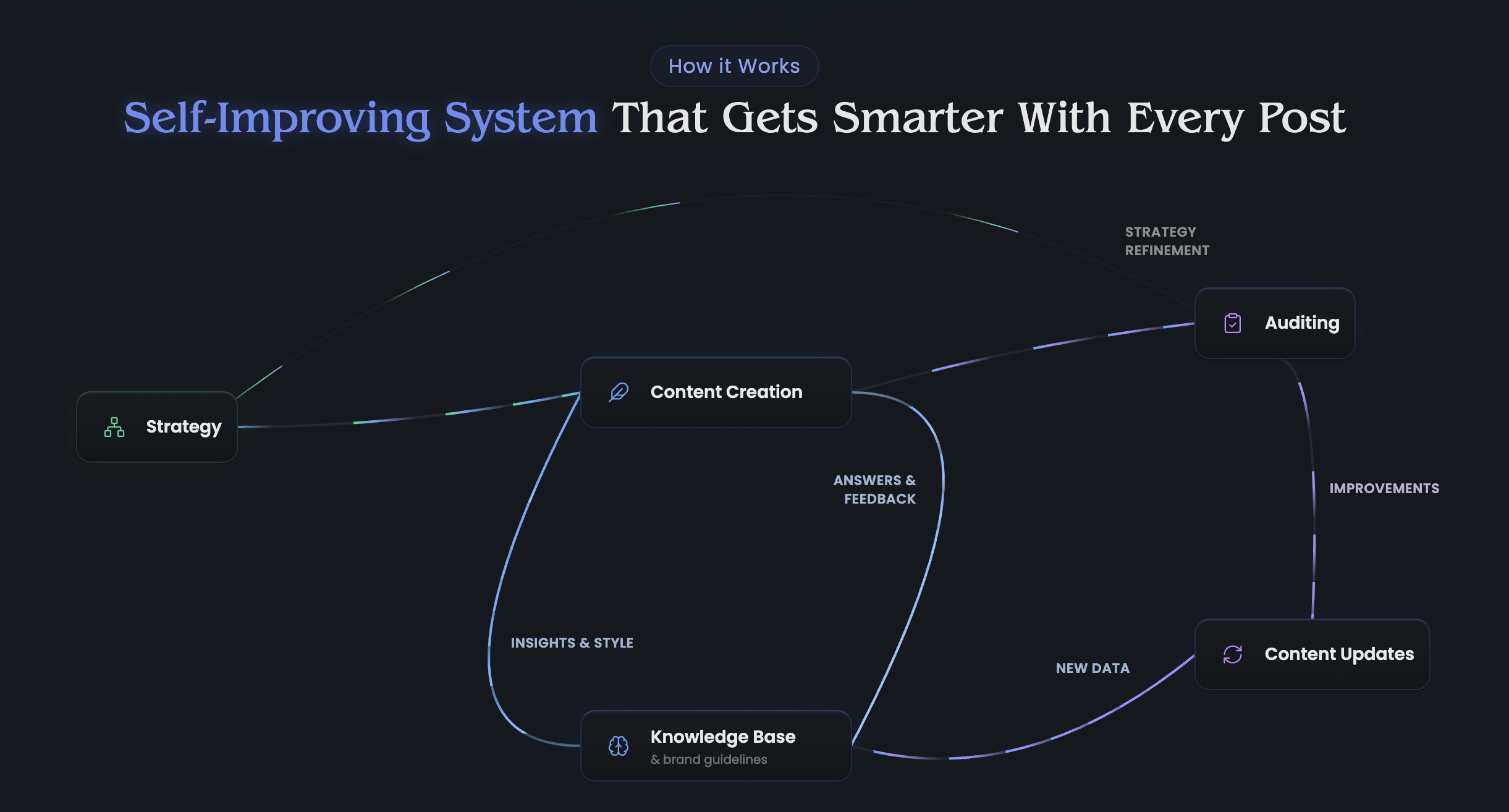
RankUp plans what to write, creates the content, and improves pages after they go live so they can keep earning visibility.
Here's how the agents handle that cycle:
Find the opportunity. Magnus researches competitors and groups related keywords into a topical map. He checks for duplicate or overlapping topics, then puts the topics in priority order so you know what to cover first.
Build the content asset. Cedric researches current search results, checks your product knowledge, and asks focused questions where expertise is missing. He writes and reviews a publish-ready article or page using your creative brief, style guide, and reference article.
Review the judgment calls. Your team approves strategy, answers product-specific questions, and checks claims before anything goes live.
Improve the live library. Lyra reviews page performance monthly, audits underperforming or outdated content, and organizes refreshes and internal-linking changes. She routes writing work to Cedric and reports performance so the next round of content work follows what the site needs.
All three agents use your RankUp Knowledge Base. It stores your positioning, customer language, sales objections, style rules, competitor context, previous answers, examples, proof points, and approved claims.
Instead of restarting from scratch on every page, the agents reuse the context your team has already taught the system.
Magnus: keyword research, topical maps, and strategy
Magnus handles the work that should happen before anyone starts drafting.
Instead of handing you a raw keyword export, he turns research into a plan your team can actually use:
Competitor discovery: finds the sites and pages shaping the search results.
Keyword research: finds the search terms your buyers already use.
Topical maps: groups related keywords into usable clusters.
Content prioritization: decides what should be created, updated, or skipped.
A draft can only follow the direction it receives. Better rankings start with choosing the topics and angles your buyers are already searching for.
Cedric: autonomous content workflow plus editorial iteration
Cedric is the writing agent inside RankUp's creation workflow.
Cedric takes a topic through research, planning, and drafting to a SaaS article or page you can review, rather than leaving you to manage each step in a chat box.
The workflow runs like this:
Live SERP and Knowledge Base research: RankUp pulls current Google results, checks how competitor pages are structured, and reads your Knowledge Base for product context, positioning, proof points, and approved claims.
Outline built from gaps: Cedric works from an outline shaped around competitor coverage, the reader's next question, your business angle, and the article type.
Blueprint before drafting: Cedric plans each section: what to say, what evidence it needs, where the CTA should lead, and where your own knowledge would make the article better.
Focused questions only when needed: If a product claim, example, or positioning choice is missing, Cedric asks a targeted question instead of guessing.
Drafting with your context: Cedric writes section by section using your creative brief, style guide, Knowledge Base, and reference content.
Self-review and cleanup: The draft gets checked against writing rules, source control, structure, and brand fit before it reaches your team.
You can also work with Cedric directly after the autonomous run. Ask for a rewrite, push back on a section, tighten claims, add approved internal links, or refine the tone until the article matches your standards.
Cedric also handles writing that starts elsewhere in RankUp. When Lyra finds pages that need updates, he turns her instructions into edits you can review.
Lyra: site-wide updates, refreshes, and improvement workflows
Lyra is the content manager agent for pages you already have live.
Her core job is simple: you describe the change you want, Lyra finds the relevant pages, works out what needs changing on each one, and turns the work into reviewable edits.
Common scenarios include:
Product launches: roll out a new feature, use case, or positioning angle across the pages where it should appear.
Pricing and messaging updates: update stale claims, CTAs, comparison language, or product descriptions across multiple pages.
Content refreshes: find outdated sections, thin explanations, missing angles, and pages that need a stronger answer.
Internal linking: find relevant pages to link to and suggest where each link should go.
Performance follow-up: use Google Search Console data to spot pages that are declining, stagnating, or ready for the next update.
Lyra can guide a whole content refresh, internal linking pass, cleanup project, or performance report, not just a one-off edit. You don't have to coordinate each step in a spreadsheet.
When a page needs rewriting, expanding, or cleaning up, Lyra sends the work to Cedric. He makes the changes using the same writing rules and brand context.
RankUp carries the change through to your live site: review the written edit, approve, then RankUp applies it to your CMS. Your team controls what goes live without having to copy the change into the page by hand.
How the Knowledge Base makes the agents better over time
The Knowledge Base keeps what you've taught RankUp available for the next piece of work.
Every time your team answers a focused question, approves a claim, updates positioning, or adds a useful example, that context becomes easier to reuse in future work.
AI content often starts from zero each time. RankUp uses what you've already taught it to improve the next article, update, or rewrite.
It remembers:
Product positioning
Customer language
Sales objections
Style rules
Competitor context
Answers from previous interviews
Examples, proof points, and approved claims
Magnus can use that context when planning, Cedric can use it when drafting, and Lyra can use it when improving existing pages.
What you still control
RankUp handles the heavy work, but your team still owns the judgment calls that matter.
Agent workflow handles | Your team controls |
|---|---|
Keyword research, competitor discovery, and topical maps | Strategic approval |
Publish-ready articles and pages grounded in your product knowledge | Expert answers where context is missing; product positioning and claim approval |
Content audits, written updates, and internal-linking changes applied through your CMS connection | Reviewing and approving the exact changes before RankUp applies them |
That split matters for SaaS content. RankUp researches, writes, manages existing pages, and reports on performance. Your team approves the strategy and product-specific claims before anything goes live.
Who RankUp is best for
RankUp is built for SaaS founders and GTM, sales, and marketing leaders who need better Google rankings and more visibility in AI answers, without taking on the SEO and GEO work themselves.
The fit is strongest when:
Competitors keep showing up in AI answers - Your buyers ask ChatGPT, Claude, Perplexity, or Google AI Overviews for category advice, and other brands get mentioned first.
Your content library is aging - You have old articles that need audits, updates, internal links, and clearer next steps.
One marketer owns too much - Strategy, briefs, writing, optimization, and reporting all sit with one person or a very small team.
Your GTM is founder-led - You know the product and market, but you do not want to become a full-time SEO operator.
Your content needs real product context - Generic AI drafts are not enough because your best angles come from customer knowledge, positioning, and internal expertise.
RankUp is a weaker fit if you mainly need:
Ecommerce product feed, SKU, or category-page templating
Enterprise pSEO at massive volume
Deep technical SEO remediation
Local SEO operations across many locations
The clearest fit is a lean SaaS team with deep product knowledge and limited time to plan, create, and improve the content that puts them in front of qualified buyers.
Pros and cons
RankUp plans, writes, and updates SaaS content for search and AI discovery. It's the clearest fit when you need that content work done, rather than ecommerce templates, enterprise pSEO infrastructure, or technical fixes.
Pros:
Full content loop: RankUp turns keyword and competitor research into a prioritized content plan, publish-ready articles and pages, content updates, internal-linking changes, and monthly performance reports.
SaaS-specific context: the Knowledge Base carries your positioning, customer language, objections, examples, proof points, and approved claims into future work.
Review control: Your team checks product claims and exact page edits before they go live; RankUp handles the approved CMS changes.
Built for Google and AI discovery: RankUp creates and improves product-led content aimed at better Google rankings and more mentions or citations in relevant AI answers.
Custom ongoing plan: After the 7-day free trial, pricing depends on where your site stands, how far competitors are ahead, what needs updating, and what content you need to compete. The trial is only available to SaaS and technology companies with English-language websites.
Cons:
Not built around ecommerce product pages: if your main SEO workflow is product feed optimization, category-page templating, or SKU-level content, RankUp is not the best-fit system.
Not enterprise programmatic SEO infrastructure: RankUp can support repeatable content workflows, but it is not a custom pSEO engine for generating thousands of templated pages from a database.
Not a technical SEO stack: RankUp is not a crawler, log-file analyzer, schema validator, or code-level remediation platform.
Technical SEO note: if technical SEO is the gap, you probably don't need an ongoing content system to fix it. Screaming Frog, Google Search Console, Claude Code, and open-source SEO scripts from GitHub can often cover crawl, indexing, schema, internal linking, and template fixes.
Get the technical foundation right, then check it occasionally. For most SaaS teams, the ongoing work is planning, writing, and updating content.
How RankUp pricing is scoped
RankUp pricing is custom because each site needs different work: how much content to create, what to update, and what it will take to compete.
After the trial, you can build a custom ongoing plan in-app around:
Your current site baseline: how many pages exist, which ones are worth improving, and where content quality is holding back visibility.
Competitor pressure: who you need to catch, how often they publish, and how deep their topical coverage already is.
Content gap size: how much new content is needed to close the distance.
Update workload: the audit, rewrite, cleanup, and internal linking work needed to get more value from your existing library.
Ongoing strategy scope: how much keyword research, competitive analysis, prioritization, content creation, and content improvement RankUp should handle over time.
Start your 7-day free trial to have RankUp analyze your site and what it needs, then propose an ongoing plan around that work.
For SaaS and tech companies with English-language sites only.
2. Otto by Search Atlas
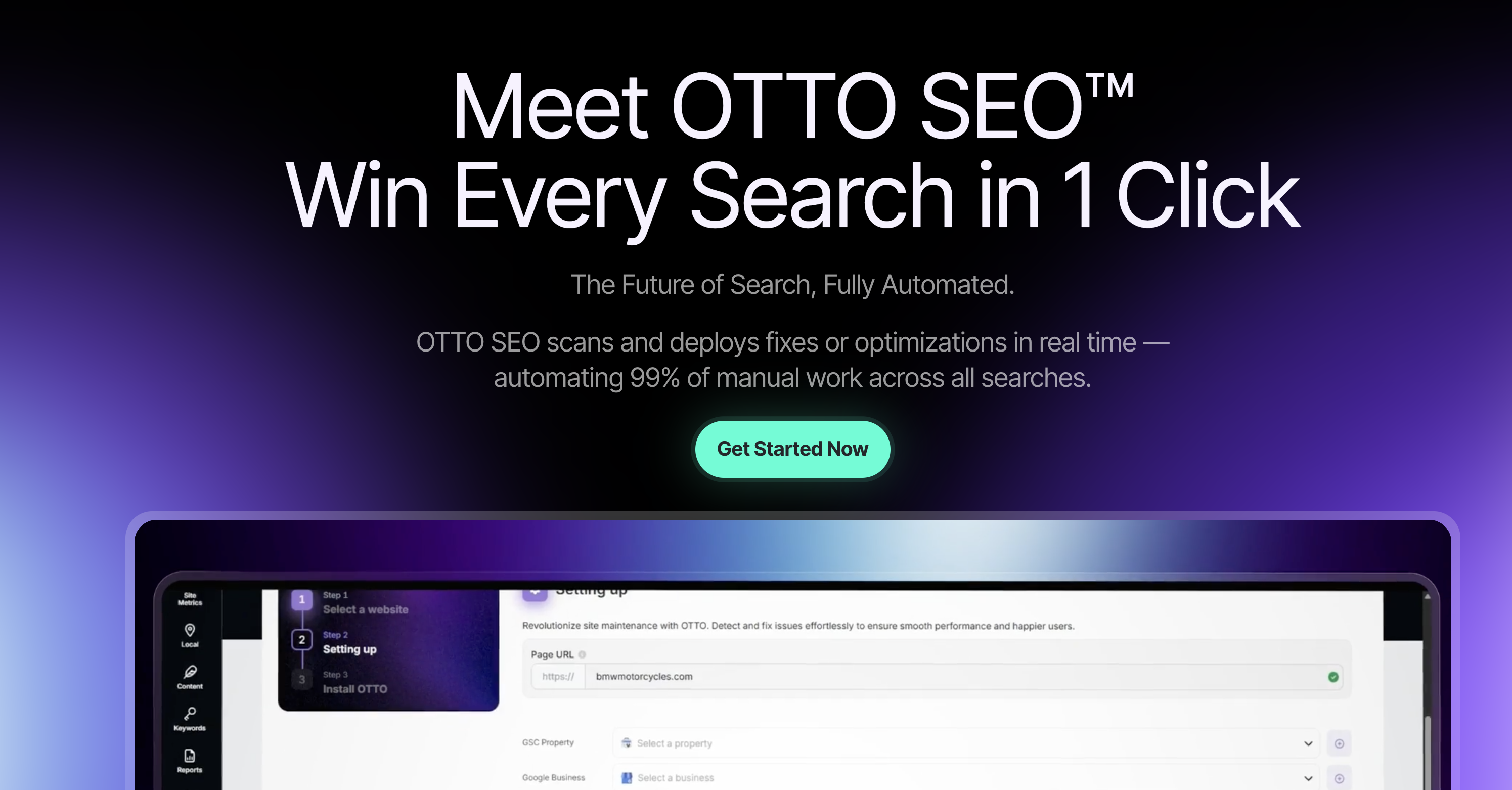
Otto is Search Atlas's AI SEO agent for applying technical, on-page, and local SEO fixes through a dashboard. It is a narrower fit when the goal is strategy-led content creation, because Otto focuses on approved site and local changes.
I reviewed Otto through product research and user-review patterns, but did not fully test it end to end. Treat the reliability notes below as research-based, not hands-on testing results.
Buyer fit
Otto can apply approved SEO changes through a pixel or Cloudflare DNS setup, which helps teams push site updates without CMS access.
It suits teams that already know which technical, on-page, or local SEO fixes they want to apply.
The clearest buyer-fit patterns are:
Local SEO teams managing Google Business Profile work and review response workflows.
Shopify operators who need SEO changes applied without waiting on theme edits or a developer backlog.
Agencies managing repeatable site-fix work across multiple client accounts.
Workflow coverage and limits
Otto audits a site, queues recommended fixes, and lets the user approve changes from the Search Atlas dashboard.
Its coverage is concentrated in four areas:
Technical SEO: crawl errors, broken links, and site structure issues.
On-page SEO: page-level recommendations based on Search Atlas grading and competitor data.
Local SEO: Google Business Profile updates and review replies.
Monitoring: search crawl tracking and LLM visibility signals.
Otto modifies sites through a tracking pixel in the header or through Cloudflare DNS. That setup helps when the SEO owner does not have CMS access.
The limits are straightforward. Otto does not provide autonomous keyword strategy, brand-led article creation, or a persistent product knowledge base.
AI content generation exists inside Search Atlas, but it is capped by plan at 40 to 500 pages/month. Content creation is secondary to Otto's site-fix and local SEO work.
Human approval is still part of the system. Users can approve one optimization at a time or bulk approve queued recommendations before changes go live.
Search Atlas reviews also raise reliability concerns around complex automation tasks. Reviewers mention bugs, failed tasks, and cases where automation needed manual troubleshooting.
Otto's value is concentrated in local SEO automation and site-level execution. The tradeoff is reliability: queued fixes can depend on site setup, platform behavior, and task complexity.
Pros and cons
Pros:
Local SEO automation - Google Business Profile optimization and automated local map review replies are built into the workflow.
No-code deployment - The pixel or Cloudflare DNS setup can apply on-page fixes without developer access.
Large crawl capacity - Enterprise-level plans list crawl capacity up to 100 million pages/month.
Visibility monitoring - Otto includes search crawl tracking and LLM visibility monitoring.
Cons:
Approval required - Every optimization needs explicit human approval before execution.
Reliability complaints - G2 and Capterra reviews mention bugs, failed tasks, and workflows that require manual troubleshooting.
Limited brand context - Recommendations rely on site grading and competitor data rather than a custom product knowledge base.
Content workflow limits - AI content generation is capped by tier and is separate from Otto's main technical SEO workflow.
Pricing
Search Atlas plans run from $99/month to $999/month. The pricing structure is plan-based, with fixed seat counts and different crawl or keyword limits by tier.
Buyers should check these details before buying.
Plan | Price/Month | Seats | Keyword Tracking | Crawl Cap |
|---|---|---|---|---|
Starter | $99 | 1 | ~100 keywords | 50,000 pages/month |
Growth | $199 | 3 | ~300 keywords | 100,000 pages/month |
Pro | $399 | 5 | 5,000 keywords | Not specified |
Agency | $999 | 10 | Not specified | Up to 100M pages/month |
Annual discount - Search Atlas offers a 20% discount when plans are billed annually. The annual equivalents are Starter at $79/month, Growth at $159/month, Pro at $319/month, and Agency at $799/month.
Fixed seats - Adding more users may require moving to a higher plan.
AI page limits - AI content generation is limited to 40 to 500 pages/month, depending on tier.
Crawl limits - Starter lists 50,000 pages/month, while Agency lists up to 100 million pages/month.
Watch out for: Pixel setup is fast, but strict Content Security Policy headers can block injected changes. Confirm the pixel or Cloudflare path with a developer before relying on no-code deployment.
3. Frase's SEO agent
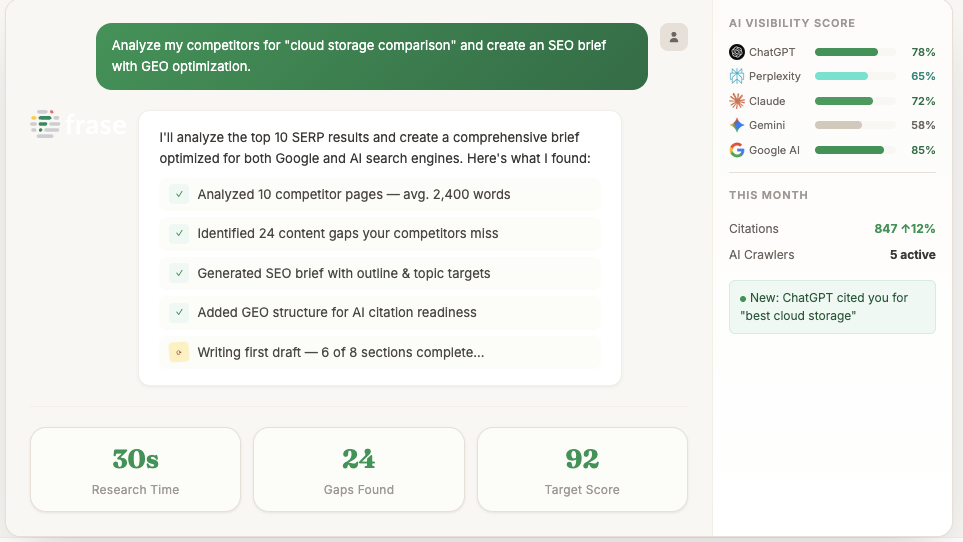
Frase sits closer to a SERP-to-brief workflow than a full SEO agent. It has a low self-serve entry point, but its session-reset problem creates extra editing work for teams with strict brand standards.
Buyer fit
Frase moves solo creators, small agencies, and content marketers quickly from SERP research to a usable brief or first draft.
It is built for teams that want SERP-assisted content production, but still expect a human editor to shape the angle, check claims, and tighten brand voice.
Workflow coverage and limits
The workflow centers on SERP research:
Competitor headings: common H2 and H3 patterns from ranking pages.
Questions: searcher questions pulled from live SERP research.
Topic coverage: suggested concepts and subtopics for the draft.
Outline inputs: structure ideas based on competitor pages.
Frase also adds AI-assisted drafting, brief creation, SEO/GEO scoring, and AI citation tracking. Platform tracking ranges from 2 platforms on Starter to 8 platforms on Enterprise.
The limits show up outside that content lane. Frase does not cover technical SEO, link-building work, direct CMS publishing, or persistent brand memory.
Human review remains important because drafts still need editing for accuracy, quality, and brand fit. The agent also resets between sessions, so brand voice, product context, and previous decisions do not persist.
Pros and cons
Frase's value is speed from SERP research to brief and draft. Its limits show up with deeper strategy, technical SEO, or durable brand memory.
Pros:
SERP briefs - Frase extracts competitor headings, questions, and outlines into a structured brief.
Affordable entry point - Starter pricing is lower than several tools in this list.
SEO and GEO scoring - Every plan includes article-level scoring for search and AI visibility.
AI citation tracking - Platform tracking scales up to 8 AI platforms on Enterprise.
Free trial - A 7-day free trial is available with no credit card required.
Cons:
Keyword precision - Keyword recommendations are lighter than premium optimization tools built for deeper strategy work.
Editing required - AI drafts need human review for accuracy, quality, and brand fit.
No persistent memory - Brand voice, product context, and previous decisions reset between sessions.
Limited technical SEO - Frase is not built for site audits, crawl fixes, or link-building execution.
Pricing
Frase self-serve plans range from $49/month to $299/month, with annual billing reducing the effective monthly price by about 20%. The main pricing differences are volume and AI platform tracking.
Starter - Lowest self-serve tier, with 10 articles/month, 50 audit pages, and tracking for 2 AI platforms.
Professional - Adds more article and audit volume for teams publishing regularly.
Scale - Raises limits to 100 articles/month, 1,000 audit pages, and 5 AI platforms.
Enterprise - Custom pricing, custom usage limits, and tracking for 8 AI platforms.
Plan | Monthly Price | Annual Price | Articles/month | Audit Pages | AI Platforms Tracked |
|---|---|---|---|---|---|
Starter | $49/mo | $39/mo | 10 | 50 | 2 |
Professional | $129/mo | $103/mo | 40 | 250 | 3 |
Scale | $299/mo | $239/mo | 100 | 1,000 | 5 |
Enterprise | Custom | Custom | Custom | Custom | 8 |
Watch out for: Use the 7-day trial to test one keyword from brief to draft to optimization score. The editing time matters more than the brief generation time.
4. Rankability
Rankability gives SEO teams a web-based workspace for content scoring, recommendations, and coaching.
The tradeoff is that the tool still depends on an SEO operator to run the workflow and validate its dual-NLP claims.
Buyer fit
Rankability combines a dual-NLP content workspace with coaching calls for SEO agencies, consultants, and optimization teams running client work.
The relevant buyer-fit pattern is a team that needs:
Repeatable client delivery across research, writing, and optimization projects.
Guidance while onboarding staff instead of a bare-bones scoring tool.
Human-led SEO judgment with software support, not a fully autonomous agent running the workflow for them.
Workflow coverage and limits
Rankability scores content in real time, recommends semantic keywords, and helps users move from research into writing inside a web-based workspace.
Its dual-NLP setup powers semantic keyword suggestions. Rankability says IBM Watson plus Google NLP improves relevance compared with single-model tools, but that is the vendor's claim.
A typical flow looks like this: load a target keyword, pull SERP data, draft with real-time scoring, review semantic keyword suggestions, then use Advisor AI to shape recommendations with uploaded client context.
The coverage is useful for research, content creation, optimization scoring, and AI citation tracking. Reporter tracks brand citations and share of voice across nine AI platforms.
The main gap is deployment. Available descriptions do not show direct CMS publishing connectors, so users still handle publishing outside the platform.
Rankability is closer to an assisted workspace than an autonomous implementation layer. Users still initiate research, review recommendations, create or optimize content, and export the work.
Evidence caveat: Public materials explain the module flow, but independent agent-specific outcomes are limited. Test the dual-NLP advantage on your own drafts before treating the claim as proven.
Pros and cons
Pros:
Dual NLP scoring: IBM Watson and Google NLP power its semantic keyword recommendations, with performance claims coming from Rankability's own positioning.
Agency support layer: monthly coaching calls add human guidance for teams that want help interpreting the workflow.
AI citation tracking: Reporter tracks brand citations across nine AI platforms.
Training orientation: the platform includes education-oriented support for agency teams onboarding SEO staff.
Cons:
Vendor-claimed NLP advantage: the IBM Watson plus Google NLP superiority claim needs independent testing before treating it as proven.
Manual deployment: no direct CMS publishing connector is listed in the available product descriptions.
Partial brand memory: Advisor AI uses a client knowledge base, but available information does not show cross-agent memory across the full workflow.
Fixed public tiers: the annual plans start higher than lower-cost SEO writing tools in this article.
Pricing
Rankability uses annual plans with three public tiers ranging from $99 to $399 per month.
Public pricing context:
Rankability: $99 to $399/month on annual plans.
Otto by Search Atlas: $99 to $999/month across listed tiers.
Frase: $49 to $299/month across self-serve plans, with annual billing available.
RankUp: tailored pricing based on content volume, audits, and page update needs.
Rankability is easier to price up front than custom enterprise tools, but usage fit depends on how much value the coaching and agency workflow add to the software.
Watch out for: Ask whether Advisor AI context carries across research, scoring, and export steps. A knowledge-base feature matters less if the context only affects one recommendation module.
5. Autopilot by BrightEdge
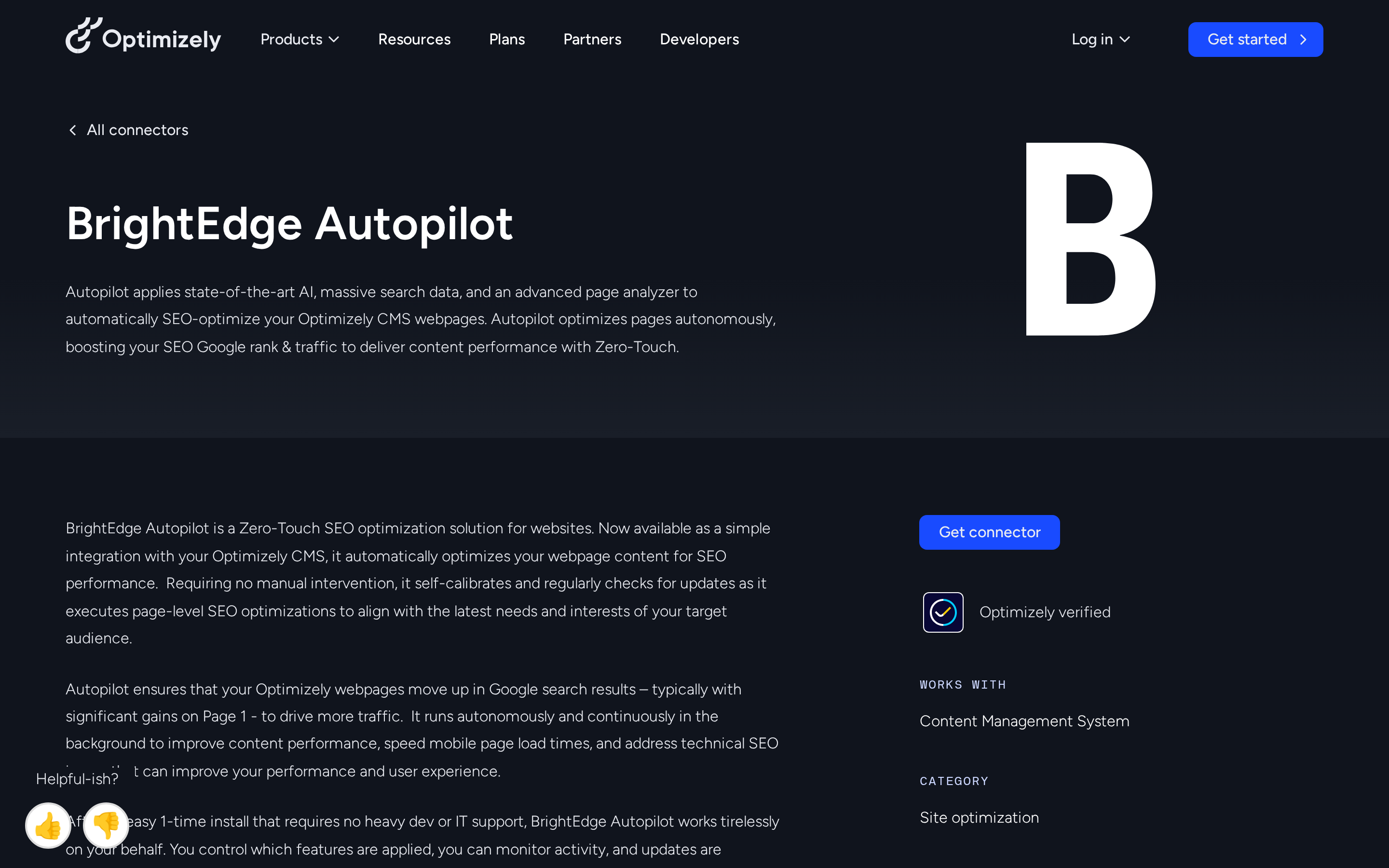
BrightEdge Autopilot sits at the enterprise end of this list: a zero-touch SEO engine for structural and on-page optimization across large websites.
Autopilot is traditional SEO automation at enterprise scale, especially data analysis, auditing, internal linking, structural fixes, and CMS-layer implementation.
Buyer fit
Autopilot uses enterprise CMS connectors for zero-touch structural SEO work on large sites where manual maintenance is too slow.
The fit is clearest when the team already has:
Large-site complexity across many pages, templates, domains, or stakeholders.
Enterprise CMS infrastructure where BrightEdge integrations can be configured safely.
Governance capacity to define rules, exclusions, and rollback expectations before automation touches live pages.
It is not the natural first pick for teams looking for keyword strategy, content briefs, or SaaS article production.
Workflow coverage and limits
The CMS layer is central to the product. Autopilot applies structural SEO changes through connectors for enterprise systems such as Optimizely and Drupal.
Its decisions are tied to BrightEdge's broader data stack:
Data Cube: BrightEdge's proprietary keyword and competitor visibility dataset.
ContentIQ: site-wide technical SEO auditing for broken links, anomalies, and performance regressions.
CMS connectors: implementation paths for structural fixes inside enterprise CMS setups.
Autopilot covers maintenance after the strategy and content already exist. The clearest uses are internal linking, structural technical SEO, and site health monitoring.
Several pipeline stages sit outside Autopilot's scope:
Keyword research and topic planning
Content strategy and brief creation
Long-form content generation
Brand knowledge integration
GEO or AI-search visibility monitoring
Autopilot is marketed as zero-touch and self-calibrating, so it can apply certain structural fixes without per-change approval.
The tradeoff is governance. Published descriptions provide limited detail on rollback controls or per-change overrides, so those safeguards need to be clarified during enterprise onboarding.
Pros and cons
Pros:
Zero-touch structural optimization: Autopilot can apply certain SEO fixes without per-change approval.
Enterprise CMS connectors: Optimizely and Drupal support make CMS-layer deployment possible for large teams.
Technical monitoring layer: ContentIQ scans for broken links, technical errors, and performance regressions.
Large-site fit: BrightEdge is built for enterprise SEO teams managing many pages, domains, and stakeholders.
Cons:
Narrow workflow scope: Autopilot focuses on structural SEO and technical maintenance, not full content production.
No GEO tracking: Autopilot does not monitor AI visibility in ChatGPT, Claude, Perplexity, or Google AI Overviews.
No brand knowledge layer: the system uses BrightEdge data sources rather than uploaded product expertise.
Reported data issues: Capterra reviewers have flagged inaccuracies in keyword research results and ranking reports.
Slow update cadence: Gartner Peer Insights reviewers have described BrightEdge product enhancements as slow to arrive.
Pricing
BrightEdge uses custom enterprise contracts, and Autopilot pricing is not listed publicly.
Reported BrightEdge contract figures place annual costs between $30,000 and $75,000, based on buyer-review discussions on G2 and Gartner Peer Insights.
Vendr transaction data puts the median at $51,294/year, across a reported $12,000 to $100,000+ range. Pricing depends heavily on negotiation, package scope, and contract terms.
Enterprise pricing context:
Conductor AI agents: Vendr transaction data reports a median annual contract of $49,510.
BrightEdge Autopilot: reported at $30,000 to $75,000/year.
Conductor AI agents: reported median annual cost around $49,000.
WP SEO AI: approximately $5,040 to $11,880/year.
Frase: starts at $49/month.
Otto by Search Atlas: $99 to $999/month.
BrightEdge is the highest-cost option in this article based on the reported ranges, and it also requires a sales process instead of self-serve checkout.
Watch out for: Before signing, ask how Autopilot handles rollback controls, excluded page types, and approval rules inside your CMS. Zero-touch automation needs boring governance to stay safe.
6. Writesonic SEO AI Agent
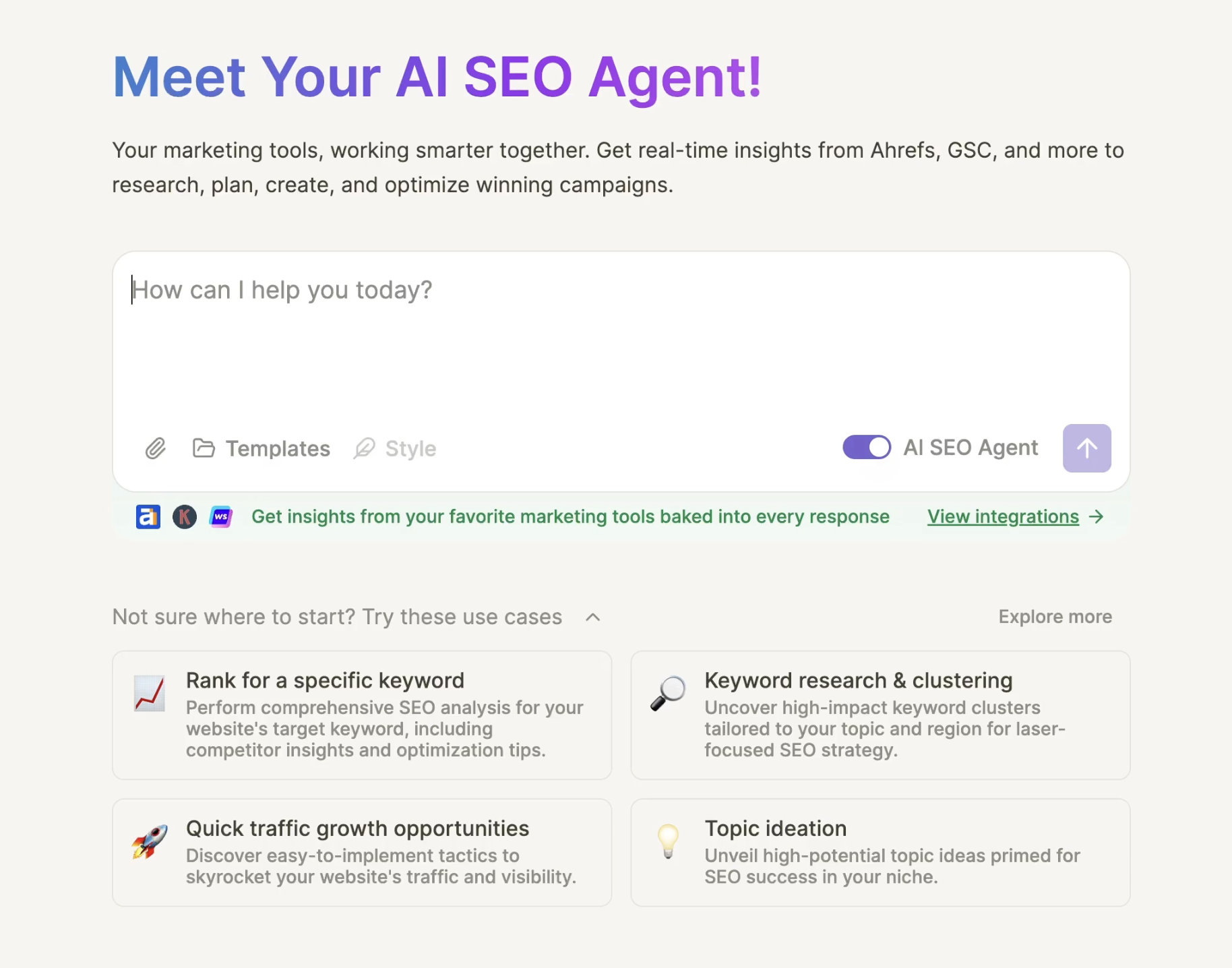
Writesonic is a chat assistant with SEO integrations rather than an enterprise platform. It moves fast when the user knows what to ask, but weak prompts keep the strategy shallow.
Buyer fit
Writesonic's chat-first workflow suits marketers who can steer SEO work with detailed prompts and hands-on review.
The clearest buyer-fit pattern is a team that:
Already has SEO judgment and knows what to ask the assistant for.
Uses third-party SEO data and wants that context available during drafting.
Needs lightweight content help more than a governed content operations system.
Can edit heavily when the first draft sounds generic or misses product nuance.
Workflow coverage and limits
When draft quality is the bottleneck, the brand-fit AI writer roundup compares writing-focused SEO tools.
Writesonic works through chat. The user asks for research, keyword ideas, briefs, drafts, audits, or GEO prompts, then refines the output through follow-up prompts.
Typical outputs include:
Keyword and SERP research through connected Ahrefs or Semrush accounts
AI article drafts based on SERP analysis and user instructions
GEO content prompts capped by plan tier
Site audit reports for up to 2,500 pages per audit
WordPress publishing support controlled by the user
The research layer is useful when a team already trusts its third-party SEO data. The constraint is that Writesonic inherits the shape of those inputs and the user's prompts.
Writesonic does not initiate research, queue content plans, or run audits without instruction. Human control is high, but the user has to prompt each stage, review generic output, and decide what gets published.
Pros and cons
Writesonic works best as a flexible assistant around a human-led process.
Pros:
Familiar chat workflow - Users can ask for research, drafts, and revisions without building automations.
Ahrefs and Semrush integrations - Teams can use existing SEO subscriptions for live data.
GSC and GA integrations - Search and analytics data can sit alongside content workflows.
High review volume - G2 lists Writesonic at 4.7 out of 5 across 2,029 reviews.
Cons:
Prompt quality matters - Weak prompts usually produce weaker strategy, structure, and drafts.
Generic output needs editing - Review patterns flag article quality and uniqueness as recurring issues.
Manual originality step - Writesonic includes a built-in Plagiarism Checker, but users still need to run originality checks deliberately inside the editor or Chatsonic.
Limited team controls - Larger teams may need deeper permissions and workflow management.
No persistent brand knowledge base - Product expertise needs to be supplied through prompts and instructions.
Pricing
Writesonic's AI Search Visibility plans start at $99/month. AI-search tracking is included from Starter, while article volume, audit capacity, and prompt tracking increase by tier.
If those caps create friction, the GEO-focused Writesonic alternatives list compares broader AI-search workflows.
7. SEO workflows by AirOps
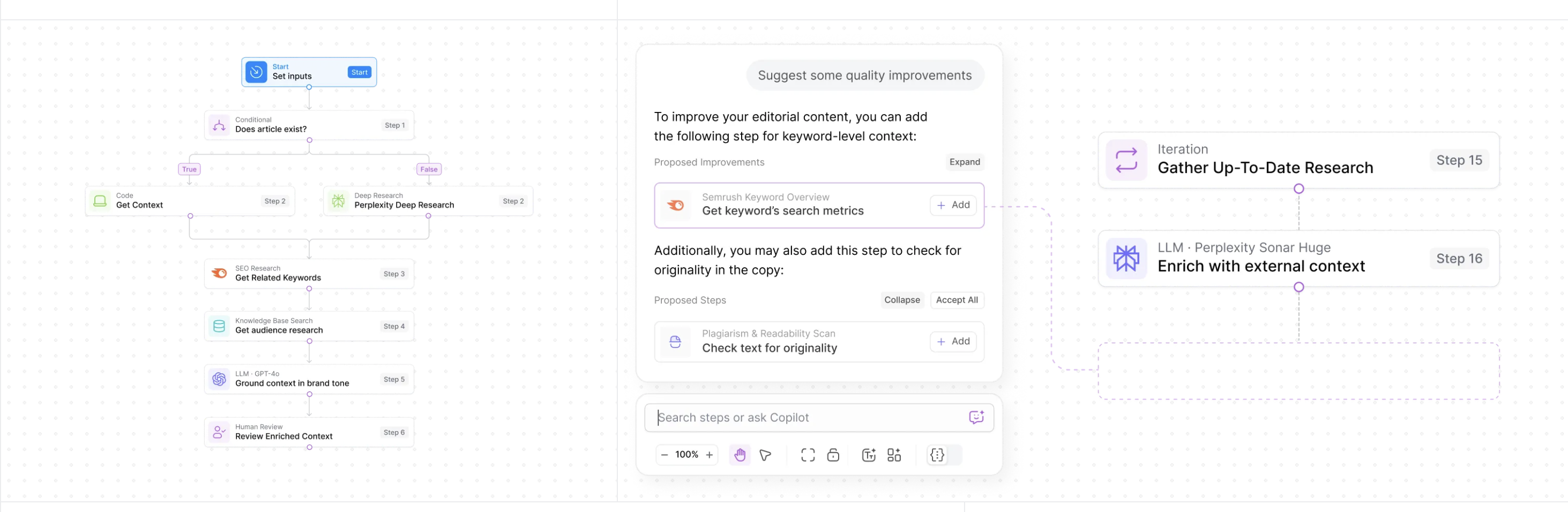
AirOps is not a prebuilt SEO agent. It is a no-code visual builder for teams that already know what they want to automate, so output quality depends on the logic, prompts, and review gates they build.
Buyer fit
AirOps gives teams a no-code visual builder for custom SEO processes, including growth engineers, technical marketing leads, and agencies with a proven workflow to automate.
The fit depends on process maturity. AirOps gives you the building blocks, but your team still owns the logic, prompts, QA checks, and review gates.
It makes sense when you have:
A defined methodology for research, content generation, optimization, or publishing.
Enough volume to justify building and maintaining custom workflows.
Technical ownership from someone who can test prompts, models, data inputs, and approval steps.
A real need for flexibility instead of a fixed SEO content workflow.
Workflow coverage and limits
Common components include:
Keyword research for topic and page planning
SERP analysis for briefs and content structure
Content generation using selected AI models
Programmatic SEO workflows for repeatable page production
CMS integrations, including WordPress publishing
AI search visibility monitoring through Quill
Quill gives AirOps a GEO monitoring layer alongside content automation and publishing workflows.
The platform can integrate brand context, but that setup is custom. Teams decide what context enters the workflow, where it is used, and how outputs are checked.
AirOps uses supervised automation. Workflows can run repeatable steps, while execution points such as publishing can pass through human approval gates.
Evidence caveat: Public review evidence is thinner for SEO-specific AirOps workflows than for older SEO suites. Validate one pipeline on a small content batch before scaling it across a site.
Pros and cons
AirOps functions as an automation layer for teams with their own SEO process.
Pros:
Flexible workflow builder - Teams can design custom research, generation, and publishing sequences.
More than 40 AI models - Different models can be used for different steps in the same pipeline.
CMS integrations - Workflows can connect content production to publishing systems such as WordPress.
GEO monitoring - Quill adds AI search visibility tracking to the workflow suite.
Cons:
Steeper learning curve - Beginners need to learn both the platform and the SEO logic behind the workflow.
High configuration overhead - Teams must build, test, and refine prompts, gates, and quality checks.
No built-in SEO methodology - AirOps automates the process a team designs; it does not supply the strategy by default.
Partial brand knowledge setup - Brand context requires custom configuration rather than a native persistent knowledge base.
Cost can outweigh value at low volume - Smaller teams may not use enough automation to justify the setup effort.
Pricing
AirOps uses task-based pricing. Production SEO workflow pricing is reported around $200/month at entry-level paid usage, with a free tier for smaller experiments.
That places AirOps above lower-cost AirOps alternatives such as Frase at $49/month and Rankability or Otto by Search Atlas at $99/month.
The pricing question is less about a single subscription number and more about task volume. Teams should estimate how many research, generation, monitoring, and publishing steps each workflow will run before comparing AirOps to fixed-pipeline SEO tools.
8. Conductor's AI agents
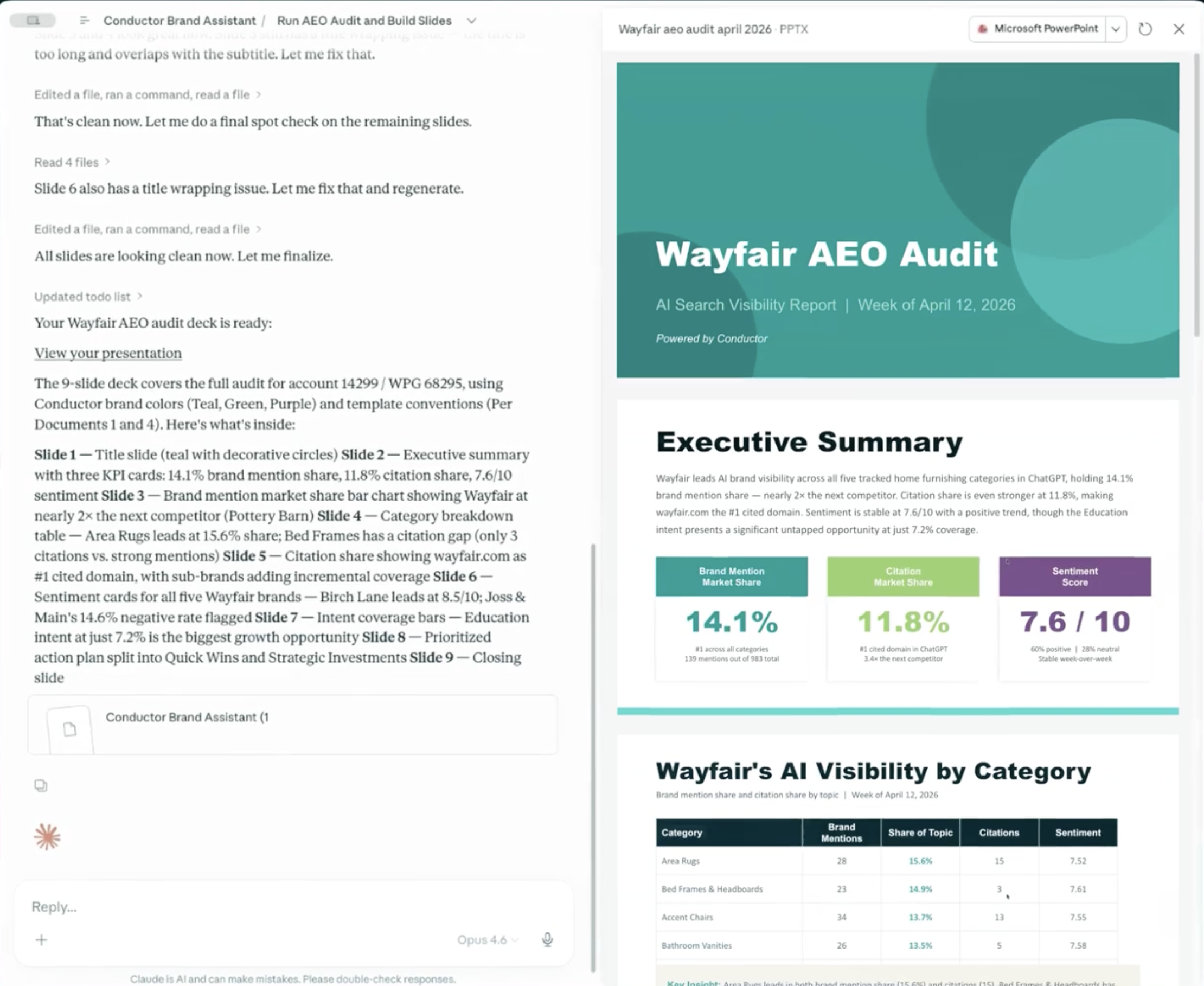
Conductor puts AI agents inside an enterprise SEO platform, with content gap analysis, approvals, reporting, and CMS publishing handled in one managed stack.
Buyer fit
Conductor connects AEO gap analysis, approvals, reporting, and CMS publishing for enterprise teams that need those functions in one managed stack.
The fit is clearest when the team has:
Enterprise budget for a custom contract, not a self-serve monthly tool.
Multiple stakeholders across SEO, content, analytics, compliance, and publishing.
CMS integration needs where approved content has to move through a managed platform.
A preference for one governed system over stitching together separate research, writing, reporting, and publishing tools.
Workflow coverage and limits
Conductor's AI agents identify AEO coverage gaps, prioritize topics, enforce brand governance, and move content from brief to published output inside Conductor.
The documented turnkey flow can move from insight to published content in under three minutes, depending on setup and CMS connection.
A typical flow looks like this: run an AEO gap analysis, surface unanswered topic clusters, generate briefs, review drafts, then push approved content to a connected CMS.
Conductor also centralizes keyword tracking, rank monitoring, site audit data, competitor analysis, reporting dashboards, Google Search Console, and Adobe Analytics integrations.
For AEO, Conductor focuses on coverage gaps and topic prioritization for answer-engine visibility. Public information emphasizes planning more than granular ChatGPT, Perplexity, or Gemini citation monitoring.
The brand layer is governance-led rather than knowledge-base-led. Public materials emphasize enterprise controls and brand alignment, not a user-maintained product knowledge base for proprietary details.
Human control mainly comes through brand guardrails, CMS configuration, and reporting oversight. The main friction is interface complexity: G2 reviewers describe Conductor as cluttered and data-heavy.
Pros and cons
Pros:
Fast content orchestration: The agent workflow can move from insight to published content in under three minutes.
AEO gap analysis: Conductor identifies answer-engine content gaps and uses those gaps to prioritize topics.
Enterprise CMS connectors: Native support for Optimizely and Drupal reduces manual export and upload work.
Centralized reporting: Keyword, ranking, audit, competitor, and analytics data sit in one platform.
Cons:
Enterprise-only access: Custom contracts and a reported $49,000 median annual cost limit access for smaller teams.
Platform friction: Reviewers describe the interface as cluttered and data-heavy.
Credits complexity: Long-term users describe the credits-based system for certain functions as confusing and dated.
Non-content SEO gaps: Review data flags technical SEO, backlink analysis, and complex migration work as less reliable than content workflows.
Bug resolution concerns: Some users report unresolved software bugs and unclear support timelines for fixes.
Pricing
Conductor does not offer public self-serve pricing for its AI agents. Pricing runs through custom enterprise contracts.
Available pricing context:
Reported median annual cost: $49,000
Pricing model: Custom enterprise contract
Self-serve tiers: Not publicly listed
Comparable enterprise tool in this list: BrightEdge Autopilot, reported at $30,000-$75,000/year
Conductor sits above monthly SaaS tools in this article. Otto by Search Atlas starts at $99/month, Frase starts at $49/month, and Rankability starts at $99/month.
9. WP SEO AI
WP SEO AI keeps research, writing, publishing, and AI visibility tracking inside WordPress, so the product scope is tied directly to that CMS.
It also includes a dedicated Success Manager, although public information does not document the exact review cadence, approval gates, or editorial sign-off process. That lack of public detail is the main evidence caveat for buyers comparing managed WordPress options.
Buyer fit
WP SEO AI runs research, writing, and publishing from the WordPress dashboard for site owners who want SEO content production inside their existing CMS.
The fit is narrow. WP SEO AI makes sense when:
WordPress is the center of the workflow and the team does not need Drupal, Webflow, Optimizely, or headless CMS support.
Annual pricing is acceptable because the entry point starts at €5,040/year, before the separate startup fee.
A managed support layer matters and the buyer is willing to clarify the exact review cadence before signing.
If you need a flexible multi-CMS workflow, WP SEO AI is likely too tied to one environment.
Workflow coverage and limits
WP SEO AI runs a research-to-publish workflow from the WordPress dashboard. The plugin covers keyword research, brief creation, AI-assisted writing, and direct publishing to the site.
The startup fee covers onboarding and AI training on the client's services, tone, and writing style before content production begins.
WP SEO AI also includes a Brand Visibility Tracker for AI search monitoring:
Perplexity citation presence
Gemini citation presence
ChatGPT citation presence
That gives WP SEO AI a clearer GEO monitoring layer than WordPress plugins focused only on metadata, schema, or on-page scoring.
Available research does not show coverage for technical SEO execution, backlink prospecting, or rank-recovery audits. The tool appears centered on content production and AI citation tracking.
The Success Manager is confirmed publicly, but the workflow details are not. Available materials do not document review cadence, approval gates, editorial sign-off, or who makes final publishing decisions.
Before signing the annual contract, ask the sales team: How many articles per month does the Success Manager review? What is the turnaround time for editorial feedback? Who approves content before publishing, you or the Success Manager?
Pros and cons
Pros:
WordPress-native workflow: Research, writing, and publishing happen inside the WordPress dashboard.
Brand onboarding: The startup process trains the AI on the client's services, tone, and writing style.
Dedicated Success Manager: Each account includes a human support layer, though the exact workflow details are not public.
AI visibility tracking: The Brand Visibility Tracker monitors citation presence in Perplexity, Gemini, and ChatGPT.
Cons:
WordPress-only: Teams using Drupal, Optimizely, Webflow, or headless CMS setups cannot use the native workflow.
Annual contract floor: Pricing starts at €5,040/year, before the separate startup fee.
Startup fee is not public: The onboarding and AI training fee is separate, but exact amounts are not disclosed.
Limited public evidence for technical SEO: Available research does not show technical SEO execution or backlink prospecting coverage.
Success Manager details are unclear: Public information confirms the role, but not the approval cadence or editorial review process.
Pricing
WP SEO AI uses annual contracts plus an upfront startup fee for onboarding and AI training.
Available pricing context:
Annual contract range: €5,040-€11,880/year
Startup fee: Separate upfront fee, exact amount not publicly disclosed
Billing model: Annual contract
Public self-serve monthly plan: Not documented in the available research
WP SEO AI costs more than the self-serve monthly tools in this article. Otto by Search Atlas starts at $99/month, Frase starts at $49/month, and Rankability starts at $99/month.
Its price ceiling remains below the enterprise-only tools listed here. BrightEdge Autopilot is reported at $30,000-$75,000/year, while Conductor has a reported median annual cost of $49,000.
To see which RankUp agents each plan includes, read the growth-stage pricing breakdown.
Comparison table: workflow coverage, automation depth, and best use case
I use this table to compare how much of the SEO workflow each agent covers and how much human review each one needs. The last column shows the fit I would consider first.
Here are the four patterns I check before comparing the rows:
Tool | Pipeline stages covered | Autonomy level | GEO / AI visibility | Starting price | Best use case | Architecture | Typical time savings vs manual |
|---|---|---|---|---|---|---|---|
RankUp | Research, prioritized planning, finished content, audits, updates, internal linking | Approve, then RankUp applies it to your CMS | Light AI-search baseline audit before the trial | Custom plan | Finished content and ongoing improvements for lean SaaS teams | Dedicated content team with shared product knowledge | Research-to-finished-content workflow; approved CMS edits replace manual implementation |
Otto by Search Atlas | Technical SEO, on-page, local SEO | Executes approved fixes | Search and LLM crawl monitoring | $99-$999/month | Local and Shopify SEO | Single-agent | Approved fixes replace manual implementation |
Frase's SEO agent | Research, briefs, AI writing, scoring, monitoring | AI-assisted user control | Dual SEO/GEO scoring; 8 platforms | $49-$299/month; Enterprise custom | Brief and optimization scaling | Workspace | Research: 2-3 hours to 5 minutes; drafting: 4-6 hours to ~30 minutes |
Rankability | Research, creation, AI visibility tracking | Connected modules with guidance | 9 AI platforms tracked | $99-$399/month, annual | Agency visibility management | Workspace | Guided modules reduce manual handoffs |
Autopilot by BrightEdge | Technical, on-page, linking, structure | Zero-touch structural optimization | No | $30,000+/year | Enterprise SEO maintenance | Single-agent | Automates recurring structural changes |
Writesonic SEO AI Agent | Research, strategy, creation, GEO monitoring | Chat-guided assistant | Tracking from Starter tier | $99/month | Chat-driven SEO drafting | Single-agent | Drafting and monitoring remain chat-led |
SEO workflows by AirOps | Custom research, creation, publishing, monitoring | Monitoring with review gates | Quill agent for AI search visibility | ~$200/month, task-based | Custom approval workflows | Workspace | Automates custom steps after setup |
Conductor's AI agents | Strategy, content, AEO gaps, publishing | Turnkey Conductor orchestration | AEO prioritisation | ~$49,000/year median | Conductor enterprise teams | Multi-agent | Faster insight-to-publish workflow |
WP SEO AI | Research, creation, publishing, citation tracking | Success Manager oversight | Perplexity, Gemini, ChatGPT | €5,040-€11,880/year plus startup fee | Managed WordPress scaling | Workspace | Publishing happens inside WordPress |
Lower-cost access: 4 tools start below $200/month. AirOps starts around $200/month; BrightEdge and Conductor sit in enterprise budget territory.
GEO coverage: Rankability and Frase track the widest spread of AI platforms. RankUp focuses on the SaaS content execution that can improve Google rankings and eligibility for AI mentions and citations.
Highest automation: BrightEdge Autopilot is the clearest zero-touch option. Otto and AirOps keep review gates before changes go live.
Best fit for lean SaaS teams: RankUp is built for teams that need one operator to coordinate research, writing, updates, and product context without stitching together five separate tools.
Why RankUp's AI agent team is best for doing SaaS SEO
RankUp divides SEO work across a team of agents rather than asking one agent to do every job.
The team follows how SaaS SEO gets done: plan what to cover, write the content, then keep it up to date.
SaaS content suffers when that work loses context. Positioning, ideal customers, product use cases, sales objections, competitor gaps, and proof points need to be available throughout the work, not left in someone's head or buried in a prompt thread.
RankUp uses those details throughout the work. You're managing a small SEO team that already knows your market, rather than briefing a writer from scratch each time.
For a lean SaaS team, that changes the job:
You can improve pages based on performance. RankUp can audit, refresh, add links to, and improve live pages as performance data points to the next priority.
Strategy stays connected to the work. Research, topical maps, outlines, blueprints, drafts, updates, internal links, and reporting stay together.
You can keep older pages useful. Existing pages can be audited, refreshed, linked, and improved rather than left alone after publication.
You keep control where it matters. Your team still approves strategy, positioning, product claims, and final edits before content goes live.
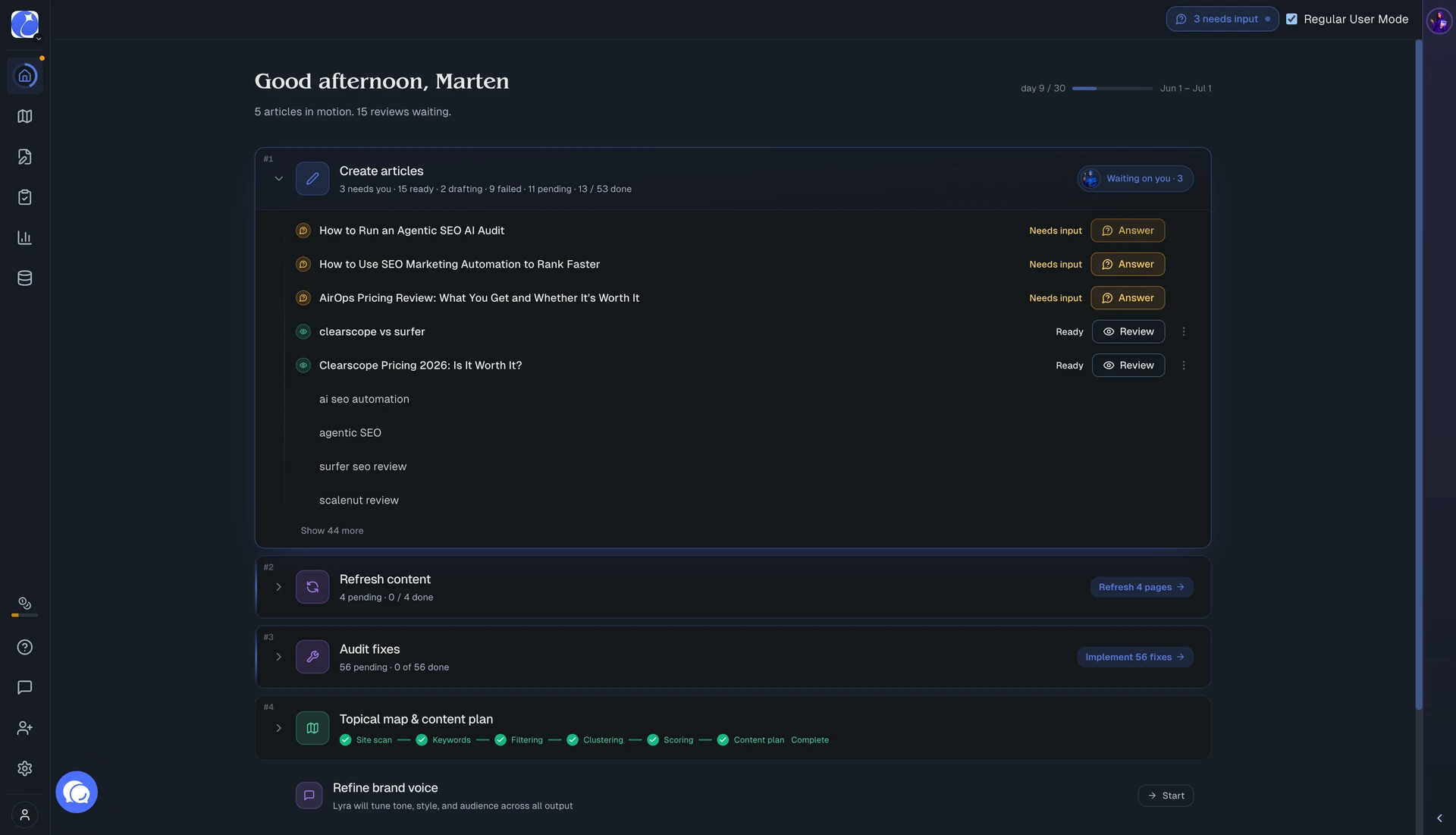
RankUp handles the research, writing, and ongoing improvements in one system to help buyers find your SaaS product through Google and AI search.
Its Knowledge Base keeps your positioning, objections, approved claims, and previous answers ready for the next article or update. You don't have to explain them all again each time.
Put RankUp to work on the pages buyers use to research and compare solutions with a 7-day free trial.
FAQs
Do AI SEO agents replace SEO professionals?
No. AI SEO agents reduce repetitive research, drafting, optimization, and reporting work, but SEO professionals still approve the strategy, positioning, claims, and publishing decisions.
The split is clearer by workflow:
Strategy: Magnus can build keyword plans, topical maps, and the research that informs content strategy, but a person should approve the final direction.
Execution: Cedric turns the content plan and your product expertise into publish-ready articles and pages; your team checks claims and approves publication.
Optimization: Otto can apply approved on-page and technical fixes. RankUp writes edits you can review to address audit findings, add relevant internal links, and refresh content.
RankUp, Otto, and AirOps can handle defined SEO tasks. I would still keep outreach, link verification, final strategy approval, and final publish approval with a person.
Can AI agents handle technical SEO?
Yes. AI agents can handle site audits, crawl-error detection, internal-link checks, and schema generation.
However, for most sites, the technical stack I trust is simple: Screaming Frog, Google Search Console, Claude Code, and open-source skill libraries from GitHub.
That covers crawl issues, indexing checks, schema, redirects, internal links, and template-level fixes. Ahrefs' documented agent use cases include:
Detecting a 404 image and opening a pull request with the fix.
Producing weekly crawl-diff reports that surface only newly detected issues.
The reason is that technical SEO has to adapt to your setup. Your codebase, CMS, rendering layer, and plugin stack all behave differently.
That is where a dynamic coding workflow usually beats a generic SEO agent.
Use Claude Code, or a CMS-connected MCP workflow, when the fix needs to happen in development or inside your CMS setup. Use tools like Otto or BrightEdge when you want a packaged platform to queue approved site fixes.
Buying takeaway: get the technical foundation right with a crawler, GSC, a code-level workflow, and open-source scripts. Then use RankUp to plan and write content, update pages, and add internal links for Google and AI discovery.
How accurate is AI-generated SEO content?
AI SEO content can be accurate enough for a draft when the workflow verifies facts and search intent. Raw drafts still need human review.
The accuracy test comes down to five checks:
Entity and citation checks: Apply entity-density, fact-density, and citation-readiness scoring while drafting.
Inline citations: Generate source links for claims that can be verified.
Current SERP data: RankUp starts with live Google results because static model knowledge can miss current ranking patterns.
Source checks: Product pricing, feature claims, integrations, and competitor comparisons need verification before the article reaches a CMS.
Approval workflow: A person should check voice, positioning, and whether the draft adds something beyond the ranking pages.
Better workflows start with current SERP context, then send the draft through source checks and editorial review.
Buying takeaway: do not judge accuracy by the first draft alone. Judge the system by the research, source control, and approval steps around the draft.
RankUp pulls live Google results and lets you approve edits before publication. You can also select a claim in the editor and check it against your knowledge base before it goes live.
Are AI agents safe to use with your content?
Yes, when permissions and review gates are set correctly. I treat CMS write access as the risk line that needs extra review.
My baseline security checklist for AI SEO agents is simple:
API key scoping: The agent should only access the CMS or SEO data its key permits.
Encrypted transmission: Data moving between the agent and connected systems should travel through encrypted channels.
Authenticated endpoints: Unsecured endpoints create risk for unauthorized access or system misuse.
Ongoing monitoring: Security reviews should continue after the integration is live.
Content safety is the second layer. I still review AI suggestions for factual accuracy and brand voice, and thin pages get revised before publication.
Buying takeaway: read-only access is lower risk, suggested edits are manageable, and direct CMS write access needs the strongest controls.
The safer pattern is simple: give the agent only the permissions it needs, keep review gates before publishing, and make every meaningful change visible as a draft, recommendation, or proposed edit first.
That way, AI agents can speed up SEO work without turning your website into an unattended testing ground.
:quality(80))
Author of the article
Georg Richard Aare
Georg is the co-founder of RankUp and an SEO nerd who spends (almost) every waking minute refining his craft and sharing his learnings. When he’s not behind his computer, which is rare, you’ll find him in the gym doing bench (never legs) to clear his mind.
This article was created using: