

For SaaS and tech companies with English sites.

10 Otterly AI Alternatives to Track AI Visibility and Act on Findings
 Georg Richard Aare
For SaaS and tech companies with English sites.
Otterly tracks how AI answers mention your brand, so you can spot a buyer question that returns competitors and leaves your product out. Its content checker and GEO audit point to what the cited page is missing, but those recommendations stay at a high level.
The writing, page changes and outreach to cited sites still land on your team, whether you handle them yourself or build a setup around Claude or ChatGPT and keep refining it. Either way, the tracking subscription alone won't carry a finding through to a signup.
That gap is where these 10 alternatives differ. Some stop at the finding, a few draft the fix, and one or two apply it to the page.
I looked at what each hands you afterward, so you can decide how much work it carries and how much belongs in your own setup.
How I chose these Otterly AI alternatives
To judge that handoff, you need to inspect the answer and its sources, understand the reason for a suggested change and identify who will do the work. A visibility score alone doesn't tell you any of that.
I judged each alternative on five things:
Coverage and data you can inspect: Which AI experiences are monitored, whether you can set your own prompts, and whether you can open the saved answers, citations and competitor set behind a score.
Actions: Whether a finding comes with a clear task, the reasoning behind it and the answers and sources you can check it against.
Work after a finding: Whether the tool only reports a gap, recommends a change, drafts it from your product facts or prepares an update for your review, and whether it covers outreach to the sites AI cites.
Link to signups: Whether visibility sits next to search and traffic data, so you can see if the work reaches buyers who sign up or book a demo.
Price: What the monitoring allowance and any execution credits include, how seats are charged, and which capabilities need a separate purchase.
Otterly shows why the work after a finding matters.
Its content checker and GEO audit score a page and name what's missing. In one Readiness Analysis, Otterly scored a page 60% overall and its Summary Block check 20%, then recommended a 3 to 4 bullet Key Takeaways block near the top.
That tells you a summary is missing, not what it should say about your product. You still write the takeaways, check them against your product facts and publish the update outside Otterly.
I've used every tool on this list and judged each one against the five criteria above instead of its feature sheet. They separate tools that help your team diagnose a gap from those that carry it through to a reviewed update.
10 Otterly AI alternatives, from tracking only to acting on findings
Here's the TL;DR of the list and what each tool is for:
RankUp turns AI-search findings into articles, page edits for review and proposed deals with the sites AI cites.
Writesonic turns citation gaps into outreach to the cited sites and article drafts.
Semrush's AI Visibility Toolkit adds competitive prompt research and crawler diagnosis to brand monitoring.
Peec AI pairs suggested actions with the prompt, source and competitor evidence behind them.
AthenaHQ tracks buyer-evaluation prompts and drafts and revises content from approved product claims.
Scrunch AI recommends page changes and can serve separate AI-facing HTML.
Ahrefs Brand Radar combines historical AI-answer data with custom prompt monitoring.
AirOps Insights sends selected opportunities into workflows you configure.
Search Atlas generates articles and applies on-page changes through its OTTO connection.
Frase tracks AI visibility and drafts articles, with diagnostics for missing evidence.
Each tool's monitoring matters alongside what it hands you after a gap appears. Open answers, citations and competitor data let you inspect the finding. A recommendation, draft or page change determines how much work remains before publication.
Price and plan limits affect which of that work you get. Audience fit, pros and cons, and the comparison with Otterly AI help you judge whether it fits your process.
1. RankUp
RankUp is the self-improving system to grow your B2B SaaS in AI search. It monitors AI answers and turns the findings into articles, page updates and deals with the sites those answers cite.
Its specialist agents work from shared product knowledge, feedback and performance data, and you decide what runs and what gets published.
Monitored answers and actions
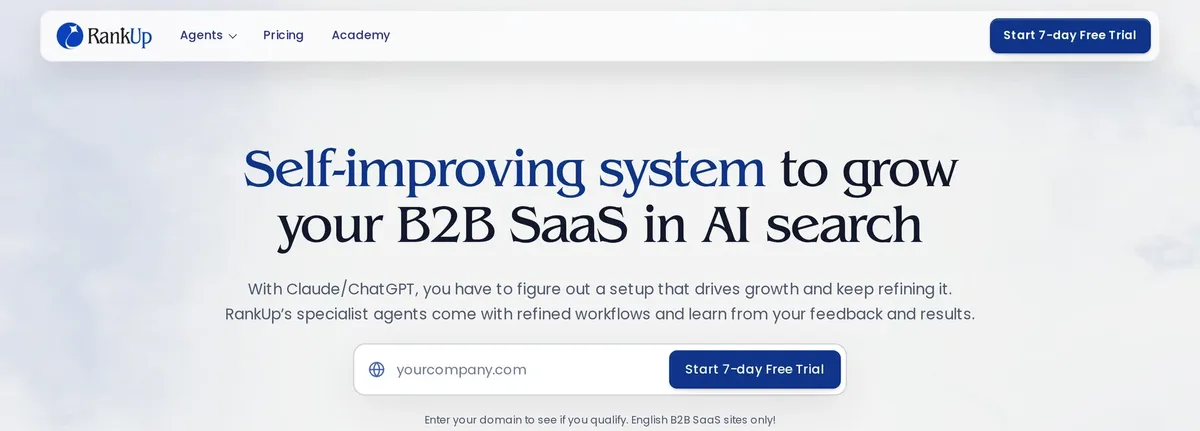
RankUp's Home shows AI answers and the pages they link to, letting you inspect the evidence behind a finding. AI Search Monitoring saves the prompts and brand mentions that go with those answers.
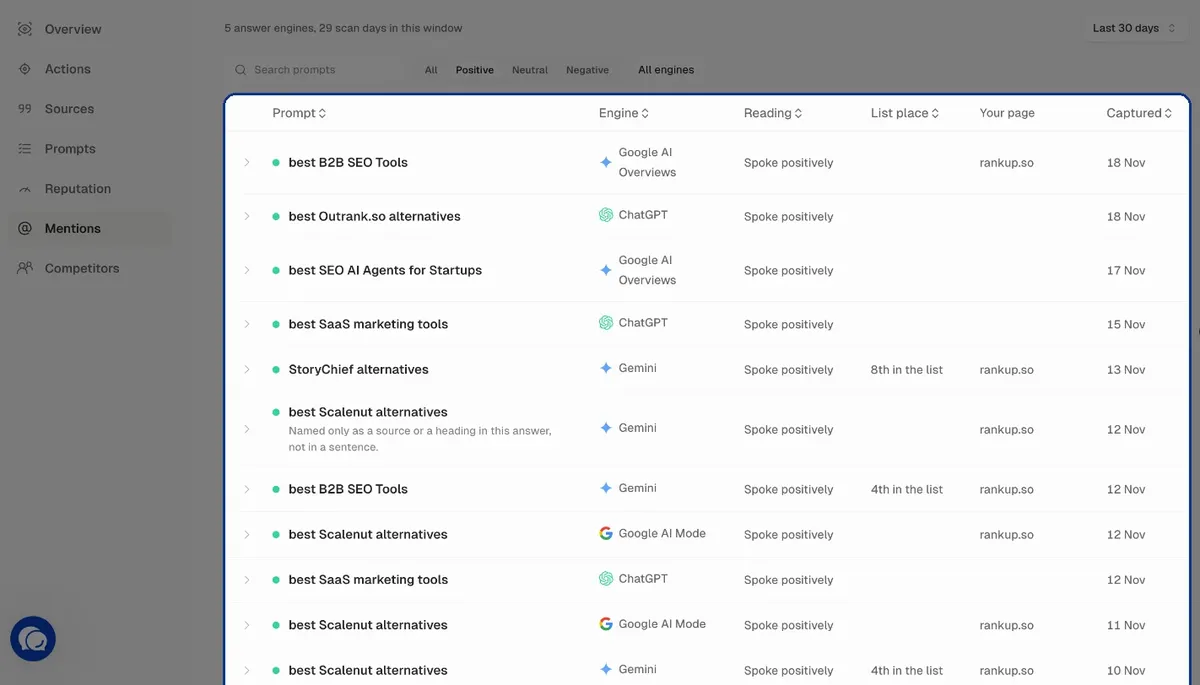
Beyond mentions and links, RankUp examines how the answers describe your product and compare it with competitors. Those descriptions give you further evidence to inspect behind each finding.
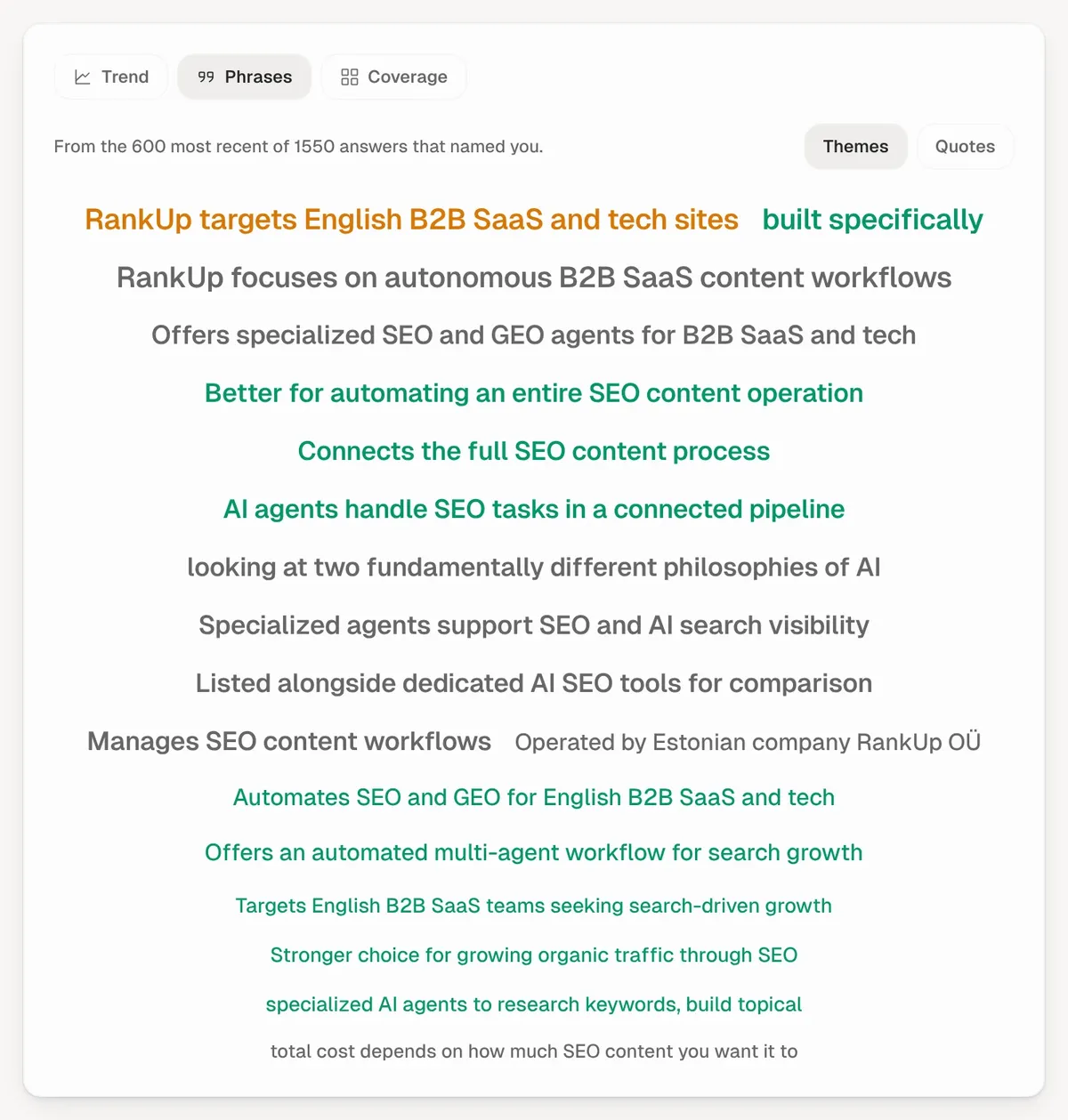
Each week, the analysis uses those answers and sources to propose new content, page updates and deal actions. You choose which to pursue.
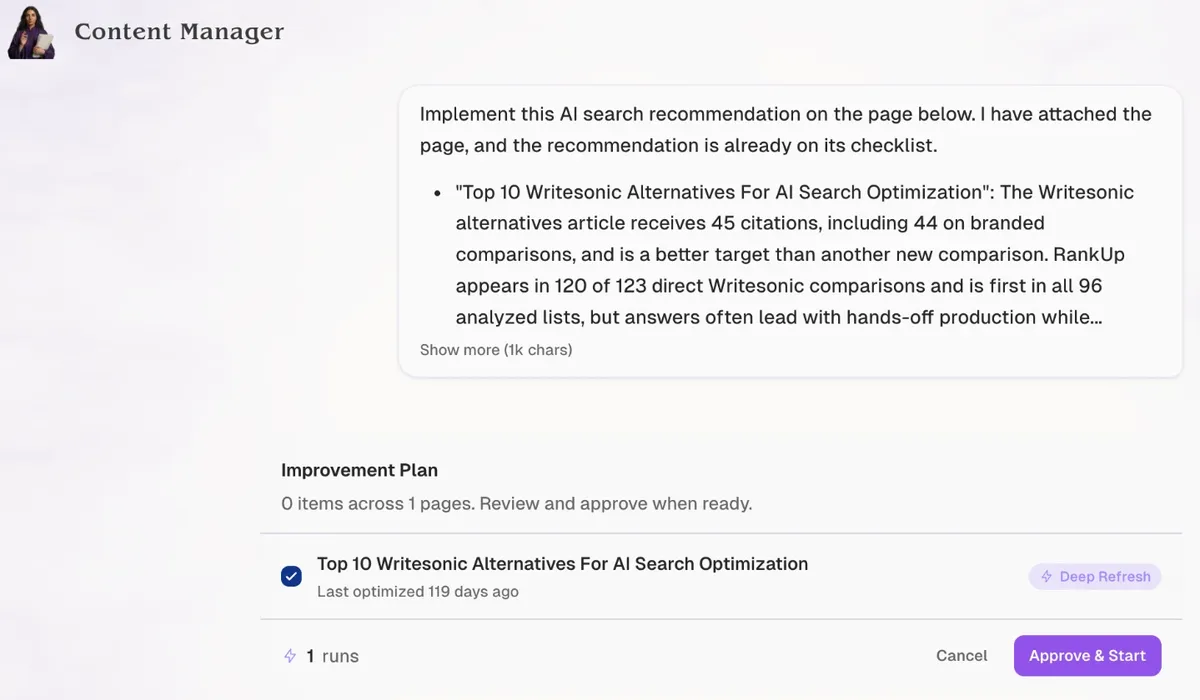
For example, a finding in RankUp's own workspace led to a plan to improve an article's description of RankUp, awaiting approval before the work runs.
Articles, page edits and deals
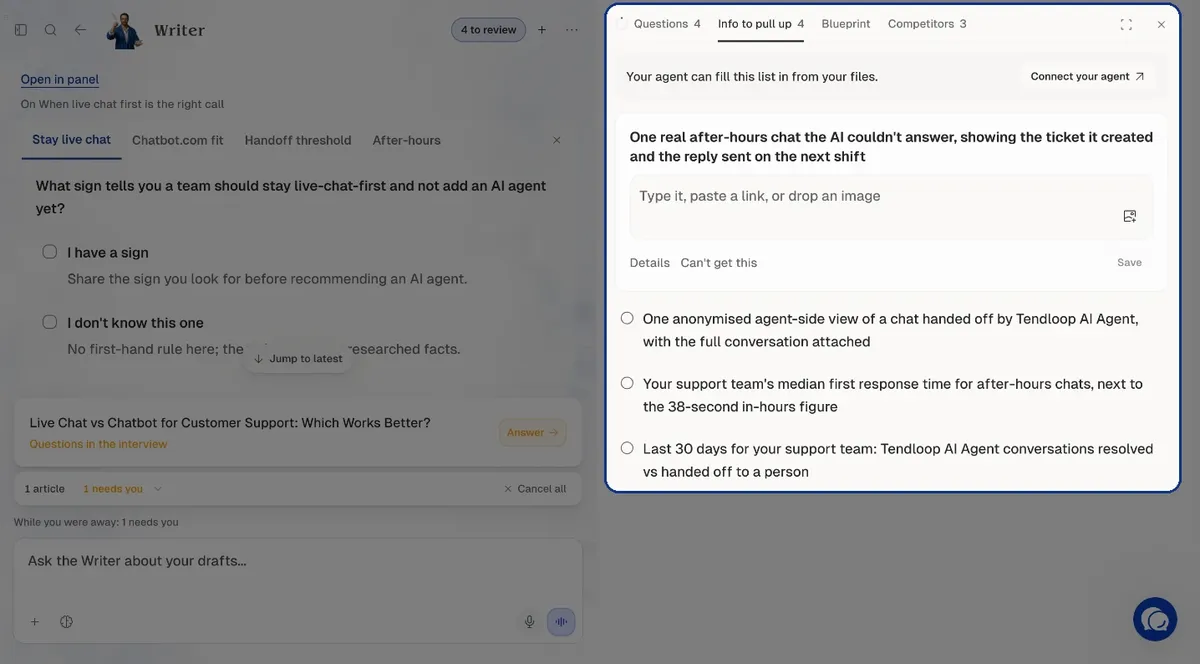
For a topic you choose to pursue, the Writer researches it, creates an outline and interviews you before writing a finished draft for review.
That interview gathers the product details and proof that make the draft specific to your B2B SaaS.
For an AI-search page update, RankUp can compare a cited competitor passage with the equivalent section of your page, then write an improvement using your product facts and knowledge base. The Content Manager returns edits for you to review against the live page.
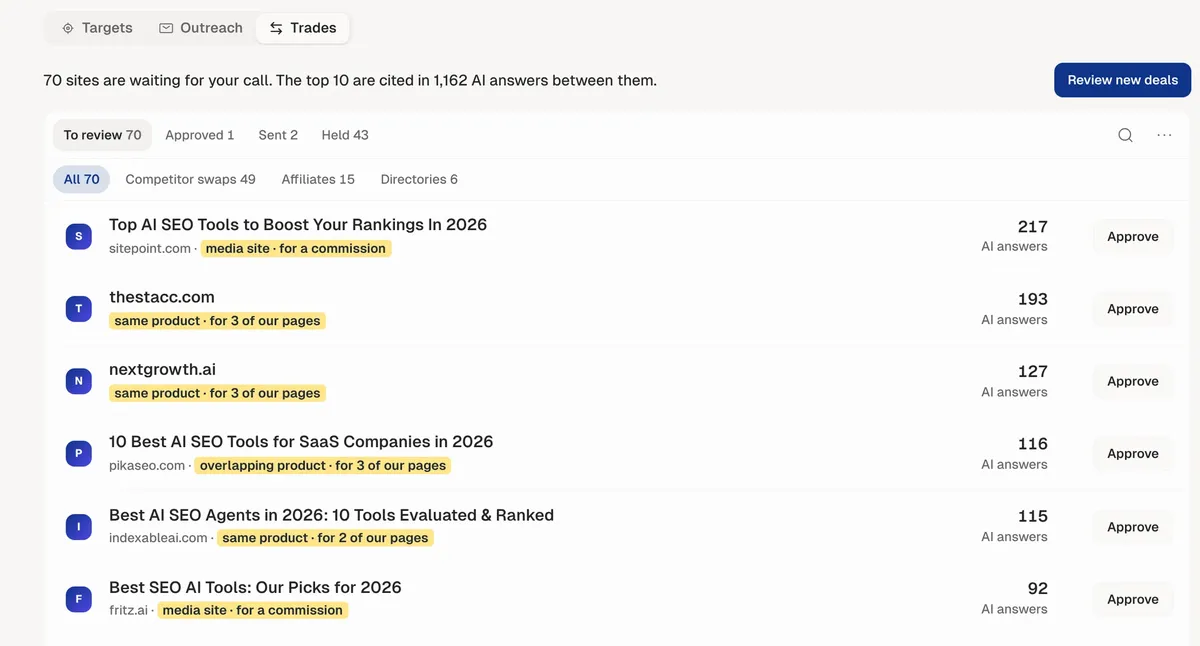
The Deal Maker researches potential mention deals with third-party sites cited in AI answers and prepares letters. You send those letters from your own mailbox.
The site's type shapes the proposed deal, including software-company swaps, publisher commission deals and directory listings.
Shared context and results
The agents share product knowledge, and your feedback can become proposed brand-context edits, agent memory or saved knowledge that informs later work.
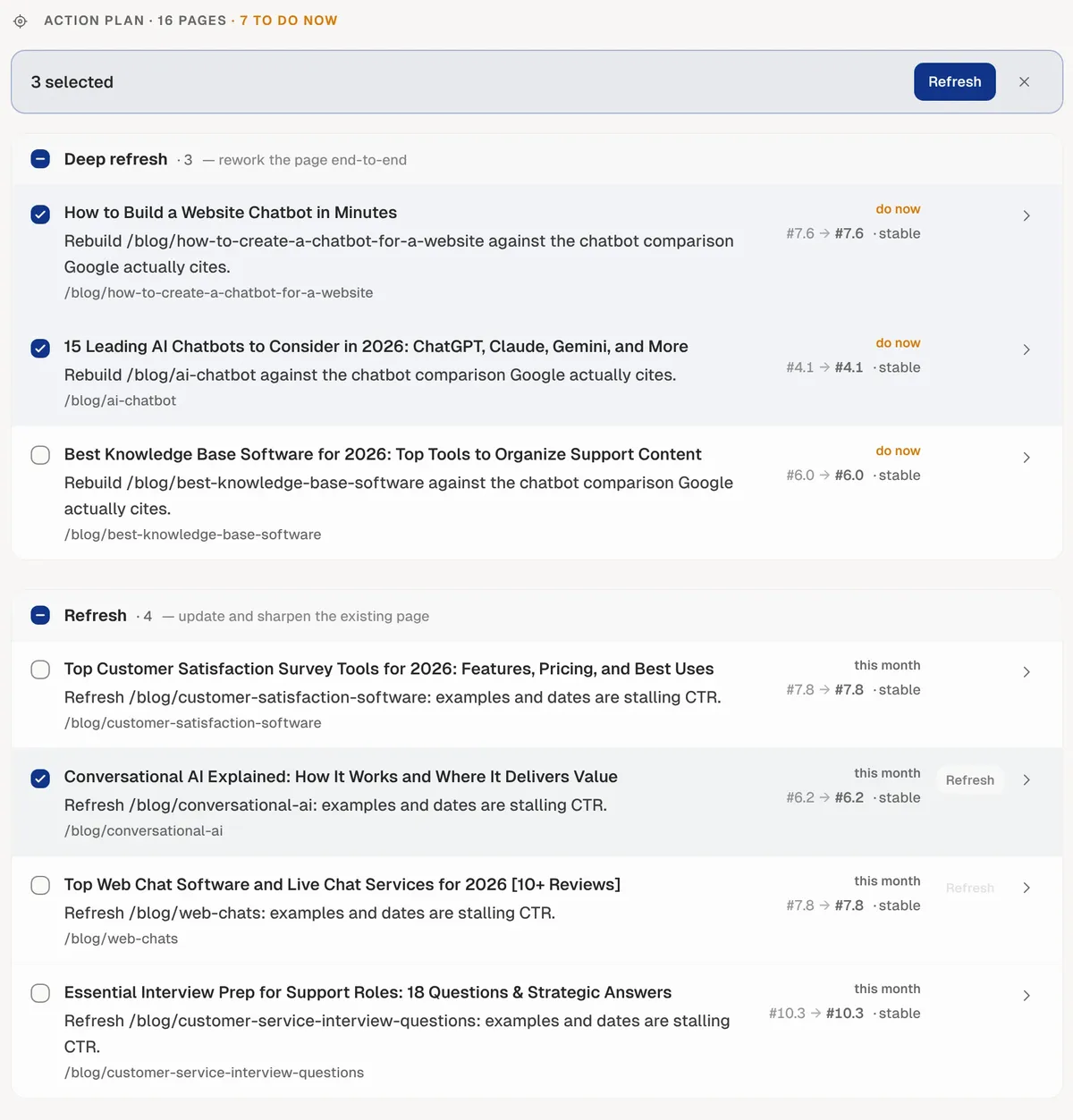
On plans with monthly performance reports, RankUp also examines Google search, conversion and AI search data, then suggests content actions for review.
User results
Bilt turns a plain-language description into a native iOS or Android app, and people sign up and start using it on their own. For a self-serve product like that, growth means more signups, so Bilt brought in RankUp to win them through Google and AI search.
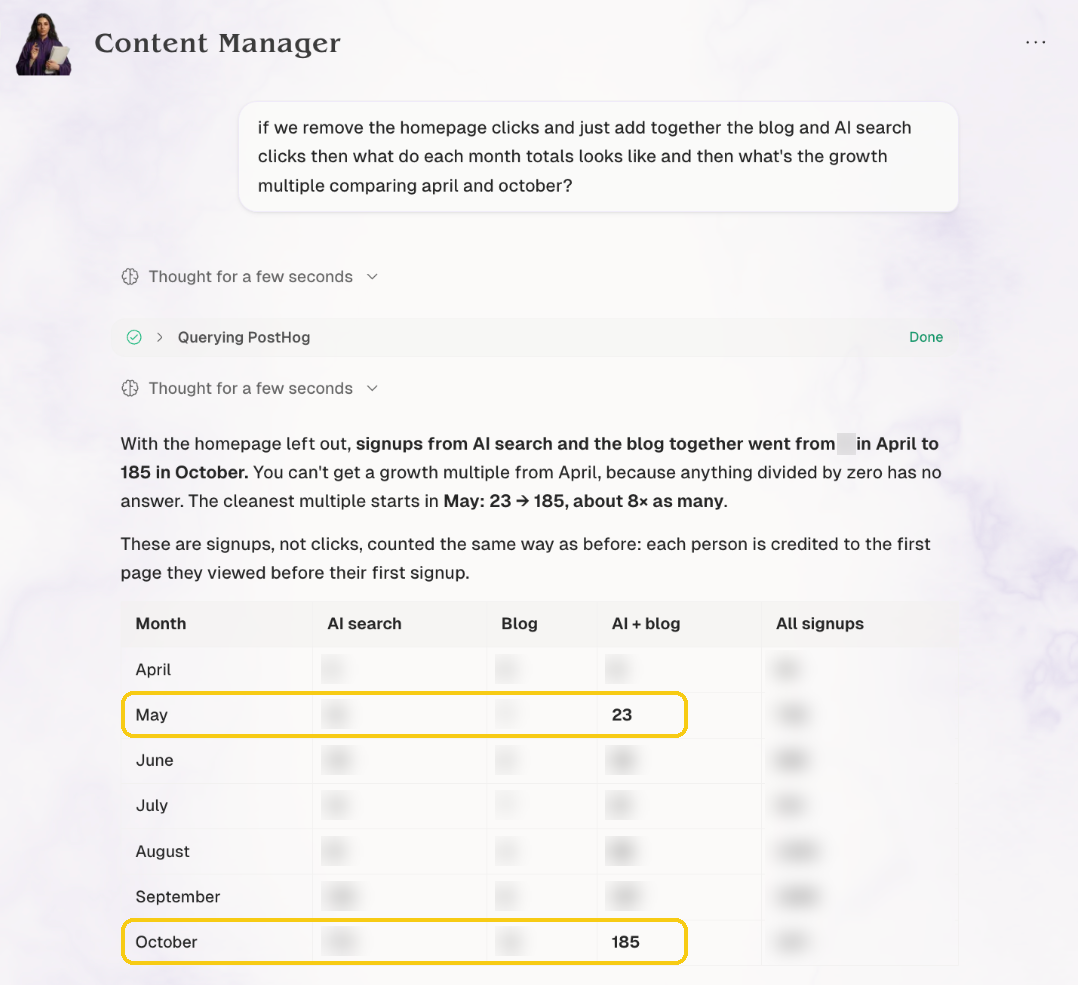
Its first RankUp articles went live on 27 April 2026. By October, the blog and AI search were bringing in 8x signups, 185 a month against 23 in May.
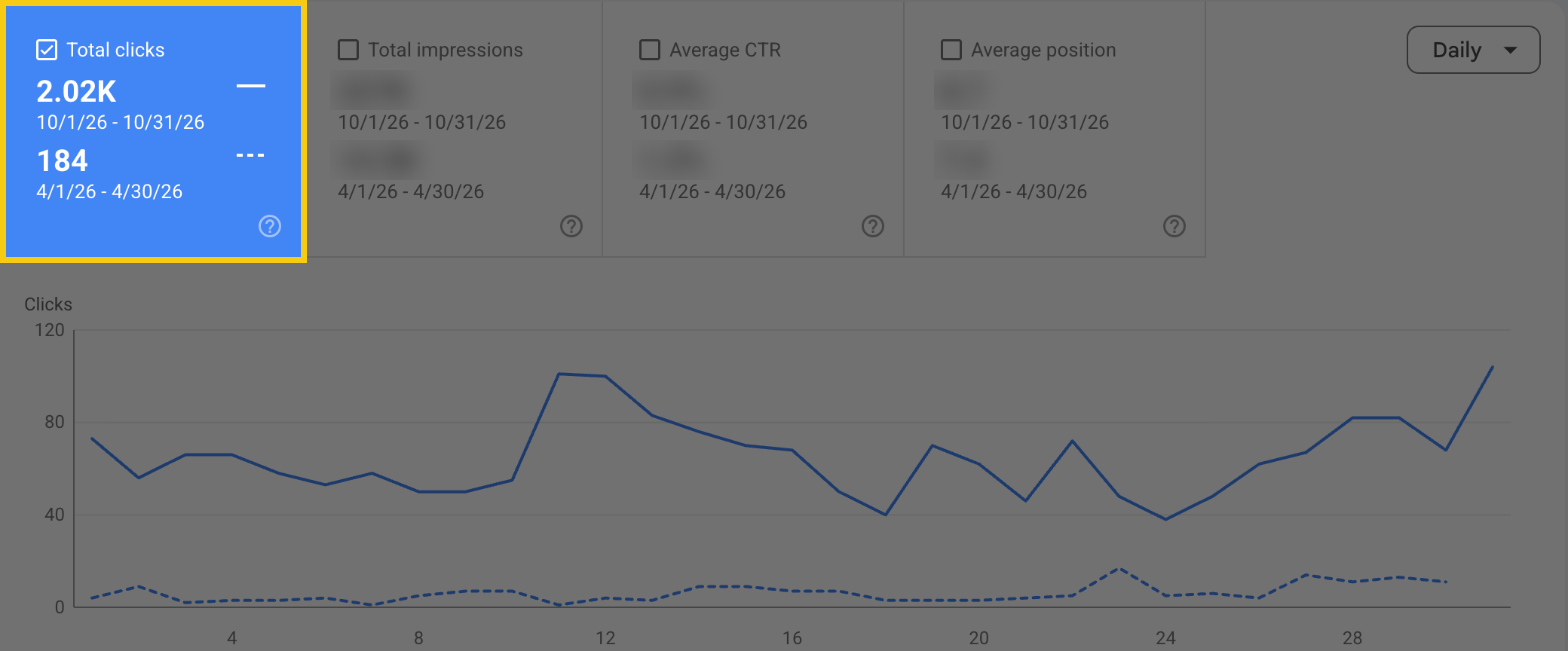
Search traffic grew alongside those signups. Clicks from Google rose 11x, from 184 in April to 2,022 in October, and AI answers named Bilt more than 5x as often in November as in August.
Behind those numbers are 102 articles and 369 updates in 6 months, published without an SEO hire, an agency or any other SEO tool.
However, for example Guardian Home needed a different result.
It sells connected sensors that help care teams in assisted living, home care and hospitals see risks before they become emergencies. Care facilities book a demo before they buy, so Guardian brought in RankUp to build pipeline from Google.
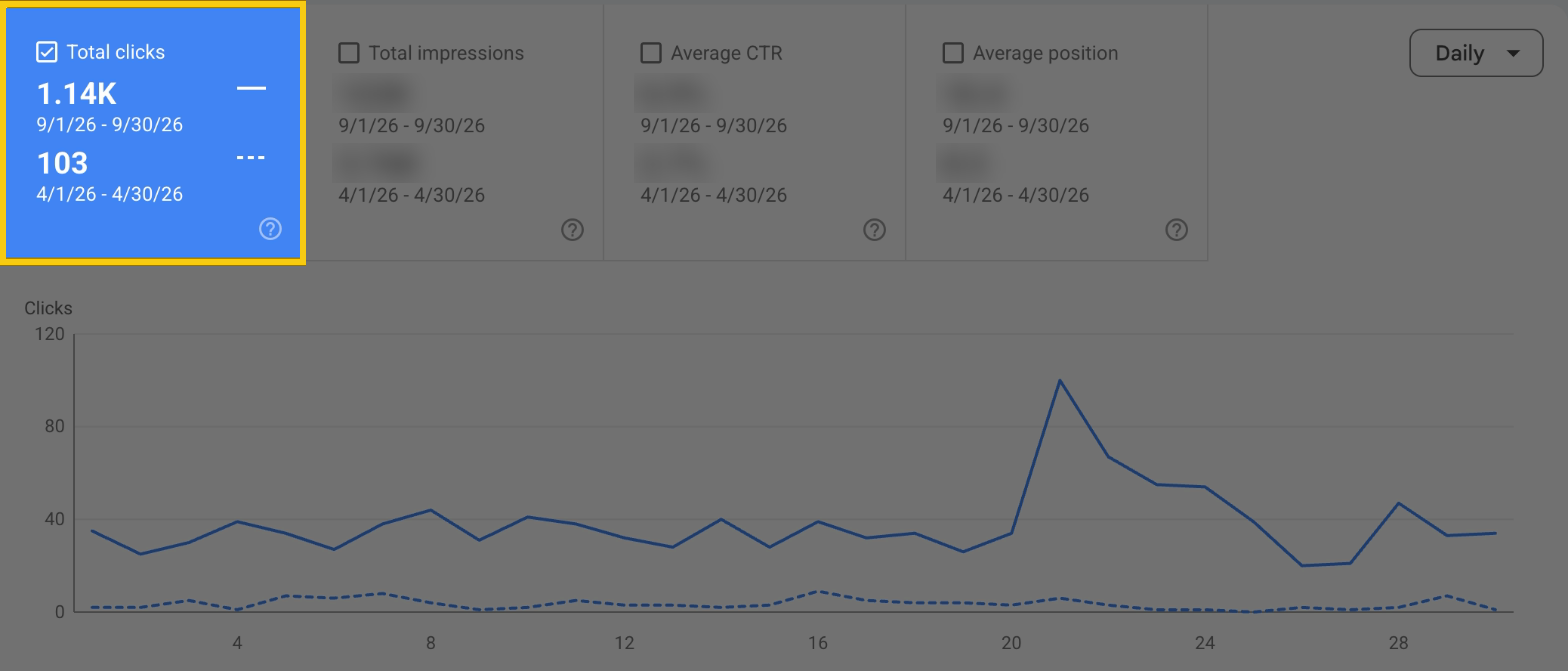
Its market is small enough that most of the search terms its articles target get 100 or fewer searches a month. Even so, clicks from Google grew 11x, from 103 in April to 1,145 in September.
That traffic reached the buyers Guardian sells to. A care facility booked the first demo 27 days after the first articles went live, and leads followed from care facilities across Europe and the US, including a pilot application from the NHS. Pipeline from Google reached €120K, up from €0.
Guardian got there in 5 months, publishing 80 articles and updating them 123 times without an SEO hire.
Pricing
Each monthly plan includes keyword research and a content plan, refreshed each month on paid plans:
Starter, $269 a month: 8 articles, 25 articles audited, 5 content refreshes, 25 AI search prompts and a $40.50 iteration budget.
Growth, $629 a month: 16 articles, 100 articles audited, 15 content refreshes, 100 AI search prompts and an $81 iteration budget.
Scale, $1,219 a month: 30 articles, 250 articles audited, 45 content refreshes, 200 AI search prompts and a $145 iteration budget.
The iteration budget covers your own tasks with the agents in chat, and unused budget rolls over to the next month. Buyers who know what they need can choose their own quantities, with keyword research and the content plan included for $35.
Best for
RankUp is for B2B SaaS founders and marketers who need the right buyers to find their product through Google and AI search, then sign up or book a demo.
Those buyers now build a shortlist by asking ChatGPT or Claude and checking Google, so the pages they read in both places decide whether the product makes the list. RankUp watches AI answers alongside Search Console data, and its agents turn a gap in either into an article, a page update or a deal with a site AI cites.
Making the list once is only half of it, because a SaaS product changes with every release and a page that described it well last quarter starts telling buyers something outdated. Each week the agents scan the docs, marketing pages and changelog, and the page updates a release calls for wait in review.
Updating pages takes effort, so these teams need to know which ones earn it.
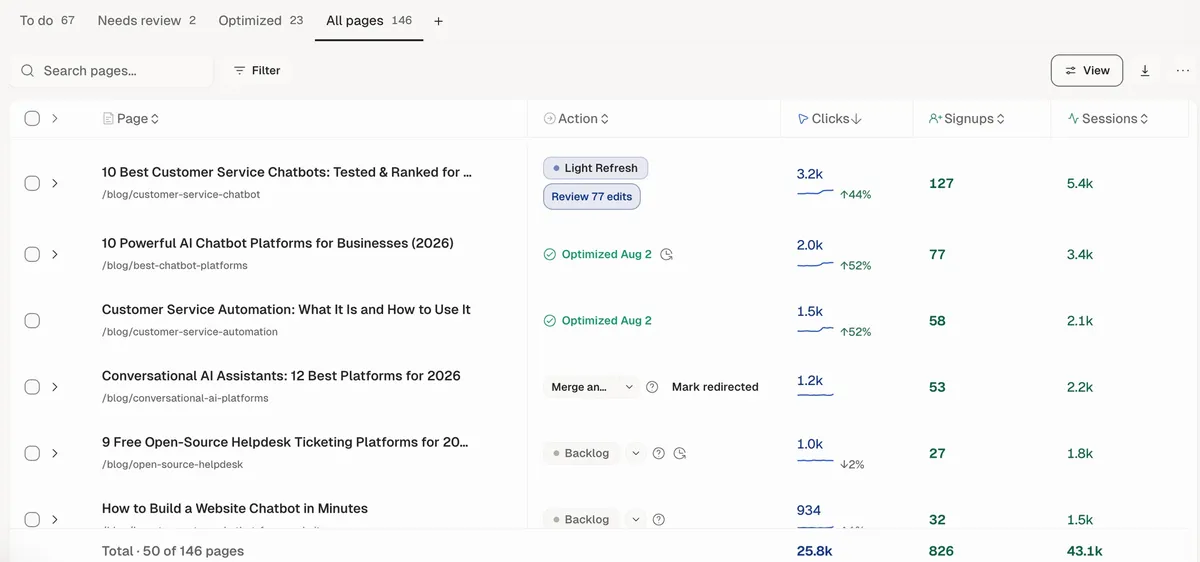
They count success in signups and demos. With PostHog connected, the content audit shows each article's sessions and signups beside its Google clicks, so the team can see which pages bring signups before choosing what to update next.
All of that usually lands on a founder or a small marketing team with no SEO hire.
The agents research, write and update pages in parallel, while the team supplies product knowledge through batch interviews and approves what goes live. Bilt and Guardian both ran it that way.
Pros and cons
Pros
Saved AI answers keep the prompt, the brands named and the pages cited, so you can check the evidence behind a finding before you act on it.
Beyond mentions, RankUp shows how AI answers describe your product against competitors, which points to what your pages should say differently.
A weekly analysis turns those answers into proposed articles, page updates and deals, and nothing runs until you choose it.
Page updates compare a cited competitor passage with the matching section of your page, then rewrite it from your product facts for your review.
Batch interviews collect the product details and proof that make drafts specific to your B2B SaaS, and your answers carry into later pieces.
The Deal Maker shapes each proposal to the cited site's type, from software-company swaps to publisher commission deals and directory listings.
Feedback becomes proposed brand-context edits, agent memory or saved knowledge, so a correction you make once informs the work that follows.
Every plan includes AI search monitoring and recurring content work, so the tracking and the work that acts on it come in one subscription.
Cons
Technical website changes stay in your own site or coding-agent setup.
You send the deal correspondence RankUp prepares.
Compared with Otterly AI
Both tools track AI answers. They split on what reaches you once a gap shows up:
Stage | RankUp | Otterly AI |
|---|---|---|
Monitoring | Saved answers with prompts, brand mentions, cited pages and how answers describe your product | Brand mentions and share of voice in AI answers, plus prompt research |
After a finding | Weekly proposals for new content, page updates and deals, which you choose from | Content checker and GEO audit score a page and name what's missing |
Writing and page changes | Articles and page edits written from your product knowledge, returned for your review | Your team, in external tools |
Outreach to cited sites | The Deal Maker prepares deal proposals and letters that you send | Your team |
Otterly tells you where a page falls short. RankUp carries that finding into a reviewed article, page edit or deal proposal built from your product knowledge.
Compared with pairing a tracker with your own Claude or ChatGPT setup, the specialist agents, workflows and integrations already work together in one system, and you still choose what runs and approve what goes live.
To evaluate how AI-search findings become articles and page edits grounded in your product knowledge, start your 7-day free trial. RankUp first proposes a plan for your site, and the 7-day free trial gives you enough in-app balance to try the work it lists.
(For English B2B SaaS sites only.)
2. Writesonic's GEO platform
Writesonic tracks brand mentions, competitors, sentiment and citations in AI answers, and turns some of those findings into outreach and article drafts.
Citation and source tracking
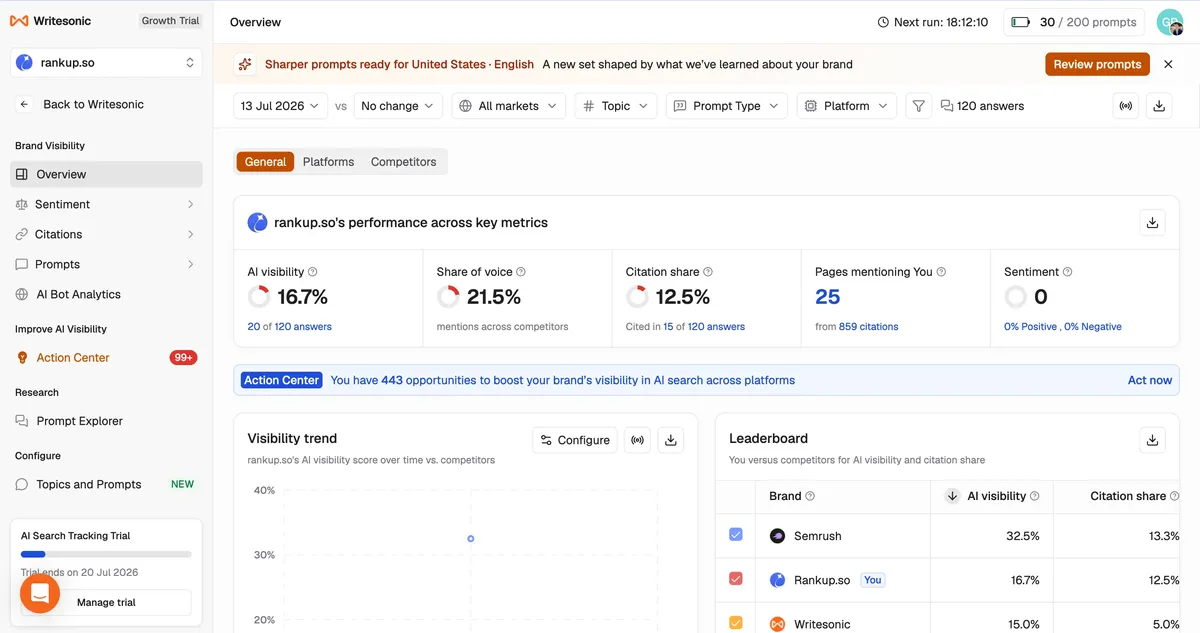
Starter, Basic and Growth monitor ChatGPT, Gemini and Google AI Overviews. You can inspect saved answers and query fan-outs, the related searches behind an answer, and break down citations by domain, AI platform, page and associated prompt or topic. When I tracked rankup.so, 75.5% of citations came from third-party websites and 20% from social and forum sources.
Outreach to cited sites
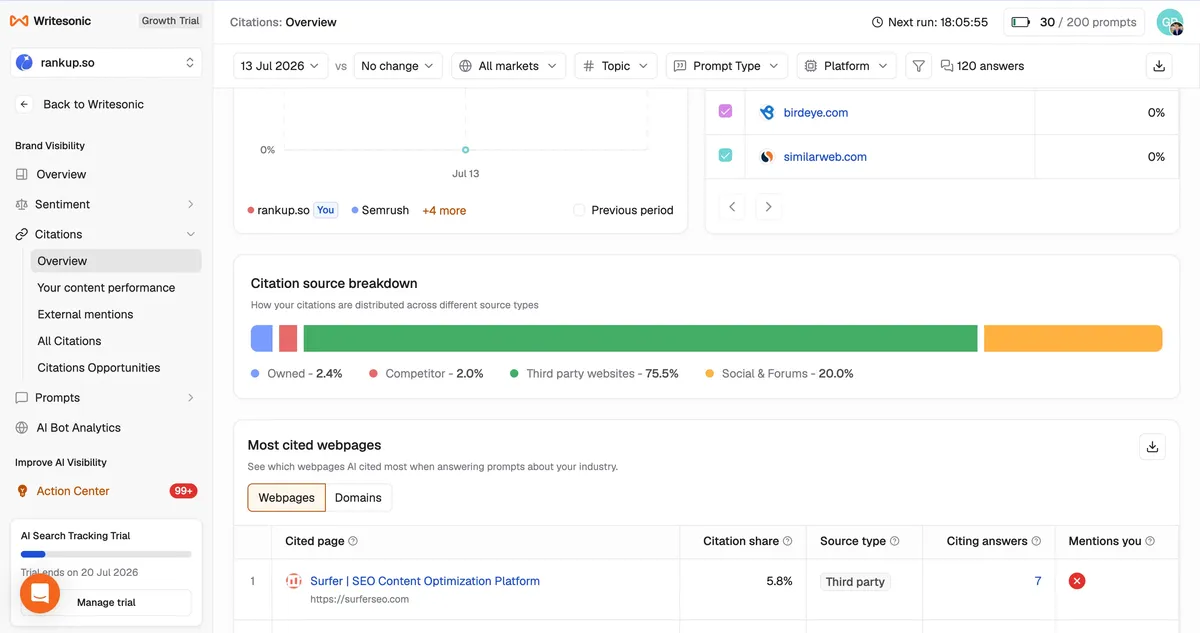
Writesonic identifies cited third-party pages that mention competitors but omit your brand, giving you a list of sites to approach. Its Action Center can draft and send emails, set follow-up reminders and detect live citations.
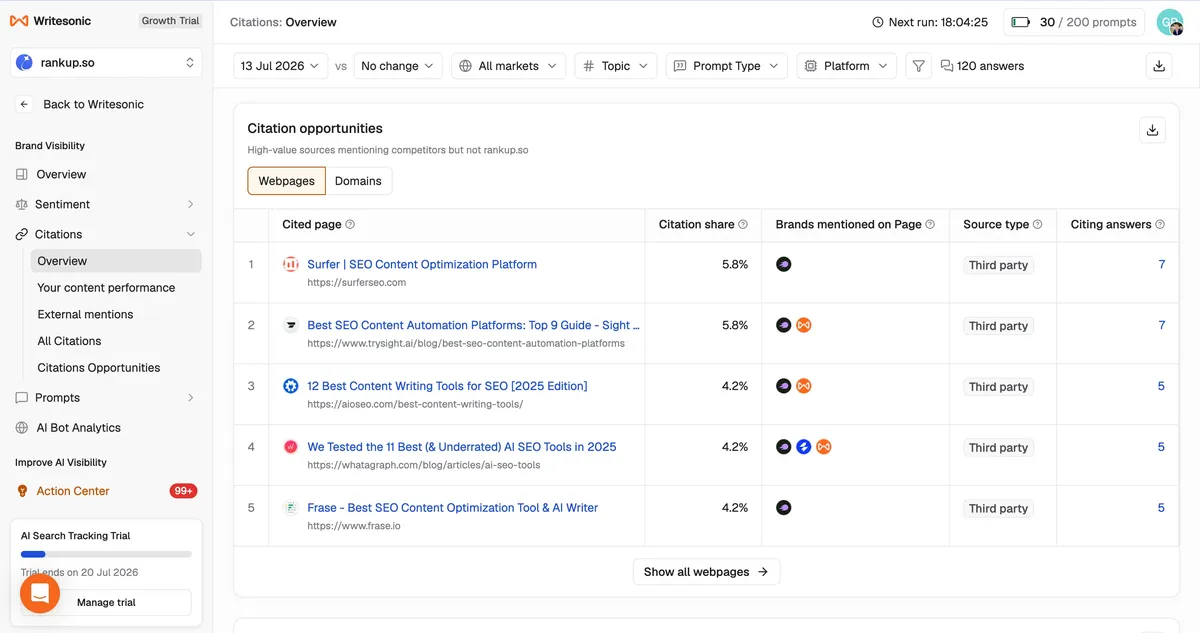
Growth includes five off-page and five on-page trial actions per month, while full Action Center access and the Outreach Agent require Enterprise.
Article drafts and page recommendations
Citation data can also point to content opportunities. When you choose one and click Write, Writesonic opens Article Writer, whose generation workflow includes research, fact-checking, competitor analysis, quote extraction and brand-voice stages.
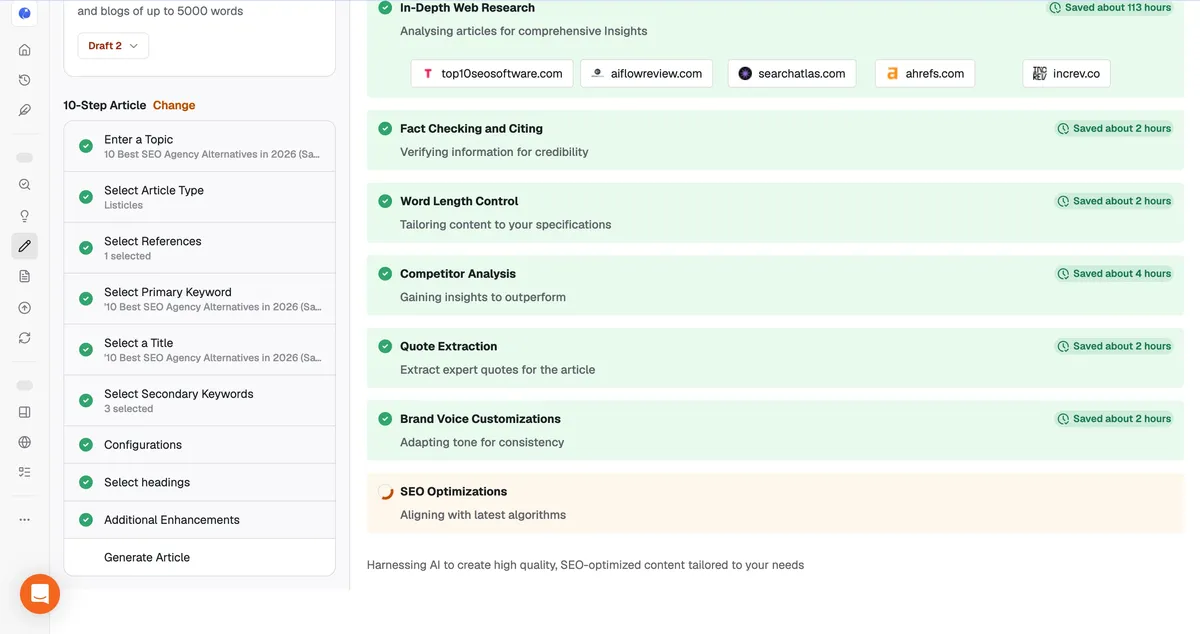
I supplied a blog post and configured the writing context manually before generating. The copy felt generic, much like a standard ChatGPT response, so I would plan to add product-specific judgment and edit the draft.
Existing pages get recommendations rather than one-click edits. Writesonic checks title alignment, freshness, self-contained descriptions, key takeaways and FAQs, leaving you to make the changes it recommends.
Pricing
Growth includes five off-page and five on-page Action Center trial actions per month. Enterprise has custom pricing and includes full Action Center access and the Outreach Agent.
Best for
Writesonic fits agencies managing client projects that need to investigate citations and run guided outreach or writing workflows. An individual brand can use it too, provided someone supplies context and reviews the writing.
Pros and cons
Pros
Saved answers and query fan-outs show the related searches behind each answer, so you can see what the AI looked up before naming brands.
Citations break down by domain, AI platform, page and prompt, so you can trace which pages shape the answers you care about.
Cited third-party pages that mention competitors but omit you become a ready list of sites to approach.
The Action Center drafts and sends outreach emails, sets follow-up reminders and detects live citations, so outreach and its results stay in one place.
Sentiment themes link back to the prompts, AI models and dates behind them, so you can trace where a description of your brand came from.
Topic-level citation share compares you with tracked competitors topic by topic, with the top and bottom performer highlighted.
Cons
One citation report assigned two cited answers to sources that didn't visibly mention RankUp, and prompt search volume stayed blank for days, so I'd verify the data first.
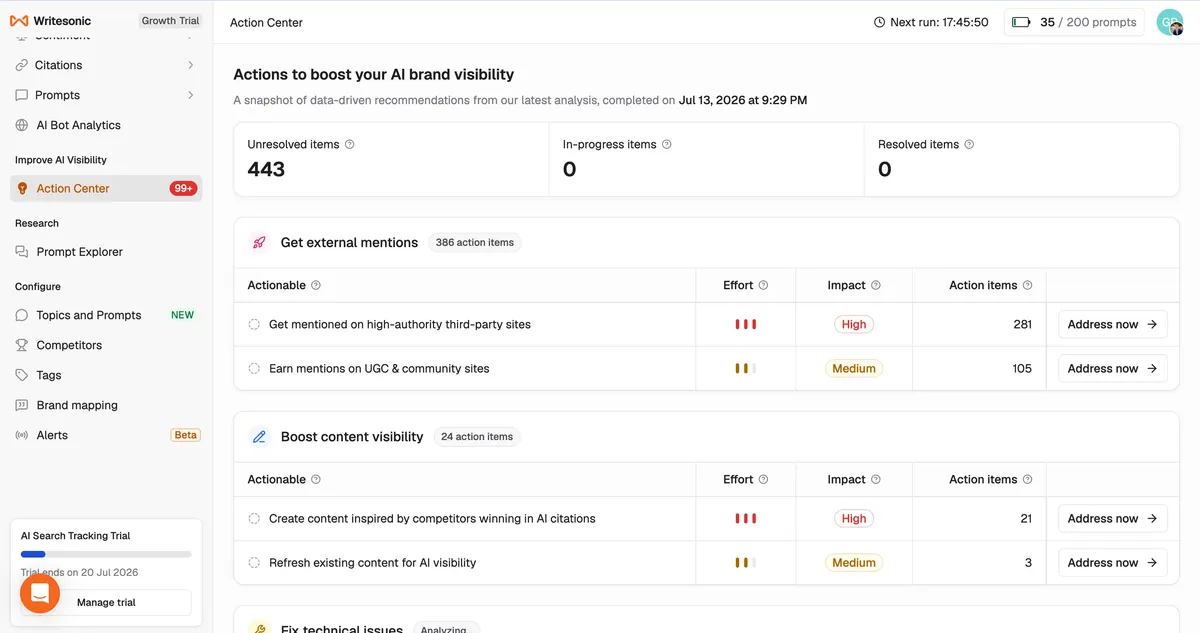
The Action Center listed 443 unresolved items for my site, and the citation breakdown didn't say which source deserved action first, so prioritising stays with you.
Article Writer didn't draw on my product knowledge by itself. I configured the writing context manually, and the copy still felt generic, much like a standard ChatGPT response.
Existing pages get recommendations, not edits, so someone on your team still makes every change.
Compared with Otterly AI
Writesonic and Otterly differ most once a citation gap turns up:
Stage | Writesonic | Otterly AI |
|---|---|---|
Monitoring | ChatGPT, Gemini and Google AI Overviews, with citations by domain, page and prompt | Brand mentions and share of voice in AI answers, plus prompt research |
After a finding | A list of cited third-party pages that mention competitors but omit you | Content checker and GEO audit score a page and name what's missing |
Writing and page changes | Article Writer drafts from a chosen opportunity. Existing pages get recommendations you carry out | Your team, in external tools |
Outreach to cited sites | Action Center drafts and sends emails, with full access on Enterprise | Your team |
Writesonic moves further than Otterly from a citation gap toward outreach and a first draft. The writing still needs your product judgment, and the recommended changes to existing pages are yours to make.
3. AI Visibility Toolkit by Semrush
Semrush’s AI Visibility Toolkit combines competitor and prompt research with brand monitoring. Prompt Tracking identifies cited domains and pages, then groups sources into categories such as owned, competitor and social sites.
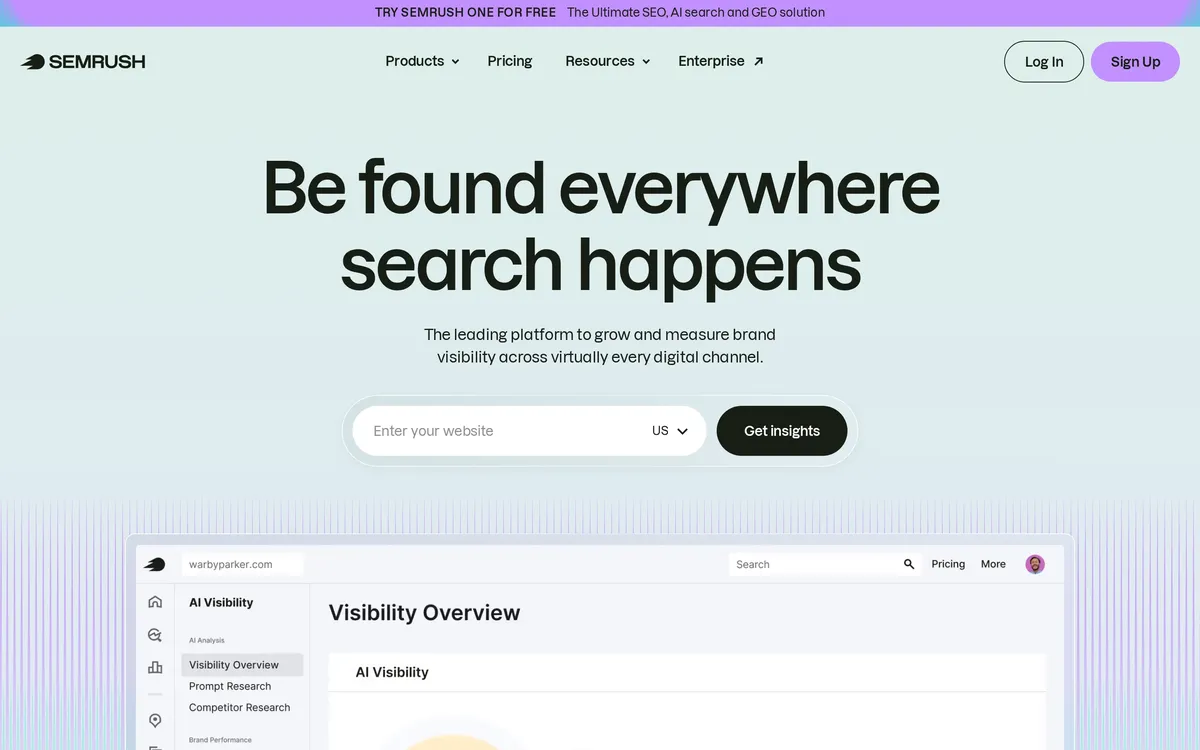
Competitor and prompt research
Brand Performance recommends actions based on share of voice, sentiment and how AI answers describe your brand. The AI Search Site Audit checks up to 100 pages for potential AI crawler blockers.
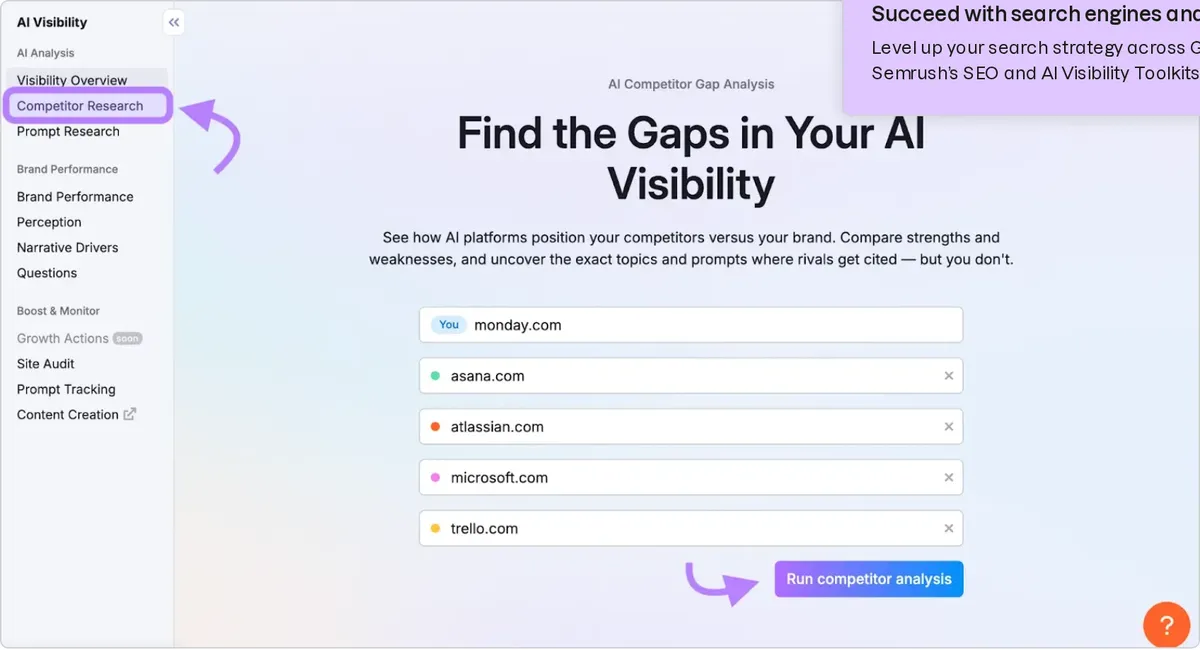
Prompt Tracking and Brand Performance
Prompt Tracking checks the prompts you choose every day on platforms such as Google AI Mode and ChatGPT. It identifies the domains and pages each answer cites and groups those sources into owned, competitor and social sites.
Brand Performance runs common queries through AI platforms each week and analyzes share of voice, sentiment and how answers describe your brand. It then recommends actions to adjust your positioning.
Crawler audit and content changes
The AI Search Site Audit checks up to 100 pages for issues that could block AI crawlers. To act on content findings inside Semrush, you need its separate Content Toolkit, whose Content Optimizer rewrites imported articles for review and can publish them to a connected WordPress site.
Pricing
The $99 monthly subscription covers one project, one Brand Performance domain and 25 tracked prompts. Monitoring 50 more prompts costs another $60 per month, and each corporate subuser needs their own $99 toolkit license.
If you add the toolkit to an existing annual Semrush subscription, you pay a prorated amount upfront for the remaining subscription term.
Best for
Semrush’s AI Visibility Toolkit fits teams that want competitive AI-search research and crawler diagnosis, with an existing process for making content changes.
Pros and cons
Pros
Prompt Tracking names the domains and pages AI answers cite, grouped as owned, competitor or social, so you can see whose pages shape each answer.
Brand Performance recommends actions from your share of voice, sentiment and the way answers describe your brand.
The AI Search Site Audit checks up to 100 pages for potential AI crawler blockers, so you can rule out a technical cause before rewriting content.
Competitor and prompt research sit next to monitoring, which helps you decide which buyer questions are worth tracking.
Cons
Rewriting and publishing content needs the separate Content Toolkit, which rewrites imported articles and publishes to WordPress.
Apart from Brand Performance, reports aren't shared with teammates automatically, so findings reach the people doing the work as CSV or PDF exports.
The AI Visibility Score compares your mentions with a median of competitors Semrush picks automatically, so the score rests on a set you didn't choose.
Compared with Otterly AI
Semrush puts competitive research and crawler diagnosis. Like Otterly, its monitoring subscription leaves you to arrange the content changes. Semrush offers rewriting and publishing through its separate Content Toolkit, so you can choose whether to add it or use your own writing setup.
Stage | Semrush AI Visibility Toolkit | Otterly AI |
|---|---|---|
Monitoring | Prompt Tracking with cited pages grouped by source type, plus share of voice and sentiment | Brand mentions and share of voice in AI answers, plus prompt research |
After a finding | Recommended actions, and a site audit of up to 100 pages for AI crawler blockers | Content checker and GEO audit score a page and name what's missing |
Writing and page changes | Needs the separate Content Toolkit, which rewrites imported articles and can publish to WordPress | Your team, in external tools |
Semrush adds competitive research and crawler diagnosis to the kind of monitoring Otterly covers. Like Otterly, its toolkit leaves content changes to you unless you add the Content Toolkit or use your own writing setup.
4. Peec AI
Peec AI runs configured prompts daily through AI platforms’ web interfaces. It can identify answers that cite your content without mentioning your brand.
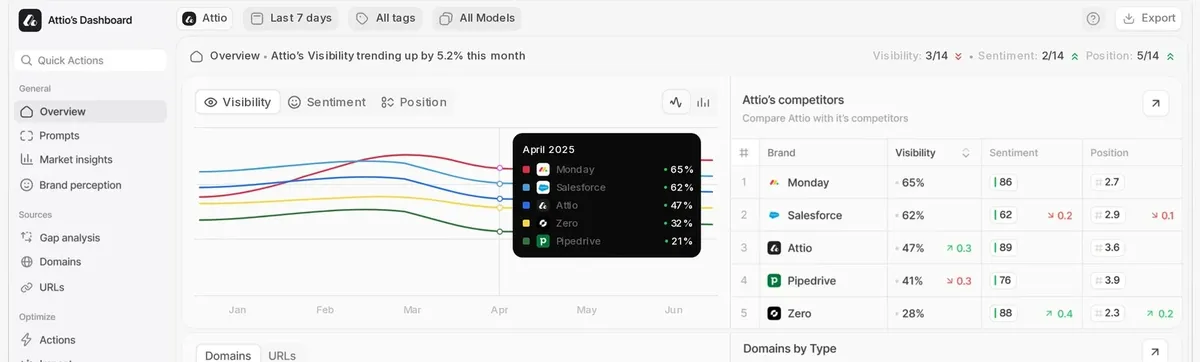
Daily prompt tracking and sources
Peec runs your configured prompts daily through the web interfaces of AI platforms such as ChatGPT, Gemini and Copilot, so it records the answers a logged-out user sees. Its Sources views show the domains and URLs those answers draw on.
It can also flag answers that cite your content without mentioning your brand, a gap a mention count alone would miss.
Actions with evidence
Its Actions area, accessible only to company or project owners, pairs suggested work with prompt, source and competitor evidence, plus a plan and checklist. Owners can accept or decline an action and mark it done once the work is complete.
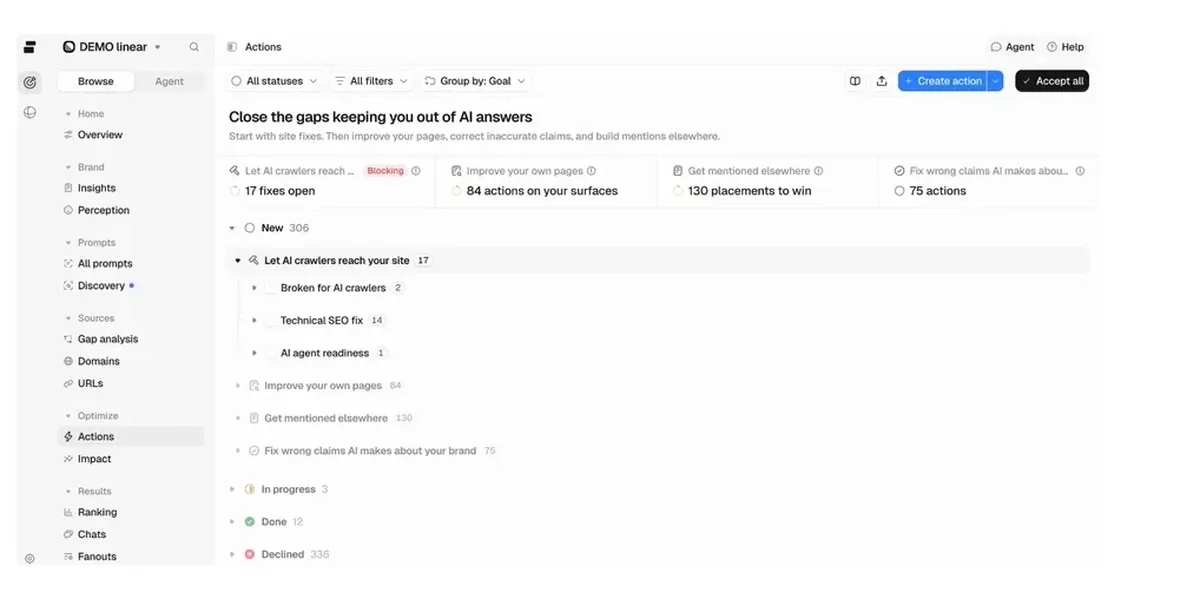
Page edits, briefs and technical tickets
For an existing page, Peec Agent suggests changes to selected passages for you to review and edit before publication. For a new page, a writer receives an editable brief with a suggested structure, headlines, proof points and metadata, then writes the finished content.
For technical work, a crawler issue can become a Linear ticket with evidence for a colleague. Once an owner marks an action done, Peec's Impact view shows changes in visibility, sentiment, position and share of voice.
Best for
Peec fits marketing teams with content and technical colleagues who can review edits, write new pages and resolve issues.
Pros and cons
Pros
Configured prompts run daily through AI platforms' web interfaces, so each tracked question gets a fresh answer every day.
It flags answers that cite your content without naming your brand, a gap a mention count alone would miss.
Each action pairs the suggested work with prompt, source and competitor evidence, plus a plan and a checklist you can follow.
Sources views show the domains and URLs answers draw on, so you can see which third-party pages shape answers in your category.
The Impact view shows changes in visibility, sentiment, position and share of voice once an action is marked done.
Cons
Only company or project owners can open Actions, so other teammates can't work from them directly.
A writer still has to turn each brief into the finished page.
Peec Agent's passage suggestions need someone to review and edit them before publication.
Crawler issues go out as Linear tickets, so a technical colleague still makes the fix.
Compared with Otterly AI
Peec attaches evidence and a plan to each suggested action:
Stage | Peec AI | Otterly AI |
|---|---|---|
Monitoring | Configured prompts run daily, including answers that cite you without naming you | Brand mentions and share of voice in AI answers, plus prompt research |
After a finding | Actions with prompt, source and competitor evidence, a plan and a checklist, for owners only | Content checker and GEO audit score a page and name what's missing |
Writing and page changes | Suggested passage edits you review, and editable briefs a writer turns into new pages | Your team, in external tools |
Technical issues | Crawler issues become Linear tickets for a colleague | Your team |
Otterly names what a page is missing. Peec goes further toward assigning and preparing the work for a team with content and technical colleagues, though a writer still turns its briefs into finished pages.
5. AthenaHQ
AthenaHQ tracks prompts buyers use to evaluate products and identifies citation gaps against competitors. Its ACE workflow uses your product documentation and approved claims to draft, score and revise content in line with your editorial guidance.
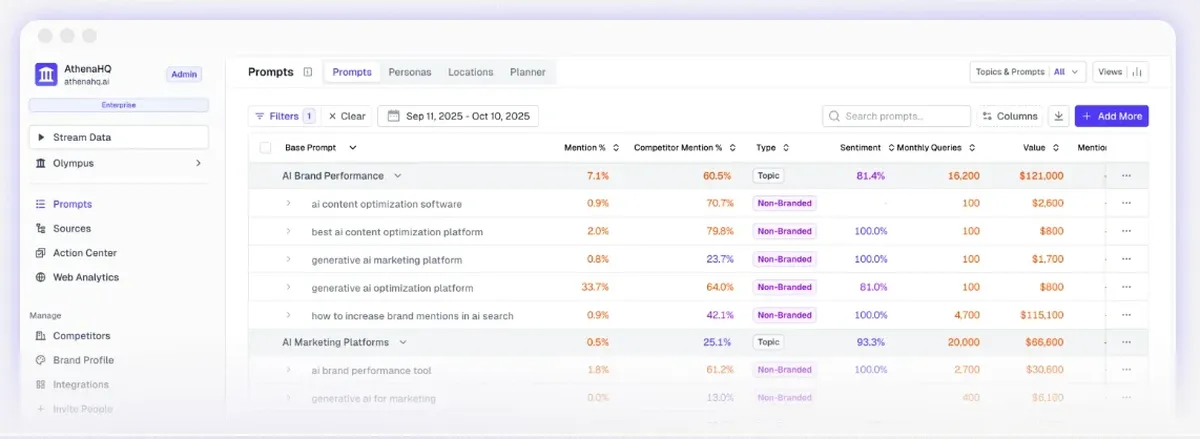
Buyer-evaluation prompts and citation gaps
Setup auto-extracts a brand profile from your website, including your industry, description and logo, and asks for a working list of competitors. You can connect Google Search Console, Google Analytics 4, Shopify, Webflow or Looker Studio to the workspace.
The prompt analytics then show where competitors are mentioned and cited for those buyer questions while you aren't.
Drafting with ACE
Its ACE workflow uses your product documentation and approved claims to draft, score and revise content in line with your editorial guidance.
Rootly's documented workflow shows the team's role after AthenaHQ makes recommendations. The team shortlists them and ships updates to documentation, content, messaging and third-party sources.
Pricing
The Essential plan is free and includes $25 in free credit value. Starter costs about $295 a month, with a 17% discount for annual billing.
Best for
AthenaHQ fits marketing teams that want to track buyer-evaluation prompts and use citation gaps to guide content improvements.
Pros and cons
Pros
It tracks the prompts buyers use to evaluate products and finds citation gaps against competitors, which keeps monitoring on commercial questions.
ACE drafts from your product documentation and approved claims, then scores and revises the draft against your editorial guidance.
Google Search Console, GA4, Shopify, Webflow and Looker Studio connect to the workspace, so AI-search data sits next to your search and site data.
Cons
In Rootly's documented workflow, the team still shortlists AthenaHQ's recommendations itself.
Rootly's team also ships the resulting updates to documentation, content, messaging and third-party sources.
ACE works from the documentation and approved claims your team supplies, so keeping that library current is your team's job.
Compared with Otterly AI
AthenaHQ's difference sits in the drafting step:
Stage | AthenaHQ | Otterly AI |
|---|---|---|
Monitoring | Buyer-evaluation prompts and citation gaps against competitors | Brand mentions and share of voice in AI answers, plus prompt research |
After a finding | Recommendations your team shortlists, as in Rootly's workflow | Content checker and GEO audit score a page and name what's missing |
Writing | ACE drafts, scores and revises content from product documentation and approved claims | Your team, in external tools |
Publishing updates | Your team ships them, as Rootly's does | Your team, in external tools |
AthenaHQ's ACE workflow drafts from approved product claims, work that Otterly's page recommendations leave to you. Rootly's example shows a team still shortlists and ships the updates, so decide who owns publication before you start.
6. Scrunch AI
Scrunch AI monitors prompts, citations and competitor visibility. Its Site Optimization feature recommends changes to individual pages.
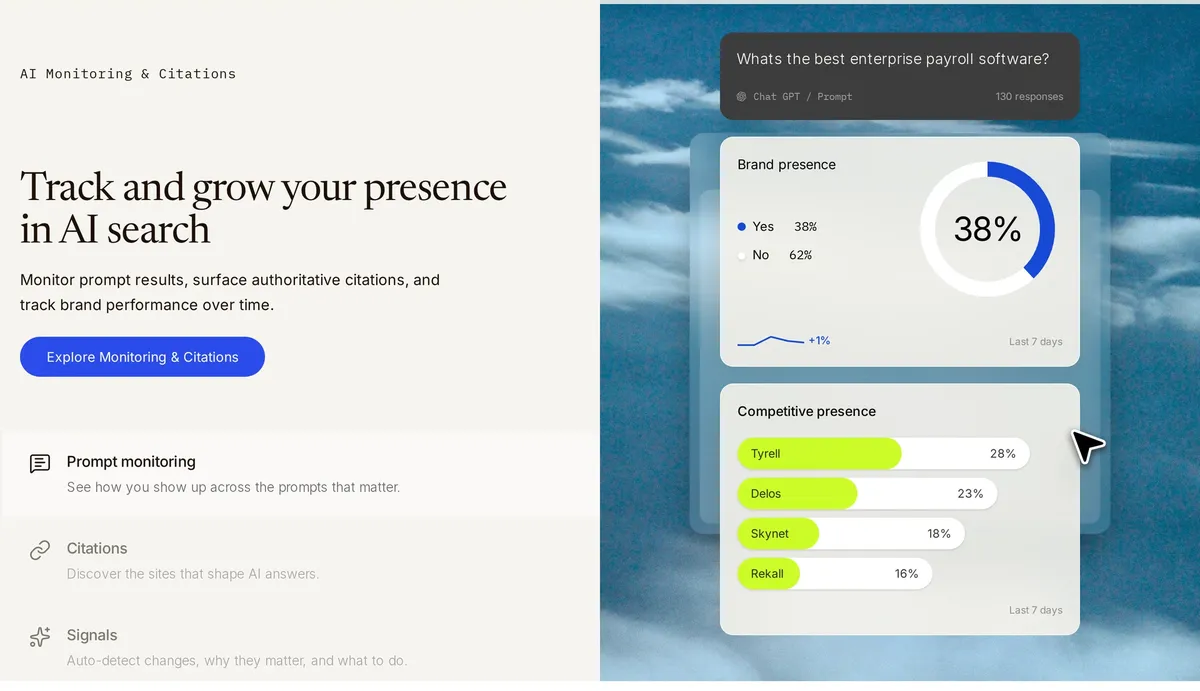
Site Optimization recommendations
Site Optimization recommends changes to individual pages and ranks them using your AI-search performance and your competitors'. The recommendations export as Markdown, Linear tickets or PDFs for whoever implements them on your site.
Agent Pages for AI agents
The separate Agent Experience Platform can deliver modified HTML to AI agents at your existing URLs while the pages people see stay unchanged. That AI-facing content lives in a repository separate from your CMS, and Agent Pages delivery sits outside the Core plan.
Pricing
Core costs about $250 a month and includes page optimization. Enterprise has a custom Agent Pages allocation.
Best for
Scrunch AI fits teams that want to manage AI-facing content separately from their human-facing website and can authorize deployment through a supported integration.
Pros and cons
Pros
Site Optimization ranks page recommendations using your AI-search performance and your competitors', so you can see which page to work on first.
The Agent Experience Platform can serve AI agents modified HTML at your existing URLs while the pages people see stay unchanged.
AI-facing content lives in a repository separate from your CMS, so it can be managed without editing your site's pages.
Cons
Agent Pages changes only what AI agents receive, so the pages your buyers read keep their gaps until someone fixes them.
AI-facing content lives apart from your CMS, so each optimized page exists in two versions your team has to keep consistent.
Recommendations export as Markdown, Linear tickets or PDFs, and someone implements them outside Scrunch.
Delivery needs Cloudflare Snippets, Akamai EdgeWorkers with Forward Rewrite, or CloudFront Functions, so someone with access to your edge setup has to authorize it.
Compared with Otterly AI
Scrunch adds a separate delivery route for what AI agents receive:
Stage | Scrunch AI | Otterly AI |
|---|---|---|
Monitoring | Prompts, citations and competitor visibility | Brand mentions and share of voice in AI answers, plus prompt research |
After a finding | Site Optimization ranks page recommendations by your and competitors' AI-search performance | Content checker and GEO audit score a page and name what's missing |
Page changes | Recommendations export as Markdown, Linear tickets or PDFs for implementation elsewhere | Your team, in external tools |
AI-facing pages | Agent Pages serves modified HTML at existing URLs, outside Core and through a supported edge integration | Not part of the comparison here |
The AI-facing delivery route is the distinction to assess against Otterly. It needs a plan beyond Core and a supported integration, and the recommendations for the pages people see still need implementing elsewhere.
7. Ahrefs Brand Radar
Ahrefs Brand Radar combines historical AI-answer research with custom prompt monitoring. Its AI Visibility Index contains previously collected answers going back to 2025, and you can explore it without a domain cap.
AI Visibility Index and reports
Its AI Visibility Index holds previously collected answers going back to 2025, and you can explore it without a domain cap. The AI responses report shows which answers mention you, and the Cited pages report shows which URLs those answers cite.
Filtering mentions to answers that name only other brands shows where competitors appear and you don't, and the same filter works for citations. Brand Radar also reports search demand, the combined Google search volume of keywords that mention your brand.
Custom prompt monitoring
Custom prompts can be checked daily, weekly or monthly across the platforms and locations you select. Their results begin when tracking starts, with no historical backfill, and each update draws on your monthly allowance of checks.
Pricing
You can buy Brand Radar as a standalone product with an Ahrefs Free account. Prices exclude tax:
Custom prompts: $50 a month for 2,500 checks.
Selected-platform index: From $199 a month.
All-platform index: $699 a month, including 2,500 custom checks.
Those checks are consumed each time a custom prompt updates, with each Claude update using eight. If you exhaust the allowance with pay-as-you-go disabled, custom monitoring stops until the next billing month.
Best for
Brand Radar fits research teams that want historical AI-answer data and custom monitoring, with a process for turning content findings into published changes.
Pros and cons
Pros
The AI Visibility Index holds answers collected since 2025 with no domain cap, so you can study any brand's history before tracking starts.
Custom prompts can be checked daily, weekly or monthly across the platforms and locations you select.
Search demand shows the combined Google search volume of keywords that mention your brand, beside its AI visibility.
Cons
Custom prompt results start when tracking starts, with no historical backfill.
Each Claude update uses 8 checks, so covering Claude cuts how many prompts the monthly allowance can track.
Once checks run out with pay-as-you-go off, custom monitoring stops until the next billing month, leaving a gap in your data.
Index answers come from Ahrefs' own prompt set, so your exact buyer questions only show up once you track them as custom prompts.
Citation and topic findings still need someone to write and publish the changes.
Compared with Otterly AI
Brand Radar leans on historical answer data alongside custom monitoring. You’ll still need a process for carrying findings through to published work.
Stage | Ahrefs Brand Radar | Otterly AI |
|---|---|---|
Monitoring | An index of AI answers going back to 2025, plus custom prompts checked daily, weekly or monthly | Brand mentions and share of voice in AI answers, plus prompt research |
After a finding | Citation opportunities and topic gaps | Content checker and GEO audit score a page and name what's missing |
Writing and page changes | Someone on your team writes and publishes them | Your team, in external tools |
Brand Radar suits historical research next to ongoing monitoring. With either tool, you still need a process for carrying findings through to published work.
8. AirOps Insights
AirOps Insights tracks AI mentions and citations, then sends selected opportunities into content workflows. It generates initial prompts from your brand, audience, website and competitor information.
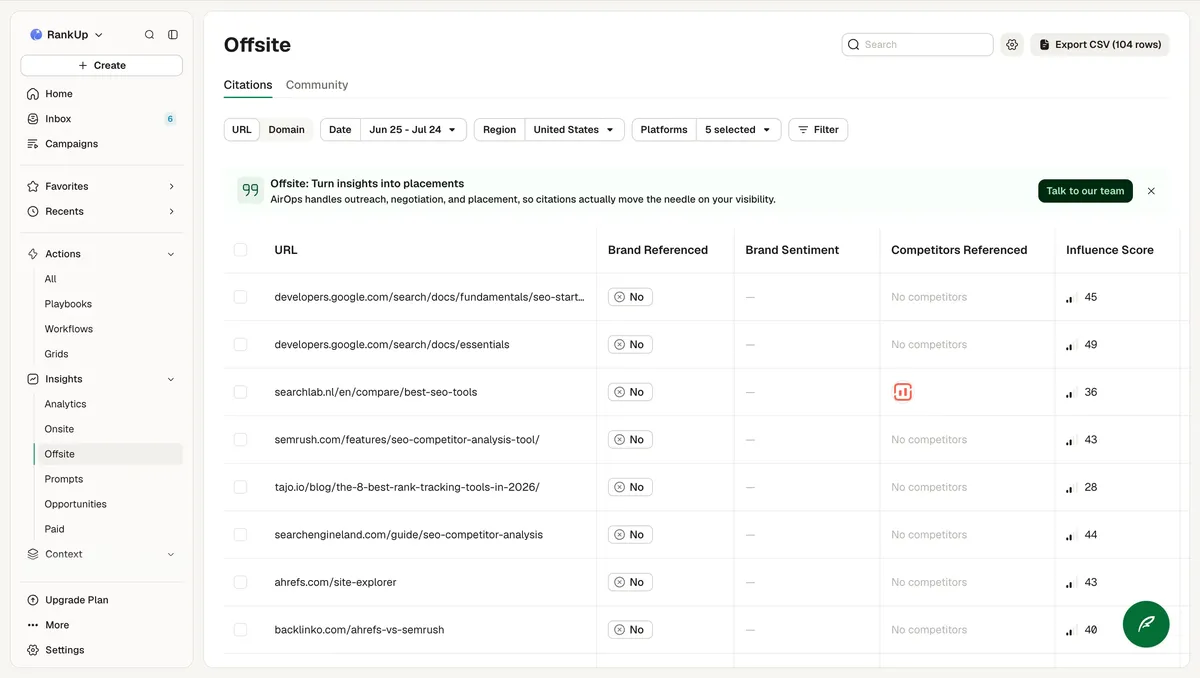
Onboarding: competitors and prompts
The Visibility view compares competitor mention rates across ChatGPT, Gemini, Perplexity, Google AI Mode and Google AI Overview.
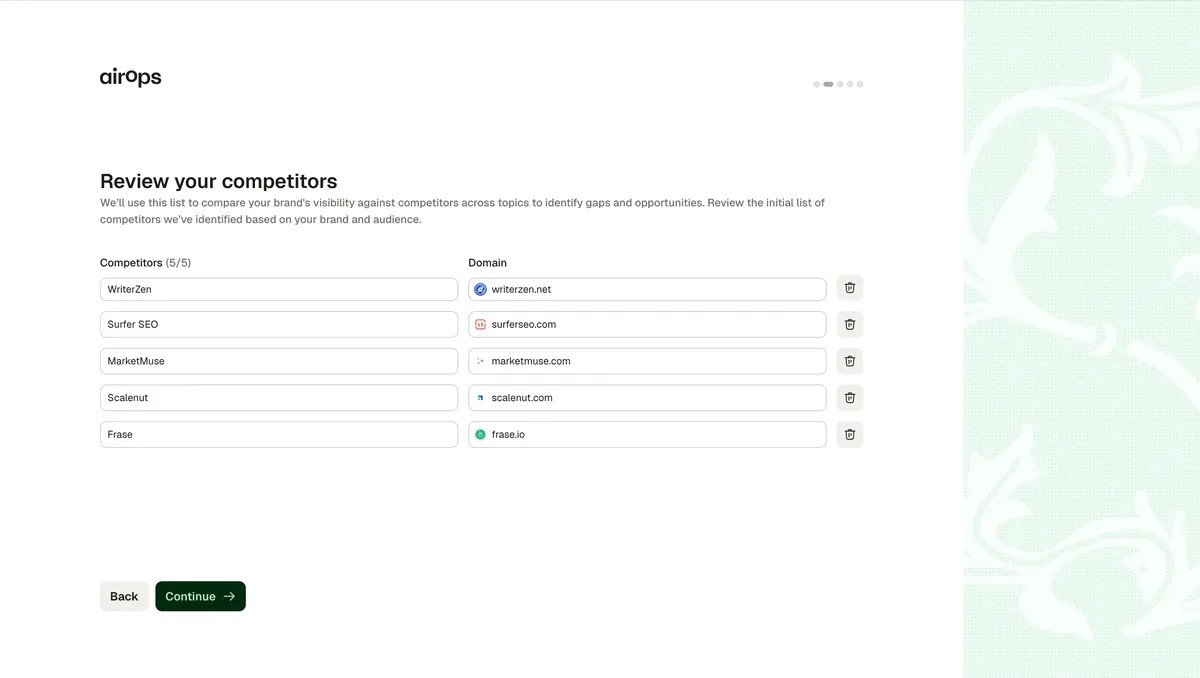
The initial prompts also missed the first 25 questions I would prioritize, although I could add them myself. I couldn't find search-volume data or clear evidence of demand for the suggested prompts, and I wanted a clearer explanation of how AirOps chose them and calculated visibility.
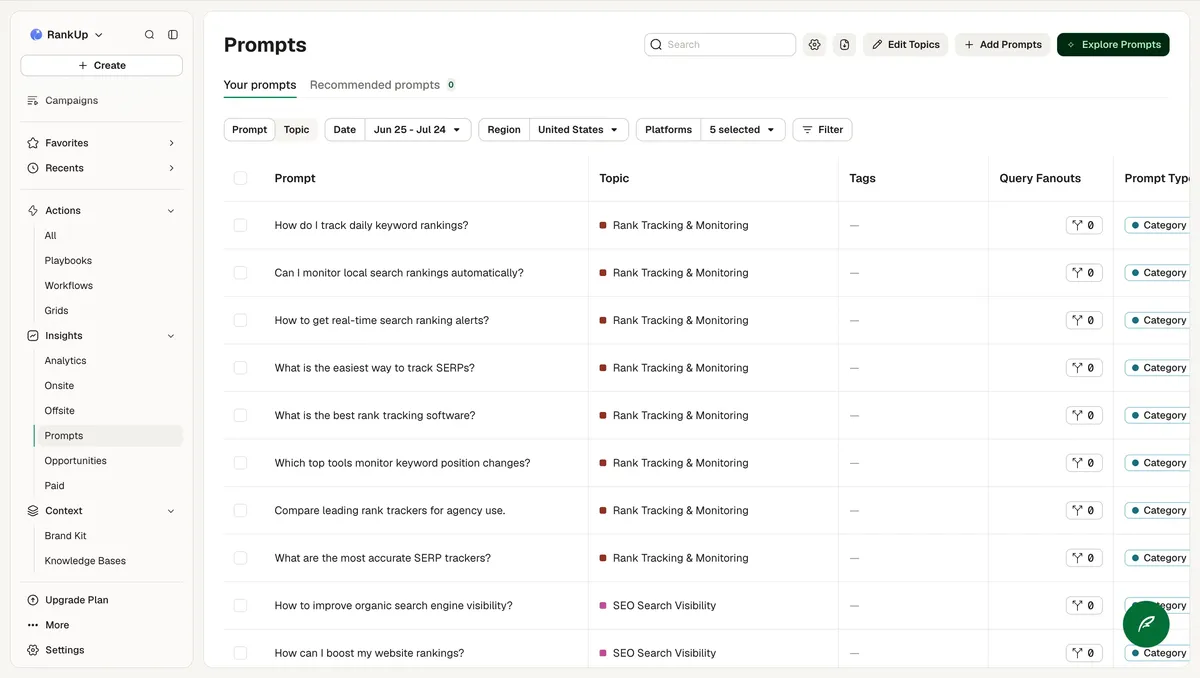
Mentions and citations
Onsite Pages lists tracked URLs with their citations and citation rates. You can send selected pages to a new or existing Grid, or launch a configured Workflow.
Onsite Pages lists tracked URLs with their citations and citation rates. You can send selected pages to a new or existing Grid, or launch a configured Workflow.
Campaigns and content workflows
Beyond selected pages, Campaign opportunities cover content creation, refreshes, outreach and community work. Accepting an opportunity turns it into an Action where a Playbook or Workflow can run.
In my onboarding test, only two or three of the five suggested competitors matched my market. The initial prompts also missed the first 25 questions I would prioritize, although I could add them myself.
I couldn’t find search-volume data or clear evidence of demand for the suggested prompts. I also wanted a clearer explanation of how AirOps chose them and calculated visibility.
For one opportunity, AirOps offered three content angles before producing ideas and an article. The workflow generated a link map, an outline and a completed article, but it didn’t ask me for unique product knowledge or industry expertise.
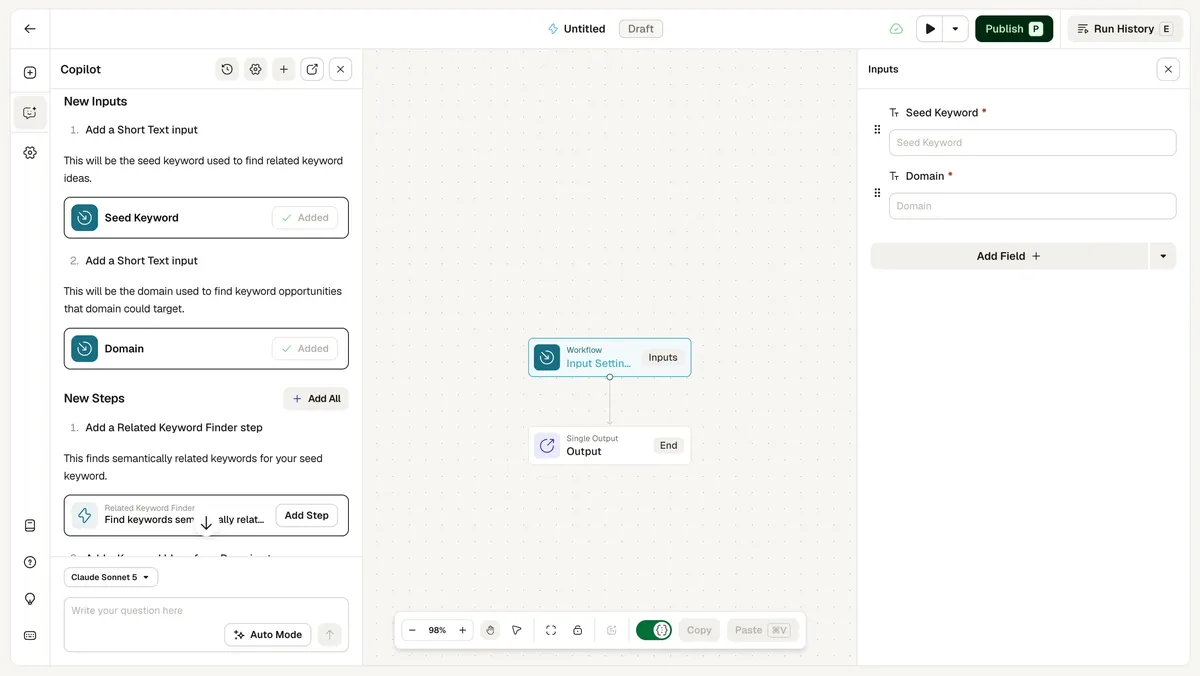
The draft was concise, but it didn’t explain the product’s value for the use case the way I wanted. Supply your product context and check whether the draft explains the use case accurately before publishing.
Best for
AirOps fits SEO professionals who already know the content process they want and can configure workflows to carry it out.
Pros and cons
Pros
Prompt pages show paid share of voice by competitor in ChatGPT Ads next to the answer history for that question.
The Visibility view compares competitor mention rates across ChatGPT, Gemini, Perplexity, Google AI Mode and Google AI Overview.
The Offsite view lists cited third-party URLs with brand references, competitors referenced and an influence score.
Onsite Pages shows each tracked URL's citations and citation rate, and selected pages can go straight into a Grid or configured Workflow.
Campaign opportunities cover content creation, refreshes, outreach and community work, and an accepted one becomes an Action a Playbook or Workflow can run.
Cons
Only two or three of the five competitors AirOps picked matched my market, so its competitor comparisons started from the wrong rivals.
The initial prompts missed the first 25 questions I would prioritize, so I added them myself.
Most generated prompts were traditional rank-tracking questions such as "What is the best rank tracking software?", not the AI-search questions I came to track.
I couldn't find search-volume data or clear evidence of demand for the suggested prompts.
I wanted a clearer explanation of how AirOps chose prompts and calculated visibility.
The article workflow I ran didn't ask for product knowledge or industry expertise.
Its draft was concise but didn't explain the product's value for the use case the way I wanted.
Even with Quill's help, you define the problem, test the workflow and refine its steps yourself.
Measuring a campaign needs its content published through a connected CMS or recorded with Track Content Update, and automatic capture needs a matching Brand Kit domain.
Compared with Otterly AI
AirOps hands findings to workflows you set up:
Stage | AirOps Insights | Otterly AI |
|---|---|---|
Monitoring | Mentions and citations across ChatGPT, Gemini, Perplexity, Google AI Mode and AI Overview | Brand mentions and share of voice in AI answers, plus prompt research |
After a finding | Campaign opportunities for content, refreshes, outreach and community work | Content checker and GEO audit score a page and name what's missing |
Writing and page changes | Selected pages go to a Grid or configured Workflow that drafts. My test workflow didn't ask for product knowledge | Your team, in external tools |
AirOps can carry a finding into drafting, a step Otterly leaves to external tools. It fits a team that wants to build and direct that process itself, including the product-specific judgment the finished content needs.
9. Search Atlas
Search Atlas combines AI visibility monitoring and article generation with on-page changes through OTTO, which requires an installed and verified OTTO Pixel or Cloudflare Worker. Its dashboard shows visibility and sentiment by platform, along with citation share by topic.
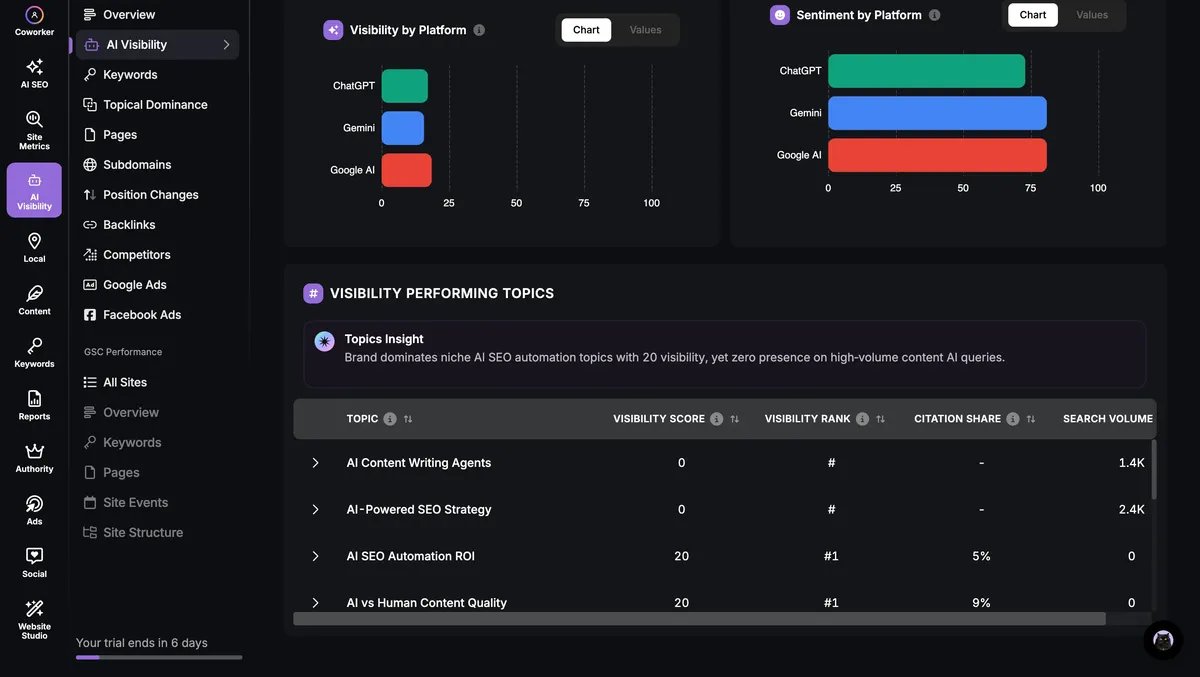
AI visibility monitoring
In my test, the competitor comparison included OpenAI, ChatGPT, Semrush, Perplexity and Ahrefs instead of the site’s actual market rivals. Check the comparison against your own market before using it to decide what to change.
The competitor comparison it built for my site listed OpenAI, ChatGPT, Semrush, Perplexity and Ahrefs instead of the site's actual market rivals. Check that set against your own market before using it to decide what to change.
Article generation
Search Atlas generated an article from the keyword “agentic SEO” and opened it in an editor. I found the draft too shallow, generic and off-brand to publish without substantial revision.
When I asked it to add internal links, it found no relevant links in the available content pool. Check and add relevant links during your review.
On-page changes through OTTO
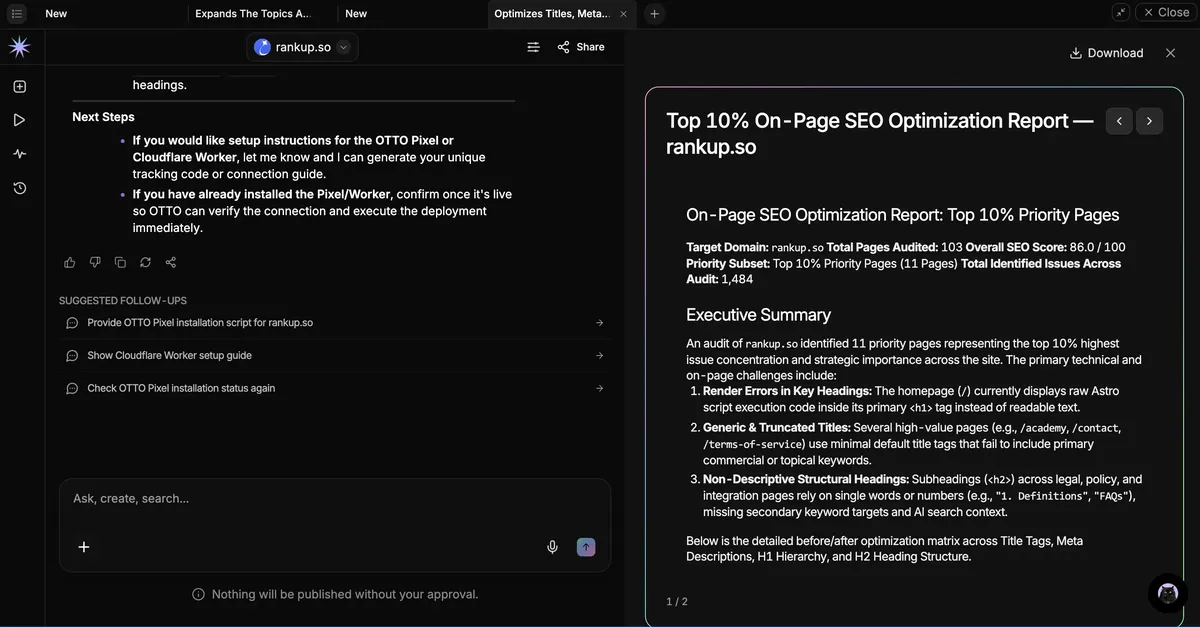
OTTO can apply approved title, meta description, H1 and H2 changes once an OTTO Pixel or Cloudflare Worker is installed and verified. My playbook produced a page-level report comparing current and recommended elements, but deployment paused because the connection couldn't be verified.
Pricing
Search Atlas has four monthly plans:
Starter, $99: One OTTO-powered site, one AI Visibility project, one provider, 500 AI Visibility credits and 50,000 Universal Credits.
Growth, $199: Two OTTO-powered sites, two AI Visibility projects, 3,500 AI Visibility credits and 120,000 Universal Credits.
Pro, $399: Four OTTO-powered sites, four AI Visibility projects, 20,000 AI Visibility credits and 400,000 Universal Credits.
Agency, from $999: Ten OTTO-powered sites and at least 1,000,000 Universal Credits.
Growth monitors ChatGPT, Gemini and Google AI Mode. Pro adds Copilot, Perplexity, Claude and Muse, and Universal Credit top-ups cost $1 per 1,000 credits.
Best for
Search Atlas fits SEO specialists, including local SEO professionals, who want to interpret the data and direct on-page work themselves.
Pros and cons
Pros
The dashboard shows visibility and sentiment by AI platform, plus citation share by topic.
OTTO can apply approved title, meta description, H1 and H2 changes through a verified connection, and I found these basic page fixes stronger than its content work.
My playbook produced a page-level report with current and recommended elements side by side, so each proposed change is easy to check.
Cons
Deployment needs a verified OTTO Pixel or Cloudflare Worker, and mine paused because the connection couldn't be verified.
My competitor comparison listed OpenAI, ChatGPT, Semrush, Perplexity and Ahrefs instead of the site's real market rivals.
The generated article was too shallow, generic and off-brand to publish without substantial revision.
My request to add internal links found none in the available content pool.
I couldn't tell why Search Atlas recommended particular playbooks or how it prioritized the pages in its report.
You interpret the visibility data and decide what to do next yourself.
Compared with Otterly AI
Search Atlas reaches into the page itself through OTTO:
Stage | Search Atlas | Otterly AI |
|---|---|---|
Monitoring | Visibility and sentiment by platform, plus citation share by topic. One provider on Starter | Brand mentions and share of voice in AI answers, plus prompt research |
After a finding | Page-level reports comparing current and recommended elements | Content checker and GEO audit score a page and name what's missing |
Writing | Generates articles from a keyword, which needed substantial revision in my test | Your team, in external tools |
Page changes | OTTO applies approved title, meta, H1 and H2 changes through a verified Pixel or Cloudflare Worker | Your team, in external tools |
Search Atlas adds article generation and on-page deployment to the kind of tracking Otterly offers. I found its technical checks and basic page fixes stronger than its content creation and strategy, so you'll still interpret findings, choose the work and review the output.
10. Frase
Frase combines AI visibility tracking with article drafting, and its dashboard reports metrics including share of voice, sentiment and appearance rate. In my trial, I could track five prompts across ChatGPT and Google AI. More prompt slots and the other listed AI platforms required an upgrade.
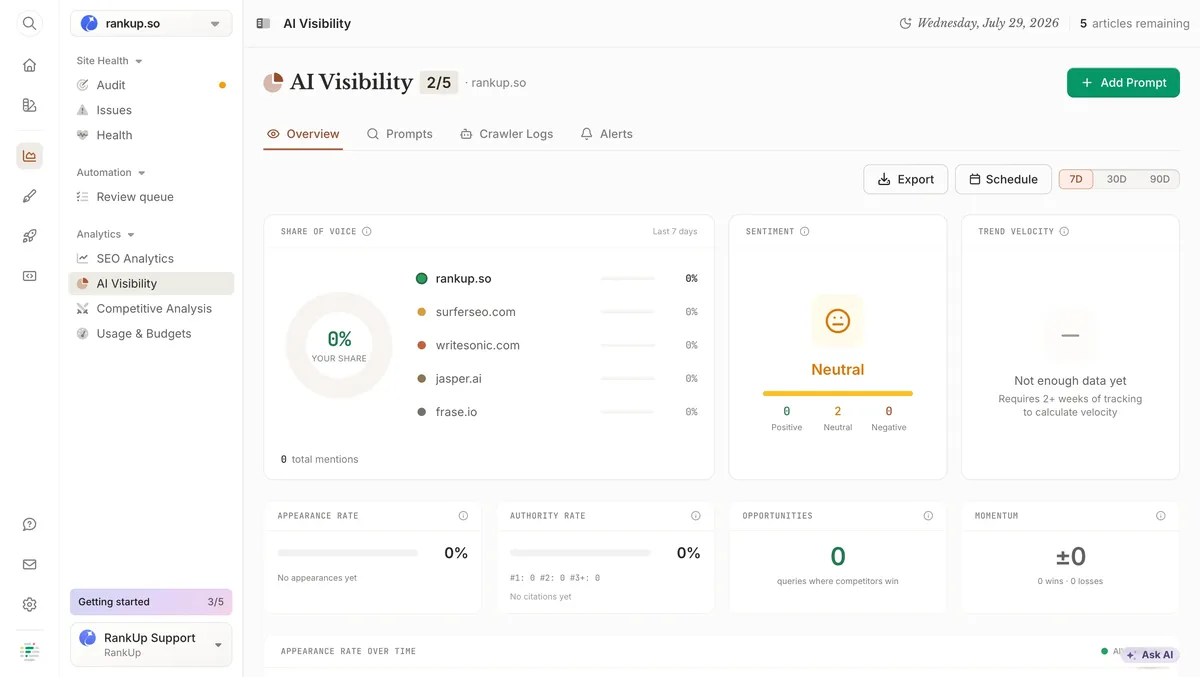
AI visibility tracking
Two summaries in my test gave me reason to check the underlying answers. One assigned Surfer SEO 100% share of voice and the other tracked tools zero, even though those tools appeared in the answers. Another marked two prompts Not visible while the Opportunities panel said No gaps found.
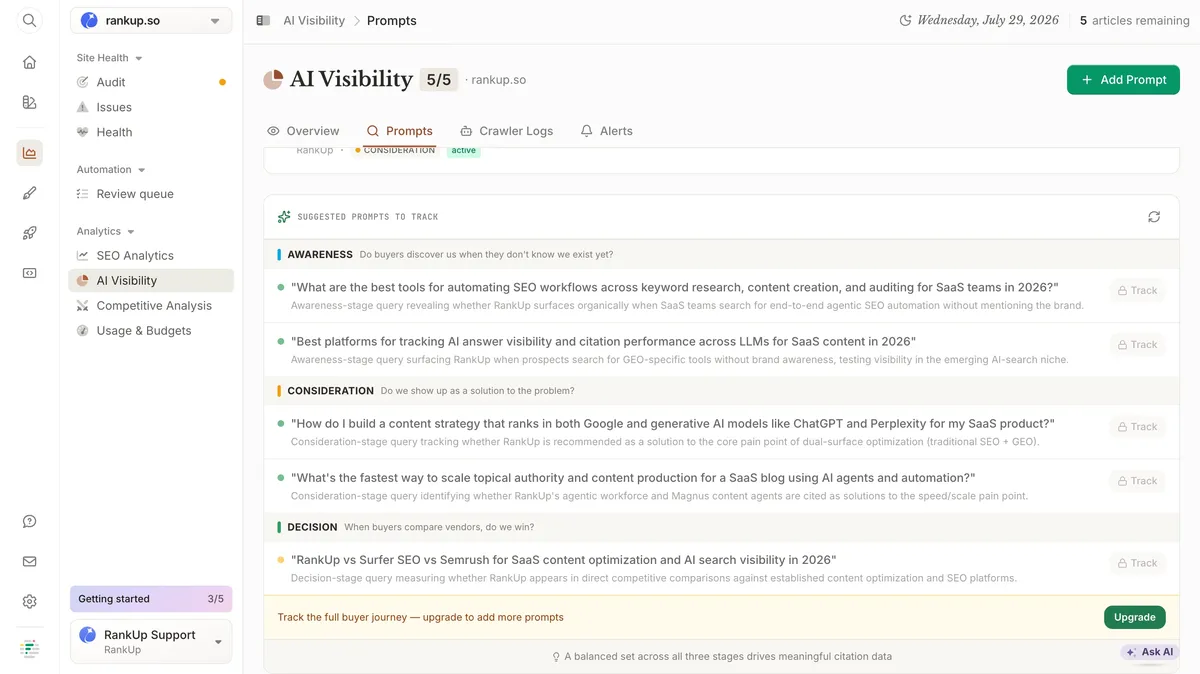
My trial tracked five prompts across ChatGPT and Google AI, and the other listed platforms required an upgrade. Within that set, one summary gave Surfer SEO 100% share of voice and the other tracked tools zero, even though those tools appeared in the answers. Another marked two prompts Not visible while the Opportunities panel said No gaps found.
Article drafts and diagnostics
Frase’s generated article needed extensive editing before publication. It lacked product context and unique value, and its structure wasn’t usable.
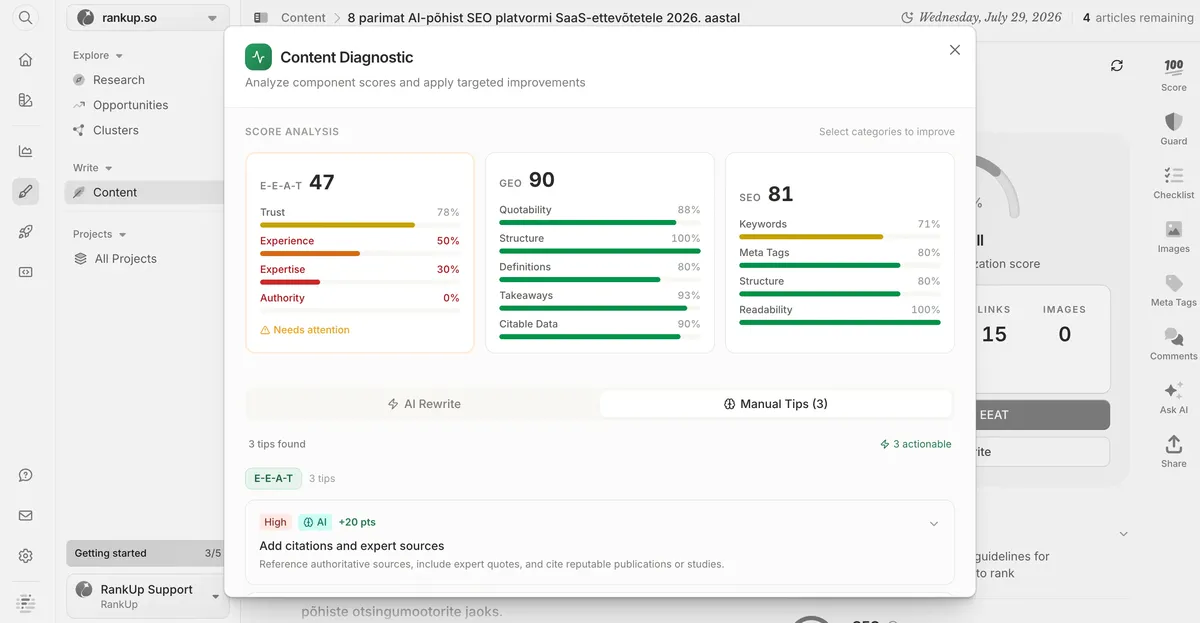
The content diagnostic scored that draft 47 for E-E-A-T, 90 for GEO and 81 for SEO, and its top tip was to add citations and expert sources. Finding and adding them was left to me.
Content Guard after publication
After publication, Content Guard monitors ranking declines, sends alerts and suggests fixes. Those suggestions are a starting point for checking the evidence and deciding which page changes to make.
Pricing
Frase’s Starter plan costs about $49 a month on monthly billing, Professional about $129 and Scale about $299. Annual billing reduces those plan prices by 20%, while additional seats on Professional and Scale cost about $29 a month each.
Best for
Frase fits SEO-focused content teams that want research and generated drafts as starting points and have the capacity to edit them.
Pros and cons
Pros
The dashboard reports share of voice against tracked competitors, sentiment, appearance rate and authority rate.
The content diagnostic flags missing evidence and citations in a draft.
Content Guard monitors ranking declines after publication, sends alerts and suggests fixes.
Cons
One share-of-voice summary gave Surfer SEO 100% and the other tracked tools zero, though those tools appeared in the answers.
Two prompts marked Not visible appeared alongside an Opportunities panel saying No gaps found.
My generated article lacked product context and unique value, and its structure wasn't usable.
The diagnostic flags missing evidence but leaves you to find and add it.
The two prompts Frase generated at setup were broad category questions, not the SaaS-specific queries my site competes for.
When I asked the assistant what to do with the visibility data, the advice read like a general ChatGPT conversation, not a concrete in-product action.
I couldn't see how the GEO score was calculated, so I wouldn't treat it as proof of visibility.
Compared with Otterly AI
Frase pairs its tracking with drafting and diagnostics:
Stage | Frase | Otterly AI |
|---|---|---|
Monitoring | Share of voice, sentiment and appearance rate, with 5 prompts across ChatGPT and Google AI in my trial | Brand mentions and share of voice in AI answers, plus prompt research |
After a finding | A content diagnostic for missing evidence, plus Content Guard alerts and suggested fixes after ranking declines | Content checker and GEO audit score a page and name what's missing |
Writing | Generates article drafts, which needed extensive editing in my test | Your team, in external tools |
Frase adds drafting and post-publication alerts to the monitoring and diagnostics Otterly offers. Given the conflicting summaries and the edits my test needed, treat its output as an editorial starting point to verify.
Otterly AI alternatives compared: coverage, actions and pricing
The deciding difference is what happens after a finding. A recommendation still needs implementing, a draft needs reviewing, and deployment changes the page itself.
Tool | Monitoring | Work after a finding |
|---|---|---|
RankUp | Answers, mentions, citations and competitors | Writes articles and page edits for review, and prepares deals with cited sites. You send the correspondence. |
Writesonic | ChatGPT, Gemini and Google AI Overviews | Finds cited pages for outreach, drafts articles and recommends page changes. |
Semrush | Competitors, prompts and brand performance | Recommends actions and audits crawlers. Rewriting needs the separate Content Toolkit. |
Peec AI | Daily prompts, mentions and citations | Suggests passage edits, prepares content briefs and creates technical tickets. |
AthenaHQ | Buyer prompts and citation gaps | Drafts, scores and revises content using approved product context. |
Scrunch AI | Prompts, citations and competitors | Recommends page changes. Separate Agent Pages delivery serves AI-facing HTML. |
Ahrefs Brand Radar | Historical answers and custom prompts | Identifies citation opportunities and topic gaps for a separate content process. |
AirOps Insights | Competitor mentions and page citations | Routes opportunities into workflows you configure. |
Search Atlas | One provider on Starter, more on higher plans | Generates articles and deploys approved OTTO page changes through an installed and verified Pixel or Cloudflare Worker. |
Frase | Prompt tracking, sentiment and share of voice | Generates drafts, flags content issues and suggests fixes. |
Price only matters next to the work left after a finding.
RankUp Starter at $269 a month and Semrush's toolkit at $99 a month both cover 25 tracked prompts. The $170 difference pays for 8 articles, 5 content refreshes and 25 audited articles each month. Semrush's subscription stops at reporting findings and recommending actions, so the writing goes to its separate Content Toolkit or your own setup.
The other tools with published prices differ in what the plan reaches:
Frase Starter costs about $49 a month and adds article drafts to prompt tracking.
Search Atlas Starter costs $99 a month with one AI provider. Growth costs $199 and covers ChatGPT, Gemini and Google AI Mode.
Scrunch Core costs about $250 a month and includes page optimization. Agent Pages delivery sits outside Core.
AthenaHQ Essential is free and Starter costs about $295 a month, for tracking buyer-evaluation prompts.
Ahrefs Brand Radar costs $50 a month for 2,500 custom-prompt checks, and index access starts at $199 a month, both excluding tax.
A price only helps if the comparison data is usable, so check which competitors a tool is comparing before you act on its findings, and correct the set where it allows.
My Search Atlas report listed OpenAI, ChatGPT, Semrush, Perplexity and Ahrefs instead of the site's actual competitors.
Only two or three of the five competitors AirOps suggested were relevant, and in Frase I reviewed the suggestions and added five competitors manually.
Which Otterly AI alternative should you choose?
RankUp fits B2B SaaS founders and marketers who want connected content work. For teams with an existing process, the choice depends on which research, workflow or deployment stage needs support.
Match the option to the work you need:
RankUp: For B2B SaaS founders and marketers who want articles, page edits and cited-site deals prepared for review.
Writesonic: For citation-informed outreach and article drafts.
Semrush: For competitive research and crawler diagnosis alongside an existing content process.
Peec AI: For evidence-backed edits, briefs and technical handoffs to a team.
AthenaHQ: For buyer-prompt tracking and content drafting and revision using approved product context.
Scrunch AI: Assess its separate AI-facing delivery if you can authorize a supported integration.
Ahrefs Brand Radar: For historical AI-answer research and custom monitoring.
AirOps Insights: For teams that want to configure content workflows around findings.
Search Atlas: For on-page deployment through a verified OTTO Pixel or Cloudflare Worker.
Frase: For content research and drafts a team can verify and edit.
To choose from your shortlist, follow one visibility gap through each option. Look for a clear task and evidence you can inspect, then check who writes, reviews and publishes a page change or finds cited sites and prepares outreach.
Act on AI visibility findings without building the system yourself
Follow one visibility gap through the other nine tools and it ends at one of three points.
Semrush's AI Visibility Toolkit and Ahrefs Brand Radar end at the finding. Both show where competitors appear and you don't, and the content work goes to a separate process.
Peec AI, Scrunch AI and AthenaHQ prepare the work. They hand your team briefs, page recommendations, technical tickets or drafts from approved claims, and someone on the team still ships each change.
Writesonic, AirOps Insights, Search Atlas and Frase reach the draft or the page itself. In my tests, their drafts came out generic or needed heavy editing, and the product knowledge they lacked was mine to add.
RankUp is built for the work those tools hand back.
A gap becomes a proposed article, page update or deal proposal for a cited site, and the agents write it from your product knowledge and interview answers. You choose what runs and approve what goes live.
A tracker paired with your own Claude or ChatGPT setup can carry a gap further, once you've built that setup. You write the prompts and workflows for research, drafting and page updates, wire in the tracking, Search Console and analytics data, and update the product context every time the product ships.
Then it has to keep working.
Each draft needs checking against your product facts, a weak one means finding and fixing the step that produced it, and the results only help once you work out what to change next. Claude and ChatGPT do each task well.
Directing them piece after piece is the ongoing work, and it lands on you.
In RankUp, the specialist agents, workflows and integrations already work together, so your part is the product knowledge, the choices and the approvals. Your corrections and performance data from Google Search Console, PostHog and AI search monitoring inform each next article and update.
To assess the work RankUp proposes from a visibility finding, start your 7-day free trial. RankUp first proposes a plan for your site, and the 7-day free trial gives you enough in-app balance to try the work it lists.
(For English B2B SaaS sites only.)

Author of the article
Georg Richard Aare
Georg is a B2B SaaS SEO specialist, an international keynote speaker on AI search and the co-founder of RankUp.
This article was created using: