

For SaaS and tech companies with English sites.

How to Optimize for AI Search and Diagnose Missing Citations
 Georg Richard Aare
For SaaS and tech companies with English sites.
If your product turns up on Google but rarely in ChatGPT, Perplexity or Google AI Overviews, the fix is less exotic than most advice suggests. Most of it is good SEO done in the right order.
Make your key pages reachable by search crawlers and answer real buyer questions directly. Back those answers with product facts only you can publish, and keep your product described accurately on the sites AI answers already cite.
Then check whether those answers name and link you, and read that beside your traffic, signups and demos.
None of this guarantees a place in an AI answer. Schema, llms.txt and formatting tricks get more credit than the evidence gives them, while the basics keep holding up.
For a small team, the first job is a short path: pick a few pages, make them reachable, answer them well and confirm the changes went live.
What is AI search optimization?
AI search optimization is the work of making your pages and product facts the ones ChatGPT, Perplexity and Google AI Overviews find, understand and cite when a buyer asks them a question.
Each of those systems has to find pages, understand what they say and choose which to cite before it answers.
Here's a typical case. Someone asks ChatGPT which tools suit their use case, and the answer names a few products and links the pages it drew on. You want your page among those links, with your product described correctly.
You'll also see it called answer engine optimization.
Using Claude or ChatGPT to research keywords or draft articles is AI-assisted SEO, which is about how your team gets the work done.
AI search optimization is about where your content ends up and whether answers use it. A team can draft every post with ChatGPT and still be missing from ChatGPT's answers.
So is it a new discipline? Mostly it isn't. The activities sit close to the SEO you already know, because when answer engines search the web, they pull pages from web indexes before they write a response.
What shifts is the focus. Ranking puts a page on a results list. In AI search, the question is whether ChatGPT or an AI Overview picks a passage from your page, quotes it and credits you. That’s why SEO experts prioritize unique content that gives AI systems something new to cite.
Those two outcomes can split. A page can rank well and still be skipped, while a page outside the top results gets cited.
1. Confirm scope and gather evidence
Write down your intended buyer, your product’s positioning and the use cases closest to it. Use those to choose a small first batch of buyer questions and existing pages that help someone evaluate your product.
Start with pages buyers read while deciding: “best X for Y” roundups, alternatives, comparisons and pricing. Keeping the batch small makes it easier to track what you changed and compare the results.
Before editing, record each page’s Google position and test its buyer question in AI search. A single test shows what one assistant said on one day. It doesn’t tell you whether you show up reliably.
Copy this worksheet into a spreadsheet, with one row per buyer question:
Buyer question | Page URL | Google position | In AI answer? | Product fact needed |
|---|---|---|---|---|
— | — | — | — | — |
Save each tested answer separately so you can compare the wording and cited sources after making changes:
Prompt | Assistant | Date | Full answer | Cited URLs |
|---|---|---|---|---|
— | — | — | — | — |
2. Find the buyer questions worth answering
Buyer questions reveal what people need to understand before choosing your product. Build your list from those decisions, then expand outward:
Pull questions from sales calls, support tickets and comparison requests.
Add relevant search queries.
Merge duplicates, keeping their sources attached.
Direct evidence comes from a buyer asking on a call. A Search Console query shows someone searched, while an AI-generated suggestion is only the model’s guess.
Group questions by how closely they connect to your positioning:
First: “What’s wrong, why this approach, and will it fit?” Address purchase objections alongside “best X for Y” roundups, alternatives, versus, pricing and review pages.
Next: “How would this fit our workflow?” Cover implementation, quality checks, team constraints and how buyers can evaluate results.
Later: “How do I solve this broader problem?” Expand into category education and broad how-to topics.
For each question, check whether it could decide a purchase, whether real buyers have asked it and whether you can contribute a better answer. Use search volume to break ties.
Search Console hides some queries, so a missing query doesn’t mean nobody asks it.
If intended buyers repeatedly ask about staffing on sales calls, an inventory row could look like this:
Buyer question | Buyer situation | Decision supported | Evidence source | Positioning connection | Priority band | Confidence |
|---|---|---|---|---|---|---|
Can we use this without a dedicated team? | Limited staff | Assess fit | Sales calls | Intended buyer’s team constraints | Next | High: repeatedly asked |
3. Map answers and coverage gaps
A question list isn’t a publishing list. Several questions may belong on the same page because they help a buyer make the same decision.
Group your prioritized questions into clusters, meaning related questions one page can answer together. Type each cluster’s main question into Google and add any People Also Ask or Autocomplete questions that fit the same page.
Each cluster needs one main page so your pages don’t compete to answer the same question. Pick that page and answer the smaller questions in its sections.
Compare each cluster with what’s already published:
Update an existing page when the missing answer fits what its visitors came to learn.
Create a new page when adding the answer would pull an existing page away from what its visitors came for.
Mark clusters already assigned to several pages before adding another page for them. Combining their answers on one page may make sense.
For example, if buyers ask whether setup costs extra and your pricing page leaves that unclear, add the answer there. A detailed migration walkthrough serves a different need and may deserve a separate page.
Record those decisions in a mapping sheet:
Buyer question | Question cluster | Main page | Missing answer | Update or new page |
|---|---|---|---|---|
Does setup cost extra? | Total cost | Existing pricing page | What setup includes and whether it carries a fee | Update |
How do we migrate? | Migration | Planned migration guide | Migration steps | New page |
4. Mix in informational how-to topics
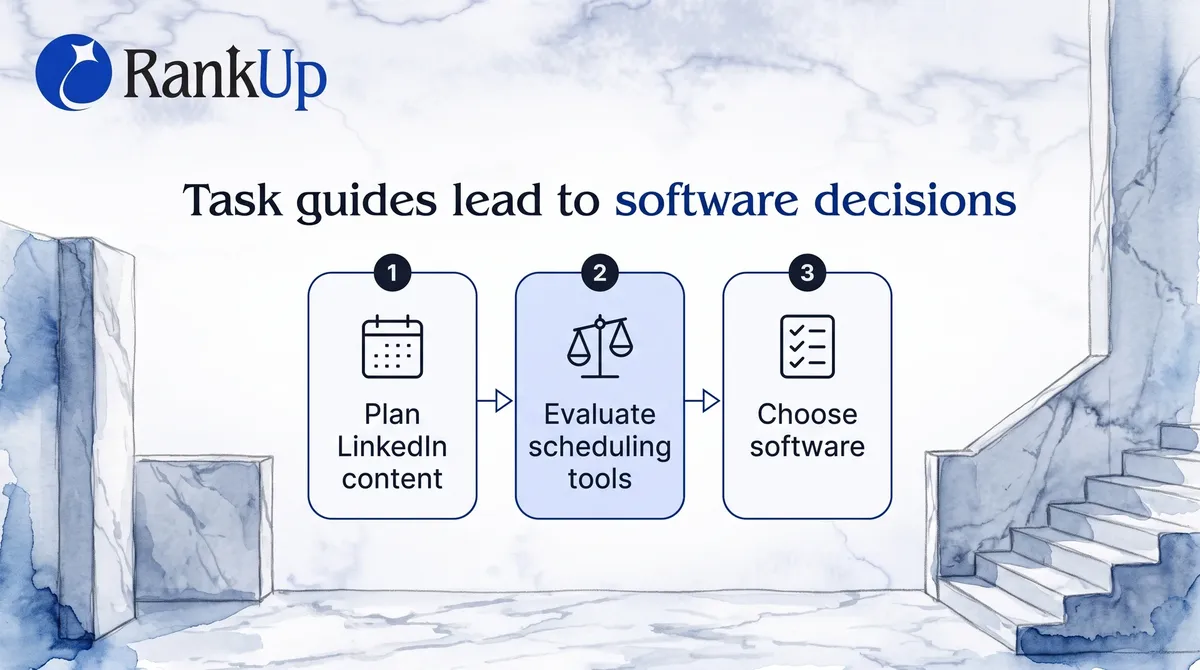
A blog made only of “best X” and alternatives pages reads like a sales catalogue. How-to pages show you understand the job your buyer is doing: a comparison helps them choose software, while a practical guide helps them complete a task.
Pick how-to topics the same way you prioritized questions in step 2, starting with tasks closest to your positioning and moving outward. If your product schedules social posts, “how to plan a month of LinkedIn content” sits right next to its main use case.
Choose topics where:
Your intended buyer performs the task as part of a use case your product supports.
Your team has done the task often enough to name the mistakes people make.
A relevant commercial page can help when the reader reaches a software decision.
Write the method fully enough for someone to follow it. Where software choice affects a step, say what capability to look for, then link to the comparison page that covers it.
In the content-planning guide, that could mean explaining how to evaluate scheduling tools once the plan is ready to publish.
Informational strategy lists can help too. “Best onboarding email strategies for SaaS” should explain when to use each approach and how to apply it. A listicle format alone doesn’t make an article spam. The substance has to help the reader do the work.
5. Match your publishing pace to competitors
How much should you publish? Look at how much your closest competitors publish on the same buyer topics. Their total article count may include subjects outside your product’s scope.
Start with competitors appearing in your saved AI answers and competing for the questions you mapped in step 3. Review what they published or substantially rewrote over the previous quarter, comparing similar content types.
Keep a record like this illustrative entry:
Competitor | Buyer topic | Content type | New or updated | Date | Proof |
|---|---|---|---|---|---|
Closest competitor | Implementation | How-to guide | New | Publication date | Page URL plus dated publication notice |
Count new pages and substantial updates separately. For example, six new comparison pages and nine refreshes over three months work out to two new pages and three updates a month on your topics. That benchmark includes maintaining existing answers, not just publishing more.
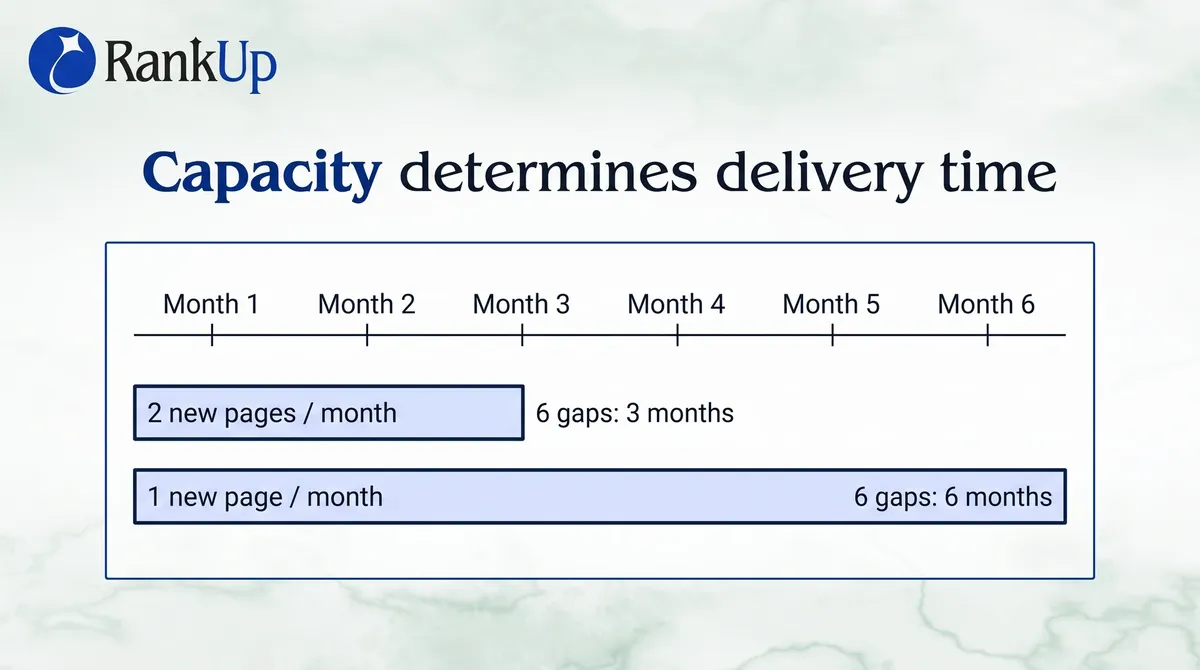
Compare that workload with what you can research, write, review and publish well. If your step 3 sheet has six new-page gaps and you can sustain two new pages a month alongside updates, filling those gaps takes three months of planned production.
If you can sustain only one new page a month, the same gaps require six months. Narrow the schedule to the first priority band from step 2 rather than thinning out every topic to match a competitor’s pace.
6. Fix access and indexing blockers
An assistant needs access to a page before it can cite it. For Google search, indexing matters too: a reachable page can still be missing from Google’s index.
Decide on training access separately, while allowing search crawlers and user-triggered fetchers to reach your first-batch pages:
Search crawlers discover pages for search. Blocking them prevents that system from retrieving your pages through its search index.
Training crawlers collect material for model training. Blocking them is a separate choice from blocking search access.
User-triggered fetchers open pages when users request them. Blocking access can stop an assistant from opening a page someone asks about.
Google’s Indexing API only accepts pages with JobPosting or BroadcastEvent structured data, so it won’t get SaaS blog or product pages indexed. Use Search Console’s URL inspection instead to check each page’s indexing status, then work through these checks:
Read robots.txt for rules blocking the search crawlers you want to allow.
Remove unintended noindex tags and review snippet controls that restrict content shown in search answers.
Open the page without logging in to identify login walls.
Follow the page URL and fix broken destinations.
Review page speed and basic page structure.
Add internal links to pages with no links pointing to them.
View the page source or URL inspection’s HTML and look for the main answer text.
If that text requires JavaScript, ask your developer about Server-Side Rendering (SSR), which renders content on the server, or Static Site Generation (SSG), which builds it ahead of time.
After fixing blockers, inspect the URL again and record its access and indexing status alongside your baseline.
7. Check each platform's retrieval requirements
Passing Google’s checks doesn’t establish access for ChatGPT or Perplexity. Check each separately, including your firewall and content delivery network (CDN).
Google AI Overviews and AI Mode
If an indexed page can show a normal snippet in Google results, it can be a supporting link in an AI Overview or AI Mode. Nothing extra is required, including llms.txt or special schema.org markup.
On your first-batch pages, look for controls that restrict what Google can use:
nosnippetprevents text snippets and use of the content as direct input for AI answers.A tight
max-snippetvalue limits how much text can be used.data-nosnippetaround the answer passage excludes that text from snippets and direct use in AI answers.
Use URL Inspection to confirm what Googlebot received.
Blocking Google-Extended won’t remove pages from AI Overviews, and allowing it won’t get them in.
Perplexity
PerplexityBot crawls for search results and links, without training foundation models. Perplexity-User opens pages for user actions and generally ignores robots.txt. A firewall or CDN block can still prevent it from opening your page when someone asks about it.
Ask whoever manages your firewall to allow both by user-agent and published IP addresses, refresh IP sets from official endpoints, and confirm requests pass in logs. In AWS WAF, the allow rule belongs above blocking rules.
ChatGPT Search
Allow OAI-SearchBot if you want your pages to appear in ChatGPT Search summaries and snippets.
8. Research distinctive supporting evidence
“Does this work with our CRM?” needs more than “most tools integrate with popular CRMs.” A useful answer names the supported integration, explains what it does and states whether it costs extra. Those details come from your own documentation.
Open your help-center articles, pricing and plan pages, changelogs, and sales or support notes. Add the exact supporting fact and its source to the “Missing answer” column in your mapping sheet.
Produce an original research study
If buyers keep asking how long setup takes, you could measure it from anonymized onboarding records you’re allowed to use. Other questions may need a survey or a repeatable product test. Choose the method that measures what buyers want to know.
Work through these steps in order:
Pick who or what belongs in the study and what you’ll leave out.
Write exactly what you’ll measure and how. For setup time, specify when the clock starts and stops.
Check data permissions and consent, then strip names and identifying details.
Run the study, analyze the data and record missing information or records you dropped.
Explain who the findings apply to and where the study falls short.
Publish the findings with tables or charts and enough methodology for someone to repeat the work. Add relevant findings to the answer pages mapped in step 3, with a link to the study.
Source statistics and attributed quotations
An outside statistic helps only if it describes something relevant to your buyer’s question. A study of enterprise teams may say little about what a small team can expect.
Follow the link from the article where you found the number, then keep following citations until you reach the original research. A roundup quoting another roundup isn’t the source. If you can’t trace the number back, leave it out.
Check what the research actually measured:
Who published it and in which year.
Who or what was studied.
What was measured and over which period.
Put the publisher, year and group studied in the same sentence as the number, and include the measurement period where it affects the meaning. That keeps an enterprise finding attached to enterprise teams, even when an AI answer lifts the sentence. Link to the original research in that sentence.
For quotations, quote what the person actually said, word for word, and give their name and job title so the reader can judge why their view counts.
A shortened quotation should still say what the person would agree they said. Cut words around the point, keeping any qualifier that limits it.
9. Write clear direct answers
A buyer should get the answer in the first sentence or two, before any background. If they’re checking whether an integration works with their setup, the requirement belongs beside the answer.
If your product page describes an integration that requires a supported CMS, replace the vague opening with the requirement:
Before | After |
|---|---|
“Connect your content through a flexible integration.” | “The integration requires a supported CMS.” |
The revised sentence gives the buyer something they can check. “Flexible” leaves them guessing whether their setup qualifies. Follow the answer with an explanation of which CMSs qualify.
On your actual page, replace “The integration” with your product’s name and the integration’s name. That lets someone understand the passage even when an assistant extracts it without the heading or surrounding paragraphs.
Search each opening for back-references such as “as mentioned above,” “this” and “here.” Replace them with the thing they point to, carrying the same integration name into any sentence that would otherwise become unclear.
Read the opening on its own. The buyer should be able to identify the feature, understand the answer and see the requirement without hunting elsewhere on the page.
10. Verify claims and editorial quality
Clear wording can make an inaccurate claim sound convincing. Before approving a draft, compare what each claim says with what its source actually supports.
Give particular attention to statements that could change a buyer’s decision:
What the product does, what it can’t do and what it costs: check current documentation, using the live pricing page for prices.
Statistics, percentages and research findings: verify them against credible primary sources and link those sources, keeping numbers exact and scope intact.
Strong claims: search for “always,” “every,” “guarantees” and “best,” then check whether a source supports each one.
Any condition attached to the claim, such as a plan tier, a supported CMS or a measurement period, should remain in the same sentence.
For an integration that requires a supported CMS, an editor might write “works with any CMS” to make the copy sound smoother. That small change turns a requirement into an unsupported promise. Restore the requirement before approving the page.
Keep the product docs open and search for the claim’s key term as you review. RankUp’s editor offers another way to check: select a sentence and ask the shared knowledge base whether it holds up.
A sentence that claims only what its source supports is the version worth publishing, so narrow it to the source or remove it.
Make authorship and accountability visible
Readers need to know who wrote the page and who can answer for its claims. Give readers that same context by naming the real person behind the article and showing why they know the subject.
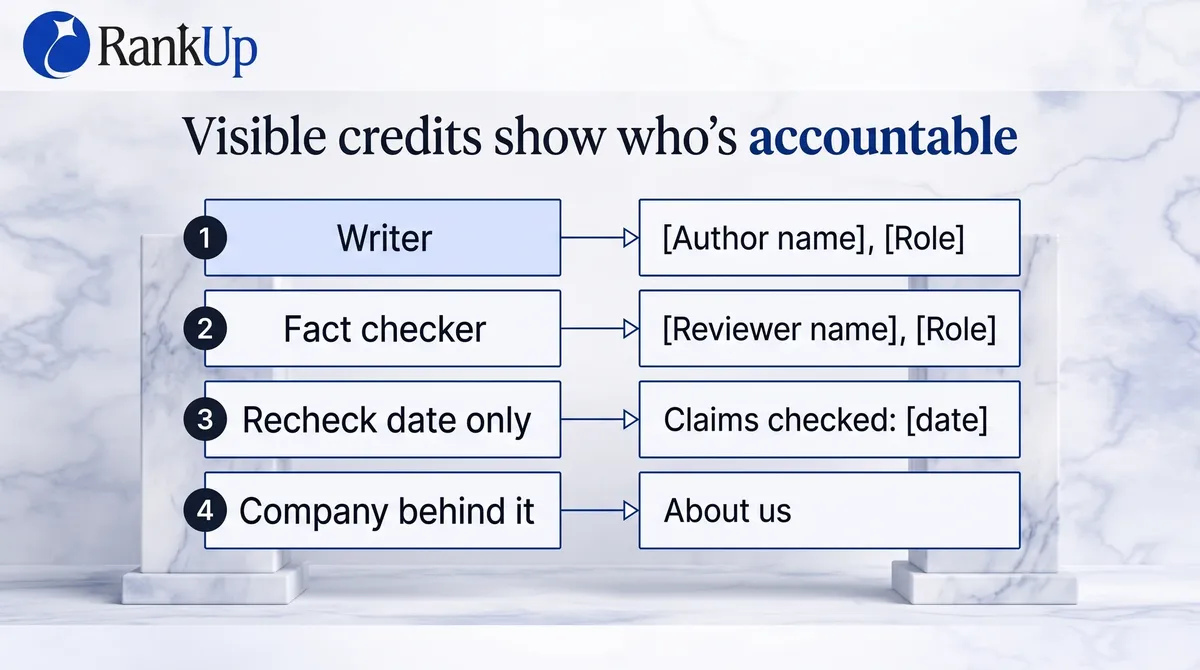
A founder or product owner can check the product facts for a small B2B SaaS team. If a marketer writes a comparison and the product owner reviews its capabilities, credit them separately so readers can distinguish the writer from the person who checked the product details.
Make those credits easy to find:
Put the author’s real name and role in a byline at the top, linked to a short bio.
Add “Product details reviewed by” beside the byline, followed by the reviewer’s real name and role.
Display the date that person actually checked the product claims.
Link to an About or contact page that identifies the company behind the product.
Change the displayed review date only when someone rechecks the claims. A headline edit shouldn’t make old product information look freshly verified.
11. Connect related pages contextually
Link the sentence that touches on a subject to the page that covers it in full. Readers can follow the link for more detail, and Google gets a clearer connection between the brief mention and your fuller answer.
Start with the pages you picked in step 3 as the main answer for each buyer question. Search your draft for each page’s topic and related phrases, then link the first mention that raises a question the destination answers.
For example, if your comparison mentions migration and your guide covers moving customer data from spreadsheets, the sentence could read: “Teams moving existing customer records can follow the guide to migrating customer data from spreadsheets.”
Link “migrating customer data from spreadsheets” to that guide. Those linked words, called anchor text, tell readers what the destination covers. “Click here” gives them no such context.
The comparison stays focused on choosing software, while teams with existing data have a clear route to the migration instructions.
12. Publish and validate live changes
The CMS preview shows what you intend to publish. The live URL shows what a visitor actually gets.
Validate the published version in this order:
Open the page while logged out. Check the new opening answer, its images and the links you added, then follow those links.
Inspect the URL in Search Console and run a live URL test, which checks access now without confirming the update is indexed. Open the tested page’s HTML and search for a phrase from your new answer.
Compare that with Google’s indexed version.
If the tested HTML contains only the page template without your answer, the site may be building its text in the browser with JavaScript. Ask your developer to have the server send the finished page, using SSR or SSG as described in the access checks.
RankUp’s content audit evaluates already-published pages within your plan’s page allowance and recommends what to change. You choose which fixes run and review the proposed edits in bulk before approving them.
Record the publication date and specific edit in the page-selection sheet you started earlier. That date gives you a reference point for comparing clicks and citations. For a product page’s integration requirement, “clarified which CMSs qualify” tells you what changed. “Updated content” leaves you guessing.
13. Align entity facts across surfaces
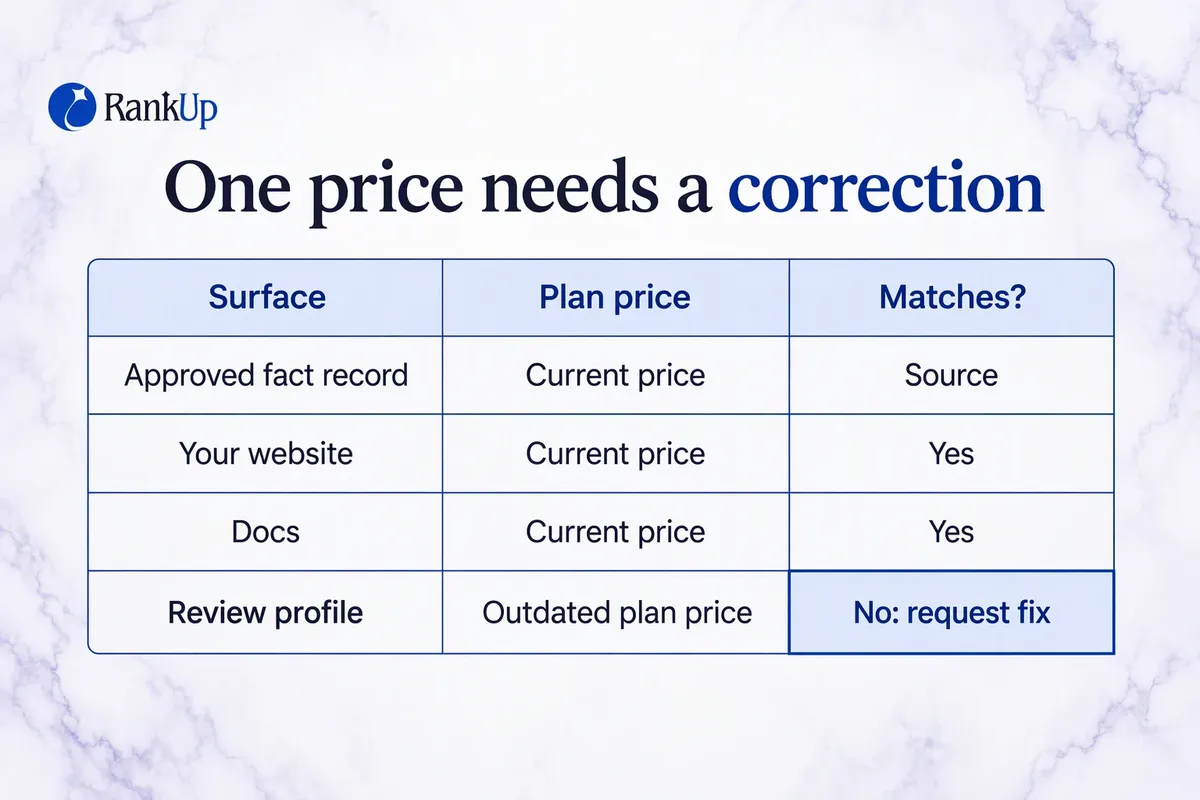
AI answers can draw on review profiles and partner listings as well as your website. An outdated price on a cited profile can become the price a buyer reads.
Keep one shared doc or sheet with the correct product facts and the page supporting each answer:
Product name, separate from the company name.
Category and intended audience.
Pricing model, distinguishing prices by plan, currency and billing period.
Supported integrations.
Have the person responsible for product facts approve it so every correction points back to the same answer. Your pricing page can support prices, while integration docs can support compatibility claims.
Start with review profiles and listings cited in your saved AI answers. Then compare your website, docs and social profiles against the sheet.
Check like-for-like facts before requesting changes. A monthly price can differ from an annual plan’s monthly equivalent without either being wrong. Independent opinions, such as a reviewer finding your product difficult to use, aren’t factual discrepancies.
Track corrections in a sheet. If a review profile shows an outdated plan price, a row could look like this:
Page | Incorrect fact | Who handles it | How to correct it | Status |
|---|---|---|---|---|
Review profile | Outdated plan price | Founder | Vendor edit form | Waiting for check |
Recheck the listing after it updates, and mark the row closed only when the published value matches your approved answer.
14. Earn independent mentions and corroboration
Start with the review sites, roundups and comparison posts linked in the AI answers you saved in your prompt-tracking sheet. Mentions across relevant sites help build agreement about your product. Prioritize pages those answers already cite that match your buyers and use cases.
Give the editor a proposal they can use:
Quote the heading or line you want changed, then write the sentence you’d add or the corrected fact.
Explain why your product fits that section’s audience and criteria.
Supply supporting product documentation.
For a roundup, that means proposing an accurate entry that meets its criteria. “Add us to your list” leaves the editor to research and write it.
Offer a relevant mention on one of your articles in exchange for inclusion on their page. Payment or an affiliate offer can also give you something to trade.
For incoming requests, check whether their page reaches your buyers, exactly what they offer back and how much writing you’ll need to do. If their offered page is weak, ask for one closer to your positioning. Two mentions for two, or two for one, can also make a deal worthwhile.
I’d generally take relevant reciprocal mentions over a small payment. My judgment is that mentions across many sites offer more long-term value to B2B SaaS.
Mark each mention in your outreach sheet as independent, traded, paid or affiliate, so bought and traded placements don’t count as independent recommendations.
15. Optimize discoverable images and video
Text gives search systems context for product visuals. Put screenshots beside the claims they demonstrate, with alt text describing what’s visible and captions explaining the evidence, and compress each file before publishing so the page stays fast.
Build a YouTube production program
Return to your step 2 questions and choose tasks, comparisons and product questions closest to your positioning where watching helps. Pair each recording with a page that answers the question fully in text, using the video to support the explanation.
The founder or marketer writing the page can own production. Fit recordings into the publishing pace from step 5:
Script the answer and evidence, then prepare an accurate demonstration.
Record, edit and have the product owner check the claims.
Prepare descriptive titles, descriptions and thumbnails, plus checked captions and a full transcript.
Publish, embed the video and transcript on its answer page, and share it through channels your buyers use.
Include the page link in the video description. Review viewer response and visits from YouTube alongside resulting signups and demos in your analytics.
When the product-fact record from step 13 changes, the production owner should check affected recordings and update their demonstrations and transcripts.
16. Measure citations and business outcomes
Mentions and citations show discovery in AI answers, while signups and demo bookings show buyer action.
Keep published and updated pages as output, rankings and AI appearances as discovery, and signups and demos as buyer action. More output alone doesn’t establish progress.
Use the prompt-tracking sheet from step 1 to score each run. One prompt checks one answer. This hypothetical row shows a mention with an accuracy problem:
Buyer question | Platform | Run date | Product mentioned? | Site cited? | Cited URL | Factual accuracy |
|---|---|---|---|---|---|---|
Which products fit our use case? | ChatGPT | Today | Yes | No | — | Wrong pricing model |
Record incorrect descriptions separately from missing mentions. They require different work.
Metric | Calculation | What counts |
|---|---|---|
Mention rate | Answers naming your product ÷ all sampled answers | The answer names your product |
Citation rate | Answers linking to your website ÷ all sampled answers | The answer links to your website |
Repeat the same questions on the same platforms, using the same sampling approach. Report added questions separately.
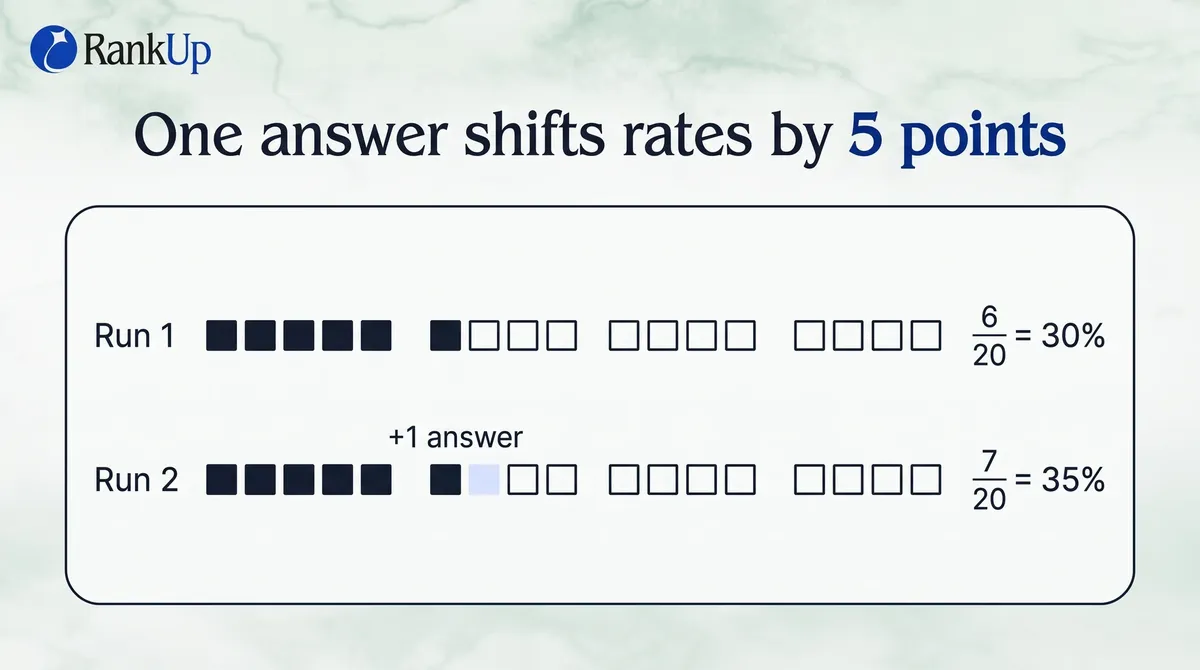
In an illustrative sample, six mentions across 20 answers give 6/20, or 30%. Each answer moves the rate by five percentage points, so 35% could mean just one answer changed. Show counts beside rates before calling movement a trend.
Compare signups and demos over matching periods. Keep page-change dates alongside them, without treating timing alone as proof of causation.
Compare organic and referral performance
In your analytics, group referral visits from the AI assistants in your prompt log, knowing that buyers who read an answer and then type your name into Google won’t appear in that group. Compare it with Google organic visits over the same dates, using the same analytics system.
Divide sessions with the action by all sessions from that source, once for signups and once for demos. Counting sessions rather than events stops repeated actions within one visit from inflating the rate.
An illustrative signup comparison could look like this:
Source | Sessions | Sessions with a signup | Signup conversion rate |
|---|---|---|---|
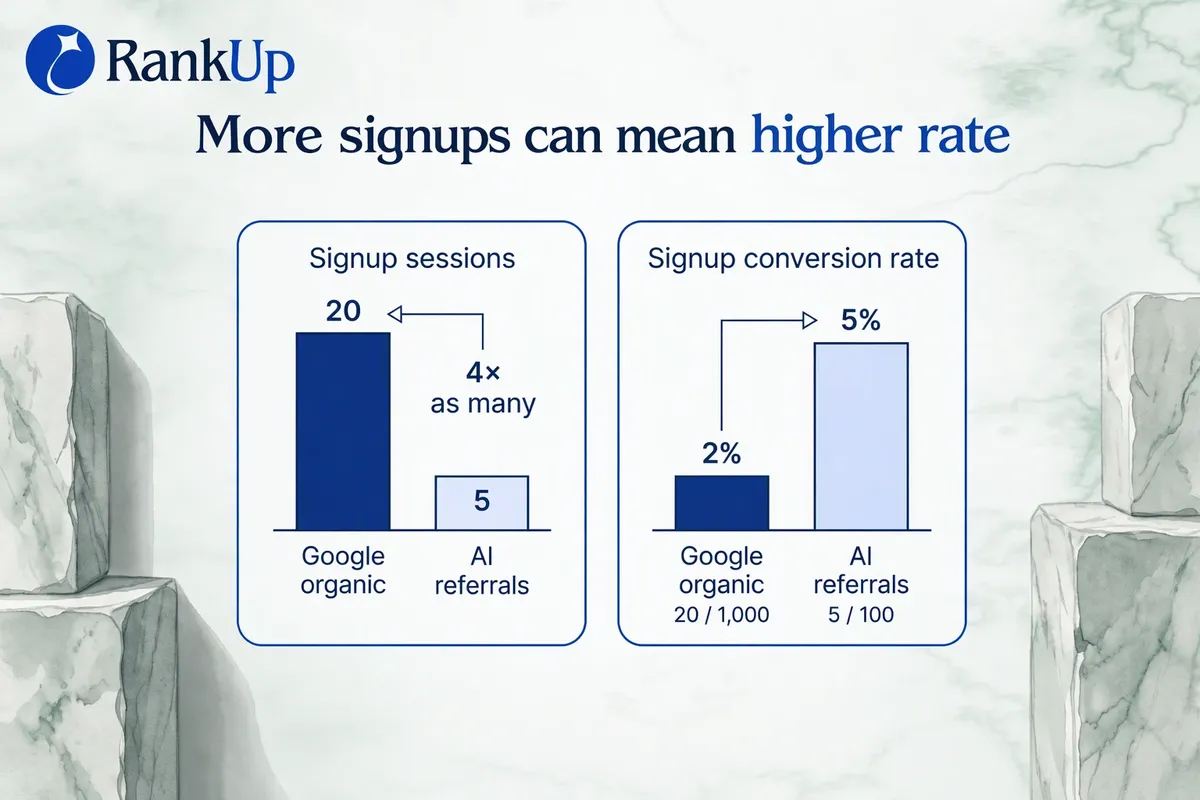
Google organic | 1,000 | 20 | 20/1,000 = 2% |
AI referrals | 100 | 5 | 5/100 = 5% |
Google still brings four times as many signup sessions. The higher AI rate is a reason to investigate which pages those visitors reach before shifting effort.
Add landing page as a second dimension in the report and compare both sources on the same page, such as your pricing page. A pricing-page visitor and a how-to reader may be at different buying stages, making a source-wide comparison misleading.
For pages converting well from Google, open Search Console and check which queries bring people there. Don’t count that Google traffic as proof an AI answer recommended your product.
Asking new signups how they first heard about you adds context the referral report can’t capture, though self-reported answers won’t be complete.
17. Refresh facts and missing coverage
Product changes deserve immediate corrections, even on recently published pages. Use a monthly review to catch missing answers and investigate weaker performance:
Changed facts: search your site for the old price, plan name or feature name. Check each result against the approved product-fact record from step 13.
New questions: review your prompt log, sales calls and support tickets. Would this page’s reader ask that question next? Add it if so.
Falling clicks: check indexing status and whether impressions also fell in Search Console. Work through the diagnosis table for missing or inaccurate citations before deciding to rewrite.
Questions that don’t fit belong in the mapping sheet from step 3, for a separate page.
Update the product-fact record and saved prompts or project files you write from in Claude or ChatGPT. Fixing a published page while leaving old information in your writing instructions gives the next draft the same mistake.
Keep each page’s original publication date and mark it as refreshed or untouched in your page-selection sheet. Compare those two groups over matching dates.
You can list the required edits manually, or ask RankUp’s Content Manager to prioritize pages, plan updates, make the edits and check the work. Product changes found in the weekly scan of your published material become proposed page updates for your review.
If keeping pages accurate as your product changes is the work that slips, start your 7-day free trial for a custom plan based on your site.
(For English B2B SaaS sites only.)
Diagnose missing or inaccurate citations
Rewriting won’t fix a blocked crawler or an outdated third-party listing. Open the answer’s cited pages first. One may include your product even when the answer doesn’t name it.
What you see | Possible cause | What to check | What to change |
|---|---|---|---|
Page repeatedly absent | Search crawlers can’t reach or index it | Check crawler access, firewall blocks and platform requirements | Fix it using the access and indexing checks |
Older wording appears | The AI tool is reading old copy | Compare the live page with the indexed version and cited source | Confirm the update is accessible and request recrawling where supported |
Cited passages answer another question | Wrong page or missing sub-question | Compare your opening answer with the buyer question and cited passages | Update the relevant page, or create one for the different question |
Incorrect product fact | An old fact on your site or a cited third-party page | Compare cited URLs with current product docs | Correct your page or send its owner the factual correction |
Product named in some answers, absent in others | The same question gets different answers | Repeat the saved question on the same platform | Record variation before editing |
Whoever owns the work should update the shared product-facts sheet and saved question sheet whenever a check confirms a fix. Keep those updates in the material used for future drafts. A tracking-sheet note only helps if whoever writes the next draft uses it.
Put your AI-search content plan to work with RankUp
RankUp is a self-improving system to grow your B2B SaaS in AI search. Its specialist agents use refined workflows and integrations, learning from your feedback and performance data.
Whether you’ve tried your own Claude or ChatGPT setup, use it now or are weighing it, you assemble and keep refining that system yourself.
RankUp comes with an established system whose working context carries product facts, corrections and performance findings into later work.
Turn chosen topics into finished articles
The Strategist researches competitors and keywords to prioritize topics around your product’s use cases and buyer searches. You accept or dismiss the proposed additions to the content plan.
The Writer interviews you for a batch of articles in one chat, asks follow-ups and lists the proof and product details it needs. You supply that material and lock in the structure, and your answers go into the knowledge base for later pieces.
For each chosen topic, the Writer develops the outline and draft section by section, with review steps inside one integrated flow. It follows your brand guidelines and leaves comments where it needs your judgment.
You handle those comments and review the article before approving publication.
Bilt, an AI app builder, published 102 articles this way and updated them 369 times in six months. Signups from AI search and its blog went from 23 in May to 185 in October, as the Bilt case study reports.
Find missing answers and write the changes
RankUp’s AI search monitoring records mentions and citations for the buyer questions you track. The Content Manager prioritizes existing pages that are missing from monitored AI answers, losing traffic or not converting, plans updates and writes the edits.
You review the findings and proposed wording before approving changes.
For mentions on other sites, the Deal Maker uses AI citation and Search Console data to prepare proposals for pages AI answers already cite. It finds contacts and writes the correspondence for you to send. When a partner agrees, the Writer writes both entries for your review.
Carry corrections into later work
What improves is the working context for your B2B SaaS. Product sources and interview answers enter the shared knowledge base.
Feedback becomes agent memory and proposed edits to brand rules or writing guidance, which you review in brand settings. Those inputs shape later drafts and page edits.
Each week, the agents scan your published docs, marketing pages and changelog for product changes. The Content Manager brings affected page updates into review.
Each month, RankUp also studies sites that consistently hold the top three in your niche and uses their patterns to inform structure and writing.
You connect Google Search Console, PostHog and a supported CMS. Where your plan includes monthly reporting, RankUp analyses performance data from Search Console, PostHog and AI search monitoring, saves winning and losing patterns and proposes content updates for review.
Those findings inform new articles and rewrites, with signups and demos kept alongside search visibility.
You supply business judgment and product expertise, choose which proposed work runs and approve publishing through the connected CMS. Technical site changes stay with your developer or coding-agent setup.
To turn the gaps you’ve diagnosed into work on your own pages, start your 7-day free trial. RankUp reads your site and proposes a custom plan first. The 7-day free trial gives you enough in-app balance to try the work that plan lists.
(For English B2B SaaS sites only.)

Author of the article
Georg Richard Aare
Georg is a B2B SaaS SEO specialist, an international keynote speaker on AI search and the co-founder of RankUp.
This article was created using: