For SaaS and tech companies with English sites.
:quality(80))
B2B SEO Audit: 8 Stages From Crawl to Qualified Pipeline
:quality(80)) Georg Richard Aare
Georg Richard Aare For SaaS and tech companies with English sites.
A B2B SEO audit can return a long list of warnings and still miss the pages leaking qualified pipeline.
When organic traffic stalls, the cause may sit anywhere between discovery and conversion. A crawl-only report cannot tell you which gap is costing qualified visits or sales opportunities.
A useful audit starts with the business model and works back to the site. Buyer needs define which queries and pages deserve attention, while the sales funnel shows where qualified visitors drop out.
This guide gives you an eight-stage audit workflow and a practical way to prioritize the fixes. You will leave with a prioritized page-level backlog, including owners, dependencies, and the evidence needed to validate each fix.
What makes a B2B SEO audit different
A B2B SEO audit judges every finding by its effect on qualified demand. Traffic matters when it brings the right buyer to a relevant page and gives them a clear next step, from product exploration to a qualified sales conversation.
Business outcomes. A generic audit tracks traffic and checklist completion. A B2B audit weighs several conversion events by their value to qualification and pipeline.
Keyword value. Search volume matters less than commercial intent, ideal-customer relevance, and the query's role in evaluation.
Buyer journey. The audit follows repeated research across roles and stages instead of assuming one visit creates the sale.
Content performance. Each page is judged by how it helps the buyer reach a relevant commercial next step.
Technical priority. Issue severity is filtered through the discoverability and conversion impact of the affected pages.
That changes prioritization. A missing title on a privacy page can wait, while an intent mismatch on a product or integration page can block a buyer already evaluating fit.
Before you start: goals, scope, and access checklist
Before you crawl, define what success means and exactly which public pages belong in the audit. Verify the data sources and capture a baseline so later changes can be measured.
:quality(80))
Complete this checklist with the growth lead and whoever owns website data and implementation.
Goals and buyer context:
☐ Name the primary website conversion that creates a qualified lead.
☐ Document the ideal customer and the buying roles that influence evaluation.
☐ Map how organic visitors become qualified leads, including the handoff to sales.
☐ List priority buyer queries and the commercial pages expected to answer them.
Scope:
☐ Define the public crawl boundary by URL, template, directory, market, language, and hostname.
☐ Catalog product and solution templates.
☐ Add integration directories and comparison pages where they exist.
☐ Exclude non-public environments and gated customer areas.
Access:
☐ Confirm Google Search Console access for every relevant property.
☐ Confirm analytics and CRM access, with conversion events, lead stages, and landing-page attribution visible. Name the person who will validate tracking before the audit begins.
☐ Secure crawler and server-log access where infrastructure review requires it.
☐ Get CMS read access to inspect templates and implementation.
☐ Gather backlink and brand-mention data when authority may be limiting commercially important pages, then include those pages in the visibility review.
Baseline:
☐ Export enough Search Console history to identify seasonality and any known traffic drop. If the site is newer, save all available history and mark seasonality as unknown.
☐ Save current rankings and landing-page performance for commercial queries.
☐ Capture organic conversions by landing page.
☐ Record current AI mentions for priority buyer prompts if AI visibility is a goal.
☐ Document every known site or tracking change that could explain a break.
Record missing access as an audit limitation. Any conclusion that depends on unavailable data should stay provisional.
The B2B SEO audit process: 8 stages in order
Each stage depends on the one before it. Work through the site in this order:
Crawl. Confirm search bots can reach the URLs you want discovered.
Render. Verify bots receive the core content and links after scripts run.
Index. Check that search engines store the right pages and exclude the right ones.
Understand. Determine whether each page clearly answers the buyer’s task.
Rank and appear. Measure visibility in search results and AI-generated answers.
Earn the click. Review how listings communicate relevance and trust.
Convert. Confirm organic visitors can reach a meaningful next step.
Attribute and validate. Connect deployed fixes to qualified business outcomes over time.
If a page fails an earlier stage, diagnose that failure before evaluating the next one. Better titles cannot help a page that search engines cannot reach.
Stages 1-2 rely on crawler output and server evidence. Search Console supports stages 3-6, while web analytics and CRM records support stages 7-8.
1-2. Crawl and render: can search engines reach your pages?
Stages 1 and 2 share one diagnostic check because rendering only matters after crawl access is confirmed. First prove that search bots can request a page, then verify that the rendered version contains everything needed for discovery.
Check crawlability in this order:
Read robots.txt. Confirm priority pages and the JavaScript or CSS resources they require are allowed, while deliberate blocks still keep low-value URL patterns out of the crawl.
Run a full crawl. Priority pages should return 200 responses, while internal links should avoid 4xx or 5xx errors and multi-hop redirects.
Trace internal discovery. Important pages need crawlable HTML links from the site’s navigation or relevant content, rather than relying on forms or internal search. Compare crawl results with sitemaps and analytics to find orphaned commercial pages.
Review server logs. Look for Googlebot requests across priority directories and repeated hits to parameter or session URLs that create crawl traps.
Once bots can request a page, verify what they receive after scripts run:
Compare the raw server HTML with the rendered DOM to confirm the main copy, internal links, canonicals, titles, descriptions, and index directives remain present and consistent.
Start with a representative URL from each JavaScript-heavy template in Search Console URL Inspection, then inspect its rendered HTML and screenshot. Expand the sample when variants use different data, scripts, or components.
Validate structured data against the rendered output, especially when scripts inject the markup.
Check calculators, product demos, and other interactive elements. Core information and navigation should remain available without a click, consent action, or browser-only event.
Diagnose a failed template with a short loop:
Reproduce the problem on one representative URL and record which content or resources are missing.
Trace the missing element to its request or script, then fix the shared template instead of patching individual URLs.
Retest the representative page and recrawl the affected URL set before closing the issue.
3. Index: are the right pages actually indexed?
Use Search Console Page Indexing and Sitemaps reports to confirm that priority pages are indexed and deliberate low-value exclusions stay excluded.
Check priority pages before sitewide totals:
Create a list of URLs that should be searchable by page type, based on business value and purpose. Missing product, integration, pricing, or comparison pages should not disappear inside a sitewide total.
Compare that list with the Page Indexing report and submitted XML sitemaps.
Inspect unexpected exclusions individually with URL Inspection.
Group each exception by its reported reason, rather than treating the total excluded count as the diagnosis.
Classify each exception by what Google reports:
Indexed. The page passes this stage and can move to the next audit check.
Discovered, currently not indexed. Revisit the crawl stage, internal discovery, crawl demand, server capacity, and URL proliferation.
Crawled, currently not indexed. Check for thin value, soft-404 interpretation, near-duplicate templates, duplicated URLs, or conflicting indexation signals.
Duplicate or alternate page. Confirm Google selected the canonical URL you intended.
Excluded by noindex or robots.txt. Verify that the exclusion is deliberate for that page type.
Before rewriting a page, align its technical signals:
Canonical tag. A standalone page should reference itself unless another URL is intentionally preferred.
Noindex directive. Keep it on pages meant to stay out of search and remove it from priority pages.
XML sitemap. Include preferred, indexable URLs that return 200 responses and remove entries that point elsewhere.
Robots.txt. Allow Google to crawl a URL when it must read its canonical or noindex directive.
For a priority page that should be indexed, fix signals in this order:
Return a stable 200 response and allow crawling.
Correct contradictions between the noindex directive, canonical tag, and XML sitemap.
Remove duplicate boilerplate or consolidate competing URL variants.
Add contextual internal links from established, relevant pages.
Request indexing through URL Inspection for isolated fixes, then monitor Page Indexing instead of treating the request as confirmation. Fix the template or site pattern when the problem affects many URLs.
:quality(80))
4. Understand: does each page match buyer intent?
Audit page intent by comparing the live SERP with the page's format, buyer stage, and primary job. A well-written page still loses when Google is rewarding a different answer.
:quality(80))
Review the full first page, using five results as the minimum sample, and record:
Page type: Guide, comparison, category page, product page, or interactive tool.
Coverage: Recurring questions, use cases, objections, and proof that leading results provide.
Entities: The product, category, problems, integrations, and concepts that define the topic, plus any inconsistent descriptions that need correction.
SERP composition: Whether one format dominates or the results support more than one interpretation.
Next, test whether the page fits the buyer's current question:
Awareness. Use a definition page, guide, or explainer when the buyer needs to understand a problem or unfamiliar term.
Consideration. Use a comparison, alternatives page, or implementation guide when the buyer is comparing approaches or vendors.
Decision. Use a product, pricing, migration, integration, or capability page when the buyer is evaluating a purchase.
Treat the SERP as evidence, not a template. Keep a distinct angle, but resolve format mismatches while adding concise extractable answers and claims supported by evidence.
On commercial pages, confirm the copy explains fit, limitations, buying-role concerns, and the next step. On informational pages, connect the problem to a genuinely relevant solution without forcing a sales pitch.
Finally, check Google Search Console for queries sending impressions to more than one URL. Repeated URL overlap often means the site has split one intent across competing pages.
Choose the fix that fits the pages:
Consolidation: Merge useful material into the strongest URL and redirect the redundant page.
Separation: Assign each URL a distinct sub-intent; align its title and H1, then update internal anchors.
5. Rank and appear: rankings, SERPs, and AI answers
Audit visibility across rankings and result-page appearances. Repeat the same AI-answer checks so you can see whether the brand appears consistently, especially when competitors recur, and whether its description stays accurate.
:quality(80))
Build the ranking view first. Group tracked queries into four bands:
Positions 1-3: Defend pages already winning prominent placement.
Positions 4-10: Look for result features or stronger competitors limiting visibility.
Positions 11-20: Prioritize commercially relevant queries with clear impressions and a credible page match.
Positions 21-50: Diagnose intent, authority, or content gaps before treating them as quick wins.
Compare equivalent reporting periods in Google Search Console. Treat average position as a trend signal because it blends devices, locations, and result types; use dedicated rank tracking when you need a fixed-location view.
Flag pages that lose position while impressions remain available, especially when the query has direct business relevance.
Add an authority pass for commercially important pages:
Compare relevant referring domains and lost links for your page and the results outranking it.
Find unlinked brand mentions that could become useful citations or links.
Trace how internal links distribute authority toward product, integration, pricing, and comparison pages.
Check whether competing results support their claims with meaningfully stronger evidence or link support.
Use one record for each visibility surface:
Traditional rankings. Record the query, ranking URL, and position band. Flag the wrong URL, sustained decay, or a commercially valuable query stalled outside page one.
SERP features. Record snippets, People Also Ask results, video packs, and sitelinks. Flag relevant features owned by another result while your page ranks nearby.
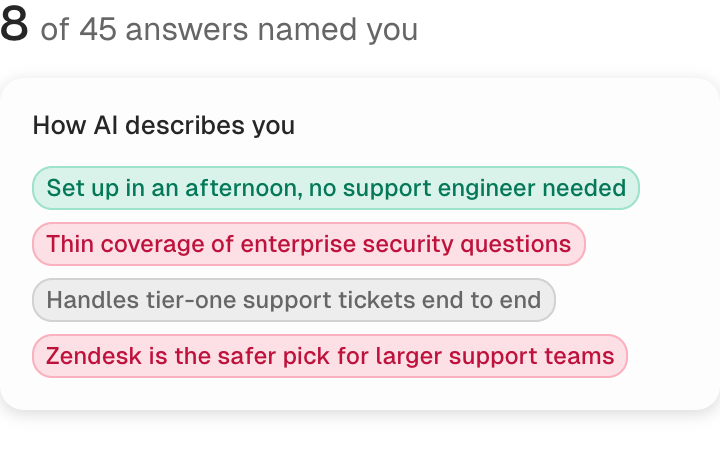
AI answers. Record the exact prompt, answer engine, response, brand presence, description, and cited sources. Flag recurring competitor presence while your brand is absent, then note inaccurate or outdated descriptions.
Search and referral evidence. Pair answer checks with Search Console movement and identifiable AI referrals rather than treating answer visibility alone as performance.
Choose AI prompts from the positioning, problems, use cases, and solution categories the business wants to be recommended for. Log the exact prompt, engine, run, response, brand presence, description, cited sources, and referral evidence.
Repeat identical prompts across selected answer engines and runs so volatility is visible.
Assess the pattern across:
Recurring brand mentions and source citations
Accurate descriptions of the product's positioning
Movement in Search Console rankings and impressions
Identifiable AI referral sessions, where available
A single mention is directional evidence. Prioritize prompts where competitors recur and your brand stays absent across runs; record misrepresentation as a separate issue when the brand does appear.
6. Earn the click: titles, snippets, and trust signals
Find click-through gaps by comparing pages with similar intent and average position in Google Search Console, then inspect the result shown for each query. High impressions with weak peer CTR deserve review.
CTR changes with position and query type; branded and non-branded searches also behave differently. Benchmark each page against comparable queries on your own site instead of using a universal threshold.
For each flagged page, compare what Google shows with what the page supplies:
Title: Match the query's language and make the page's specific value clear before truncation.
Google rewrite: Compare the rendered title with the HTML title and H1; a rewrite is a diagnostic clue that may expose an unclear or mismatched title, not a failure by itself.
Snippet: Check whether the displayed text makes a specific promise the page fulfills and supports with visible proof.
Rich result: Validate relevant structured data, confirm the markup matches visible content, and treat rich results as an eligibility opportunity rather than a guaranteed outcome.
Character counts are editing aids, not pass-or-fail rules. The live SERP shows whether the useful part of a title or description survives on the devices your audience uses.
Google sometimes builds the snippet from page copy. Review the result for the target query rather than judging the meta description alone.
Trust cues deserve a separate pass:
Site identity: Confirm the favicon and displayed site name are clear and consistent.
Breadcrumbs: Check that the visible path helps buyers understand where the page sits.
Dates: Update modified dates only after a meaningful factual revision.
Authorship: Use a clear byline and validate supported author markup when expertise affects the click.
Prioritize stable page-one rankings with high impressions when the search result undersells the page. Those pages already have visibility; the listing is the part costing clicks.
7. Convert: does traffic reach a real next step?
Organic traffic converts only when the landing page presents a useful next step that matches the visitor's intent and works without friction.
:quality(80))
Audit the path as a visitor would, on desktop and mobile:
Match the ask to intent. On an informational article, lead with a related guide or product exploration, then offer a trial or demo only when the page has answered enough of the buyer's question.
Shorten commercial paths. Comparison and solution pages should make the trial or demo route easy to find.
Set expectations. Product pages should explain what happens after someone clicks the primary call to action.
Remove dead ends. Add contextual links to relevant solution pages and next-step resources.
A suitable call to action can still fail because of broken forms, hidden buttons, or missing analytics. Check the mechanism separately:
Form behavior. Submit every form with valid and invalid inputs on desktop and mobile. Test consent banners, embedded schedulers, success states, and destinations.
Event tracking. Verify that form submissions, button clicks, and outbound clicks fire once on the correct URL.
CTA visibility. Use scroll-depth data and session recordings to see whether organic visitors reach the offer.
Once the mechanism works, trace what happens after conversion. Compare lead quality by landing page, sales acceptance or an equivalent qualification stage, and later CRM progression for visitors whose first touch was informational content.
Check shared experience and template issues separately:
Page experience. Compare mobile and desktop Core Web Vitals in PageSpeed Insights and Search Console, then trace poor results to the affected template. These issues can limit discovery as well as engagement.
Template patterns. Segment conversions by landing-page template to separate a shared layout problem from weak copy on one URL.
Do not score every page against one conversion benchmark. Compare each template with its own baseline and judge whether the next step fits the query that brought the visitor there.
8. Attribute and validate: did the fix work?
Validation compares edited URLs with their own baseline and notes other explanations for movement. Record the URLs, exact edits, deployment status, owner, and deployment date, then confirm that the intended change is live before collecting performance results.
Compare pre-fix and post-fix periods only after the URL has enough data to interpret. Use the longer baseline to account for seasonality, extend observation for low-volume pages or long sales cycles, and run these checks at URL level:
Export these Search Console metrics by page and query:
Clicks
Impressions
CTR
Average position
Use the Search Console API when the URL set is too large for manual exports.
Confirm live index status and sitemap presence after deployment through URL Inspection.
Check that conversion events still fire, then compare demos or signups, lead quality, sales acceptance, and later CRM progression from the edited landing pages.
:quality(80))
For commercial pages stuck on page two, record the affected URLs before consolidating overlaps, improving internal links, or tightening intent alignment.
Compare later movement with untouched pages and tracking changes. That keeps the work a plausible contributor.
Challenge the result before calling the fix successful:
Compare untouched pages. Similar movement across unedited URLs points toward a sitewide or market effect.
Check query mix. More clicks from irrelevant queries do not validate an intent fix.
Protect tracking continuity. A changed event definition can create an apparent conversion lift without more user actions.
Match the page's job. A product page should support qualified actions, while an informational article may prove value through downstream clicks.
Validation should create a new decision, not automatically trigger a refresh. Keep monitoring when data is insufficient, revert when the change clearly broke the page, or open a separately reviewed update when the evidence supports more work.
How the audit changes by page type
A B2B SEO audit uses a different success test for each template because product, pricing, integration, category, comparison, blog, and documentation pages serve distinct visitor needs.
:quality(80))
Use this matrix after the shared crawl and index checks are complete:
Product or solution pages. Match a commercial query to a clear promise, intended buying roles, proof, fit, limits, and one working primary action. Validate qualified clicks and progression beyond the initial form.
Pricing pages. Check that packages, inclusions, eligibility, and calls to action remain accurate and easy to understand. Validate visits from high-intent queries and completion of the intended buying step.
Integration pages. Confirm the page answers compatibility, setup, use case, and limitation questions without duplicating a directory template. Validate relevant integration-query visibility and onward product exploration.
Category pages. Explain the problem, category, alternatives, and product fit clearly enough for buyers and answer engines to understand the market position. Validate visibility for category-level commercial queries.
Blog or informational pages. Check intent coverage, freshness, evidence, extractable answers, and overlap with other articles. Validate target-query visibility and movement toward a relevant downstream page.
Comparison or alternatives pages. Target the head-to-head query directly and keep features, pricing, limitations, and positioning accurate and neutral. Validate commercial clicks and assisted qualified actions.
Documentation or resource pages. Control duplicate parameters, internal-search URLs, canonicals, and outdated versions while guiding readers to the next task. Validate support-query visibility and continued navigation.
The template sets the standard. A documentation page can succeed without demo traffic, while a product page that ranks but gives buyers no working next step still needs attention.
How to prioritize what you find
Prioritize the finding that removes the biggest current barrier between search visibility and pipeline. Fix the bottleneck first, then take the next improvement.
:quality(80))
Use the site's current state to identify it:
Pages cannot enter search — resolve the underlying access or indexation dependency before optimizing individual pages.
Pages appear but attract little qualified traffic — prioritize topics and pages tied closely to the product and buyer demand.
Traffic arrives without enough next-step action — fix the conversion path on the pages already earning attention.
Once the bottleneck is clear, capture every finding in the same fix ticket:
Page and fix. Name the exact URL, issue, and required content or technical change.
Why it matters. State the buyer or business outcome the issue blocks.
What comes first. List any crawl, template, tracking, engineering, or approval dependency.
Owner and deadline. Name the person responsible for the fix and when it will be ready for review.
Proof. Attach the baseline signal and the metric that will validate the change.
Order those assignments as follows:
Confirm prerequisites. Make sure the first assignment has the access, approval, and technical support its owner needs.
Complete high-impact, low-effort work. These fixes can improve the current bottleneck without waiting for a larger project.
Schedule high-impact, high-effort work. Put template changes, migrations, and substantial rewrites into a resourced sprint instead of leaving them in an open backlog.
Batch or defer low-impact maintenance. Minor cleanup belongs after the work tied to qualified traffic and conversions.
Severity alone should not set the order. A minor-looking issue on a commercial page can matter more than a critical label attached to a URL that has no role in the buyer journey.
RankUp’s dedicated SEO and GEO agent team handles planning, content creation, ongoing updates, and measurement. Its Content Audit puts existing pages in priority order for that improvement work.
The audit reads live pages alongside Search Console performance, weighing commercial importance and freshness. Each recommendation explains the next move, whether that means updating a comparison, consolidating overlapping content, or leaving a useful page alone.
What to do with the pages you flag
Assign each flagged page one primary treatment. Use demand and current performance first, then ask whether the page still adds unique value.
:quality(80))
This comparison keeps the decision consistent across the site:
Refresh. Use this when the page still earns useful visibility but parts are stale or misaligned. Preserve the useful foundation, update weak facts, sections, links, or conversion paths, and compare the same page-level signals with the baseline.
Consolidate. Use this when several URLs compete for one intent and weaker pages contain material worth keeping. Move unique material into the strongest URL, redirect the others, update internal links, and confirm the primary URL remains indexed.
Rewrite. Use this when demand exists but the structure and copy fundamentally miss the intent. Rebuild the page around the right audience, answer, and next step while retaining the URL when appropriate.
Prune. Use this when the page earns no useful visibility, supports no buyer or product need, and adds confusion or duplication. Remove it, and redirect only when a closely relevant replacement exists.
A page with useful backlinks but no remaining search demand may still warrant consolidation rather than deletion. Preserve the authority in the closest genuinely relevant destination instead of forcing an unrelated redirect.
Recommendations stall when nobody can tell what should happen next. Turn each decision into a short implementation sequence:
Define the change. Name the URL, treatment, and exact copy or technical work required.
Assign the owner. Give the task to the person who can publish, redirect, code, or approve it.
Set the deadline. Place the task in a sprint or publishing schedule with its dependencies attached.
Hand off validation. Link the completed ticket to the change log and success measures from stage 8.
State the exact edit or redirect required and explain why. “Improve this page” is not a ticket.
For targeted fixes, RankUp can work through individual audit items or a batch. Cedric writes changes such as sharper titles, missing internal links, and sections needed to answer the buyer’s question, ready for approval.
:quality(80))
For a deeper refresh, RankUp compares the article with competing search results before rewriting. It updates outdated facts, adds missing coverage, and tightens weak passages while preserving useful material.
The refresh returns written changes with reasons attached. You can inspect the original and proposed copy instead of rebuilding the article yourself.
:quality(80))
Put an existing article through that process during your 7-day free trial. RankUp analyzes your site and proposes a tailored plan beforehand; use the trial to create and refresh content from that plan.
Available for SaaS and technology companies with English-language sites.
Cost, timeline, and who should run the audit
Audit cost and timing follow the site's scope and complexity. Diagnosis, implementation, and post-fix validation each require different people and effort.
Choose the resourcing model that gives each fix an owner after the report is delivered.
Budget changes with:
Site size and architecture — page count, template variety, JavaScript dependencies, and fragmented architecture increase hands-on analysis.
Languages and regions — each version adds intent, duplication, and implementation questions.
Audit depth — a focused content review takes less work than a full audit covering the site's technical foundation and buyer journey.
Data and access — gaps in analytics or site access create manual investigation.
Deliverables — a findings report costs less to produce than implementation-ready requirements and post-fix validation.
Ask providers to price diagnosis separately from remediation and post-fix validation. That shows whether you are buying a report or the capacity to close the gaps.
The realistic timeline depends on the same scope choices:
Focused small-site audit. Plan around the number of templates, data readiness, and whether the reviewer is diagnosing only or also writing implementation requirements.
Focused RankUp content audit. Plan for page-level analysis and prioritized recommendations, with selected content fixes written for review. Your team approves the edits that should reach the site.
Complex multilingual or mixed-model audit. Plan separate workstreams for markets, languages, rendering models, analytics, and engineering dependencies.
The RankUp scope covers focused content analysis, not the complete multilingual technical and conversion review. Estimate hands-on audit work separately from elapsed time, remediation, and the observation period needed for search and CRM effects.
Choose who runs the audit based on the skills and time your team already has:
In-house. Use this when your team has SEO judgment, data access, and protected implementation time. Product context is close, but daily work can displace the audit.
Consultant. Use this for specialist diagnosis, an outside view, or a complex migration. Assign internal owners before delivery so the handoff does not stall.
Automated. Use this for repeatable page-level analysis and prioritization across a larger inventory. A human owner must still validate assumptions, resolve edge cases, and approve changes.
You can combine the models. Automation creates the inventory, an expert resolves ambiguous cases, and internal owners approve and ship the fixes.
Give every fix its own owner, then name one person accountable for the audit program. That person keeps evidence, dependencies, owners, and validation connected until the work is live.
An audit finds the gaps. Who closes them?
An audit creates value when someone turns its findings into approved changes. RankUp gives you a dedicated SEO and GEO agent team that carries the content workflow through execution.
You can ask RankUp’s content manager, Lyra, to roll out a change across existing articles.
For example, ask her to find descriptions of an old product capability and update them to match the release.
Lyra finds the affected pages and decides what each needs. Cedric writes the updates, while the shared work queue shows which articles are being edited and which are ready for your review.
Each change arrives as before-and-after copy. Accept it, reject it, or ask Cedric for another angle without explaining the whole job again; you decide what gets published.
RankUp marks content updates against Search Console clicks, impressions, and position so you can compare performance before and after a change.
Use stage 8’s validation checks and CRM outcomes to decide what deserves further work.
Before the trial, RankUp learns your business, analyzes your site, runs a light AI-search audit, and proposes a plan around the gaps that matter most.
Want RankUp to turn your content priorities into reviewable changes? Start your 7-day free trial and use it for content creation and refreshes.
Available for SaaS and technology companies with English-language sites.
FAQs
What is a B2B SEO audit?
A B2B SEO audit evaluates whether your site earns qualified search visibility and moves buyers toward a sales conversation. It weighs buyer intent and conversion paths more heavily than raw traffic.
How often should you run a B2B SEO audit?
Set the audit cadence from site change, publishing volume, business risk, and how quickly priority pages gather useful data. Check core commercial pages between broader reviews.
Run an off-schedule audit after a CMS migration, a major site redesign, a sustained organic traffic drop, or a search update that changes visibility.
Should the audit include AEO or AI visibility?
Yes. Include AEO and AI-visibility checks to record brand presence, description accuracy, cited sources, and identifiable referrals for the buyer questions that matter in ChatGPT, Perplexity, and Google AI Overviews.
Treat the results as directional because citations and mentions change with the prompt and model.
What tools do you need for the audit?
A practical B2B SEO audit stack needs first-party performance data, a technical crawler, competitive search data, and behavior analytics:
Search performance: Google Search Console shows queries, landing pages, indexing, and crawl signals; Google Analytics 4 or PostHog connects organic visits with key events.
Technical crawling: Screaming Frog checks status codes, canonicals, internal links, metadata, and JavaScript-rendered pages.
Competitive research: Ahrefs or Semrush helps compare rankings, backlinks, and content coverage with competing sites.
On-page behavior: Microsoft Clarity or Hotjar uses heatmaps and session recordings to expose friction on organic landing pages.
One capable tool in each category is enough. The audit depends on combining their evidence, not buying every platform.
What counts as a good SEO audit score?
A useful crawler score improves from your site's baseline after high-impact crawl, indexation, and rendering problems are fixed. There is no universal pass mark because each tool uses its own technical diagnostic, not a B2B business score.
Ahrefs Health Score measures the percentage of crawled internal URLs without errors. Other crawlers use their own formulas, so equal-looking scores are not directly comparable.
Crawler scores measure technical hygiene, not whether pages rank, match buyer intent, earn clicks, or generate qualified leads. Judge progress with the issue list, Search Console, conversion data, and CRM outcomes.
:quality(80))
Author of the article
Georg Richard Aare
Georg is the co-founder of RankUp and an SEO nerd who spends (almost) every waking minute refining his craft and sharing his learnings. When he’s not behind his computer, which is rare, you’ll find him in the gym doing bench (never legs) to clear his mind.
This article was created using: