

For SaaS and tech companies with English sites.
:quality(80))
How to Write Quality SEO Content
:quality(80)) Georg Richard Aare
Georg Richard Aare For SaaS and tech companies with English sites.
You publish the article, it reads fine, and it never moves. AI can draft a passable page in seconds, so competent writing no longer separates you from page one.
That article now has to succeed across 3 discovery paths: Google search, AI answer engines, and buyers comparing tools before they book a call.
For SaaS founders and GTM, sales, and marketing leaders, quality content gives your product a better shot at being found when buyers search, compare options, and ask AI for recommendations. This guide shows you how to build it with context, SERP research, original expertise, review, and refresh loops.
What Is Quality SEO Content?
Quality SEO content is original, useful content built to rank in search, show up accurately in AI answers, and move the reader toward a clear action.
The page has to do more than hit a readability score or repeat the SERP with cleaner formatting. It needs to prove why the brand deserves visibility and why the reader should trust the product.
A strong SEO article should do three jobs:
Rank on substance: The page satisfies search intent with original research, clear structure, factual accuracy, and visible expertise, so it can compete without leaning only on domain authority.
Shape commercial AI answers: The content gives ChatGPT, Claude, Perplexity, Gemini, and Google AI Overviews clean facts about your brand, category, differentiators, and use cases.
Convert the reader: The article presents your product as the logical next step and points the reader toward a clear CTA.
Why Quality Content Matters for SEO
Quality content is the prerequisite for ranking, being cited accurately in AI answers, and converting the readers who land on the page. It gives Google a reason to keep showing the page, and it gives buyers a reason to trust what they read.
Thin content can drag down more than one page
Thin or generic content gives Google very little reason to keep sending traffic. Repetitive, mass-produced, or unhelpful pages risk plateauing quickly, spiking briefly, or disappearing from the index.
The bigger risk is pattern recognition across the site. Repeated low-value pages can suppress the whole domain, so strong articles need to match search intent and add something competitors did not already say.
Quality also protects AI visibility and conversion
ChatGPT, Claude, Perplexity, Gemini, and Google AI Overviews all rely on web content when they answer commercial questions. If your pages contain stale pricing, old CTAs, or outdated product details, those mistakes can get repeated back to buyers.
The same work helps conversion. Readers who find a clear answer, accurate product details, and a logical CTA are more likely to keep reading and take action.
With the quality bar set, the process starts with context: the product knowledge, audience research, brand rules, and media assets that shape every draft.
1. Set Your Quality Foundation
Quality SEO content starts before drafting. Build the context system first, so the writer or AI knows what the business sells, who the reader is, what the article should achieve, and which assets it can use.
RankUp stores that context between runs in the knowledge base, style guide, creative brief, and media library. Set it up once, and Cedric starts each article with the right brand facts, voice rules, and visuals.
Set up these inputs before you build the outline:
Product or service docs: Add feature pages, use cases, onboarding notes, sales enablement docs, and anything that explains what the product does.
Customer research: Add interviews, support tickets, sales call notes, objections, reviews, and exact phrases buyers use when describing the problem.
Product visuals: Add screenshots, product demos, workflow videos, and diagrams to the media library so agents can use real assets instead of generic illustrations.
Style guide: Define voice, formatting rules, examples to copy, and patterns to avoid.
Creative brief: Lock the audience, angle, promise, CTA, and positioning before the draft starts.
Product docs stop the article from sounding like a generic summary of the SERP. They give the draft named features, concrete use cases, and product-specific explanations competitors cannot copy.
Customer research keeps the page tied to how buyers talk. A page for SaaS founders should not sound like a page for enterprise SEO managers.
Once the context is loaded, structure gets easier. The next step is building an outline that matches the SERP, uses your internal knowledge, and leaves room for original expertise.
2. Build a SERP-Grounded Outline
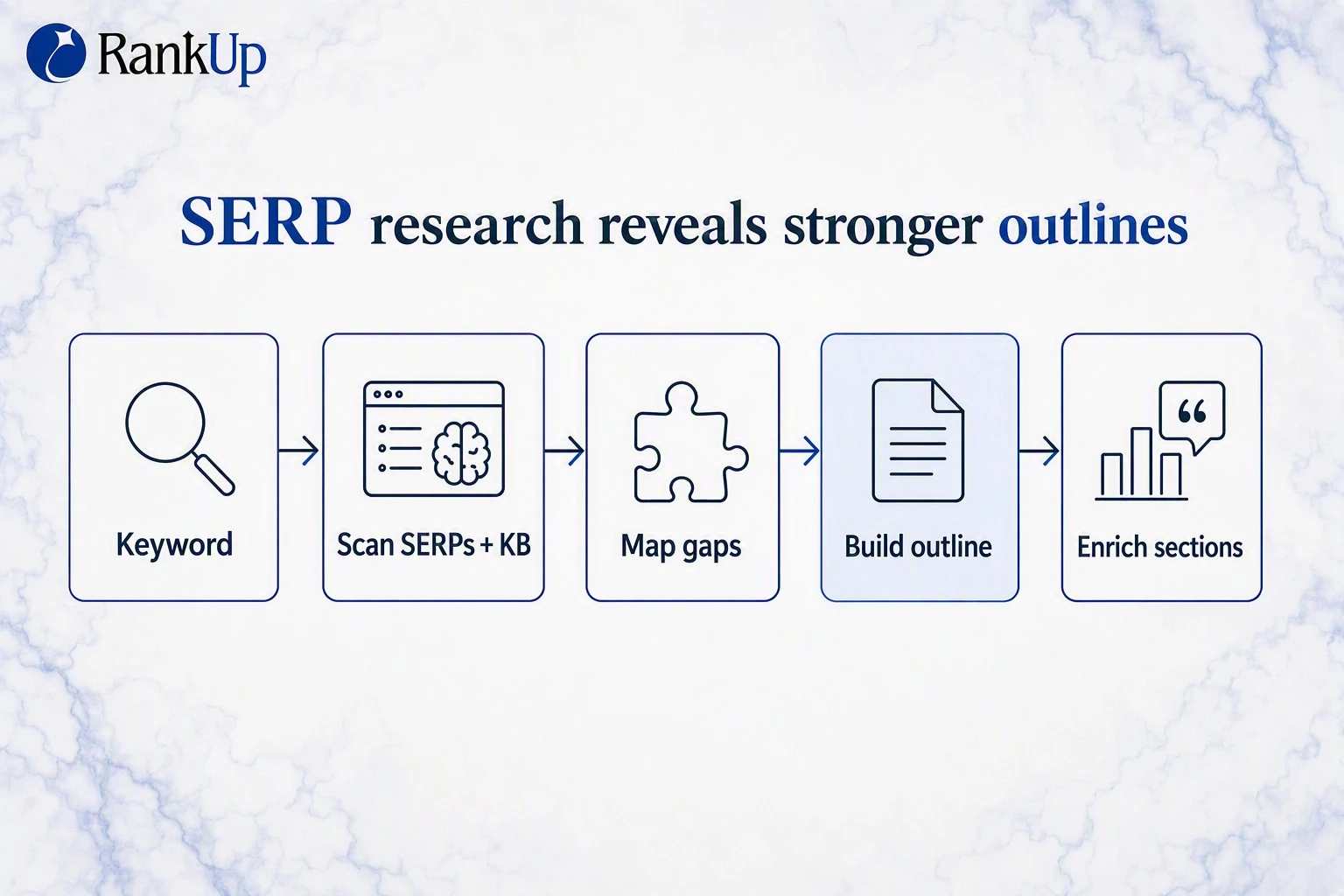
A strong outline starts with live SERP research. Check what Google already rewards, which subtopics searchers expect, and where the current results leave space for a better angle.
Manual version:
Search the target keyword: Open the top-ranking pages and ignore ads, forums, and pages with mismatched intent.
Extract competitor headings: Copy H1s, H2s, and H3s into a doc so you can see the shared structure.
Map common coverage: Mark the subtopics that appear across multiple ranking pages.
Find gaps: Look for weak explanations, missing examples, thin FAQs, or angles nobody explains with first-hand knowledge.
Build the article structure: Use headings that match search intent, then flag the gaps that need product context, customer insight, or original research later.
The outline should avoid copying competitors section for section. Page-one structures show the baseline, but the gaps show where your article can earn attention.
RankUp turns live SERP findings into a working outline, so you can cover the questions buyers expect and target gaps your competitors leave open. The outline step reviews Google results, extracts the recurring headings, and structures the article around search intent.
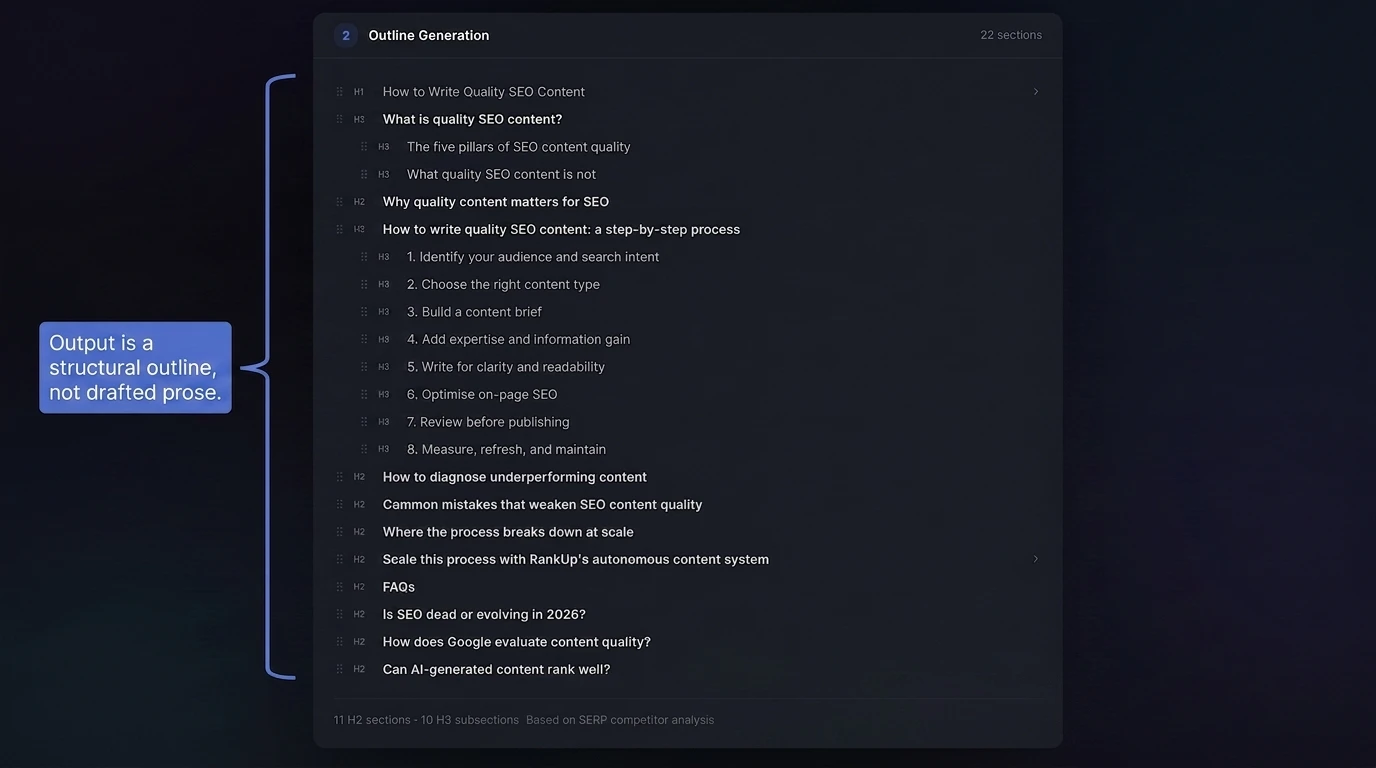
At this point, the output is a working outline. It sets the H1, H2s, H3s, expected coverage, and open gaps that the blueprint needs to fill in the next step.
Once the outline is set, do not jump straight into drafting. The next step is filling that structure with research, product context, and expert input so each section has something worth saying.
3. Fill Out the Outline with Research and Original Expertise
Once the outline is set, the blueprint turns each heading into a writing plan. This is where you attach reader questions, talking points, evidence, product context, and original angles to the structure from step two.
The goal is simple: every section should have a reason to exist before drafting starts. E-E-A-T becomes visible later through examples, quotes, proprietary data, and product experience placed where they belong.
A strong blueprint should include:
Reader questions: the specific question each section answers, so the draft stays tied to search intent.
Talking points: the ideas, examples, and claims the writer should cover under each heading.
Directional notes: what to include, what to skip, and where the section should differ from ranking competitors.
Knowledge base findings: existing product, customer, and market context pulled from the company's internal material.
Knowledge gaps: places where the draft still needs a quote, example, customer proof, internal benchmark, or expert take before writing.
Paragraph-level guidance: the thought process for how the section should unfold, not just a list of headings.
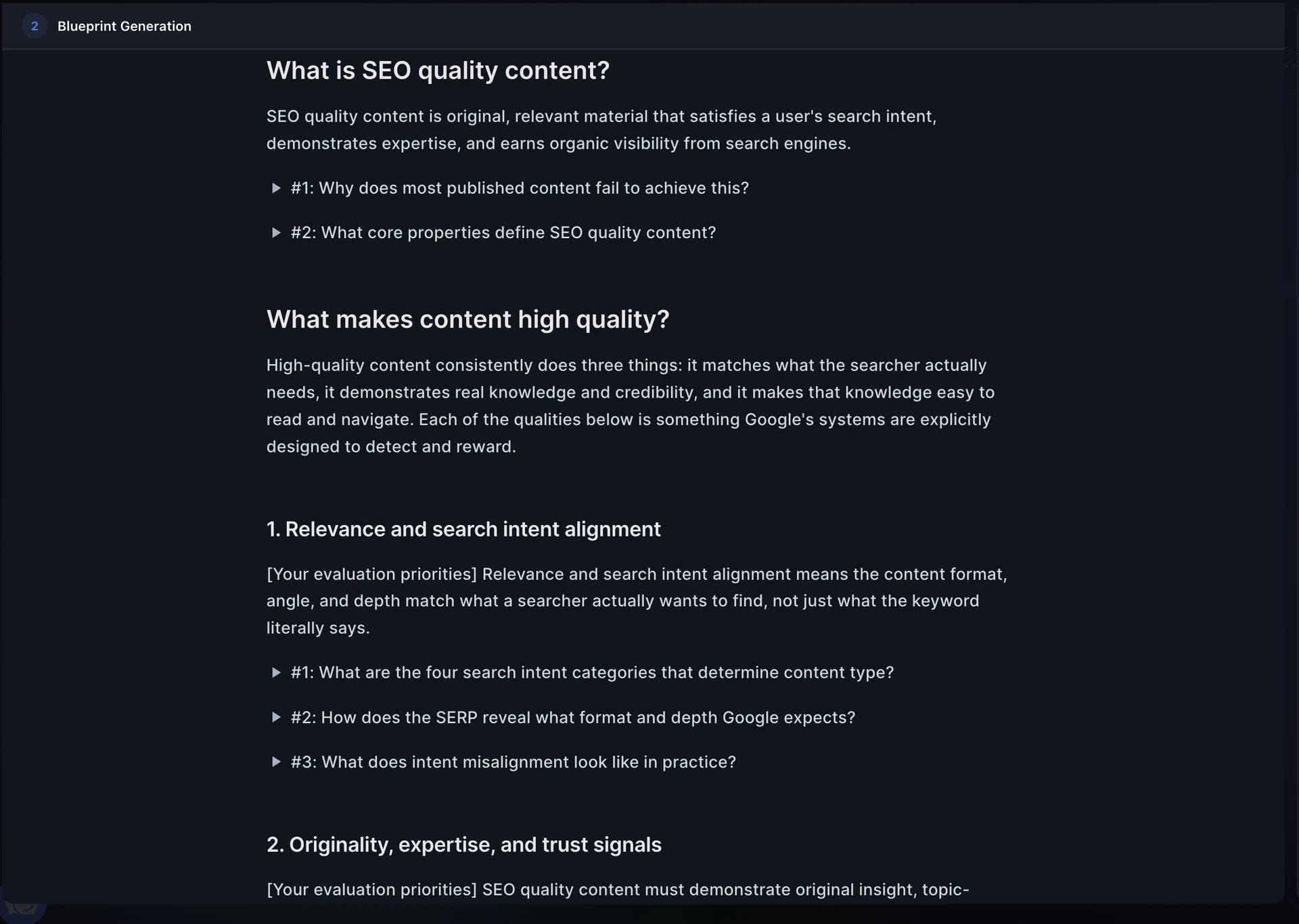
After the first blueprint pass, look for the gaps that would make the draft sound generic:
Which sections need proof instead of another explanation?
Which claims need a product example, customer quote, screenshot, or internal data point?
Which sections need an expert opinion because the SERP only gives surface-level advice?
RankUp handles this inside the blueprint workflow:
Pulls product, customer, and market context from the knowledge base.
Compares the live SERP to find gaps and repeated competitor angles.
Adds that context to the right section as reader questions, talking points, and research notes.
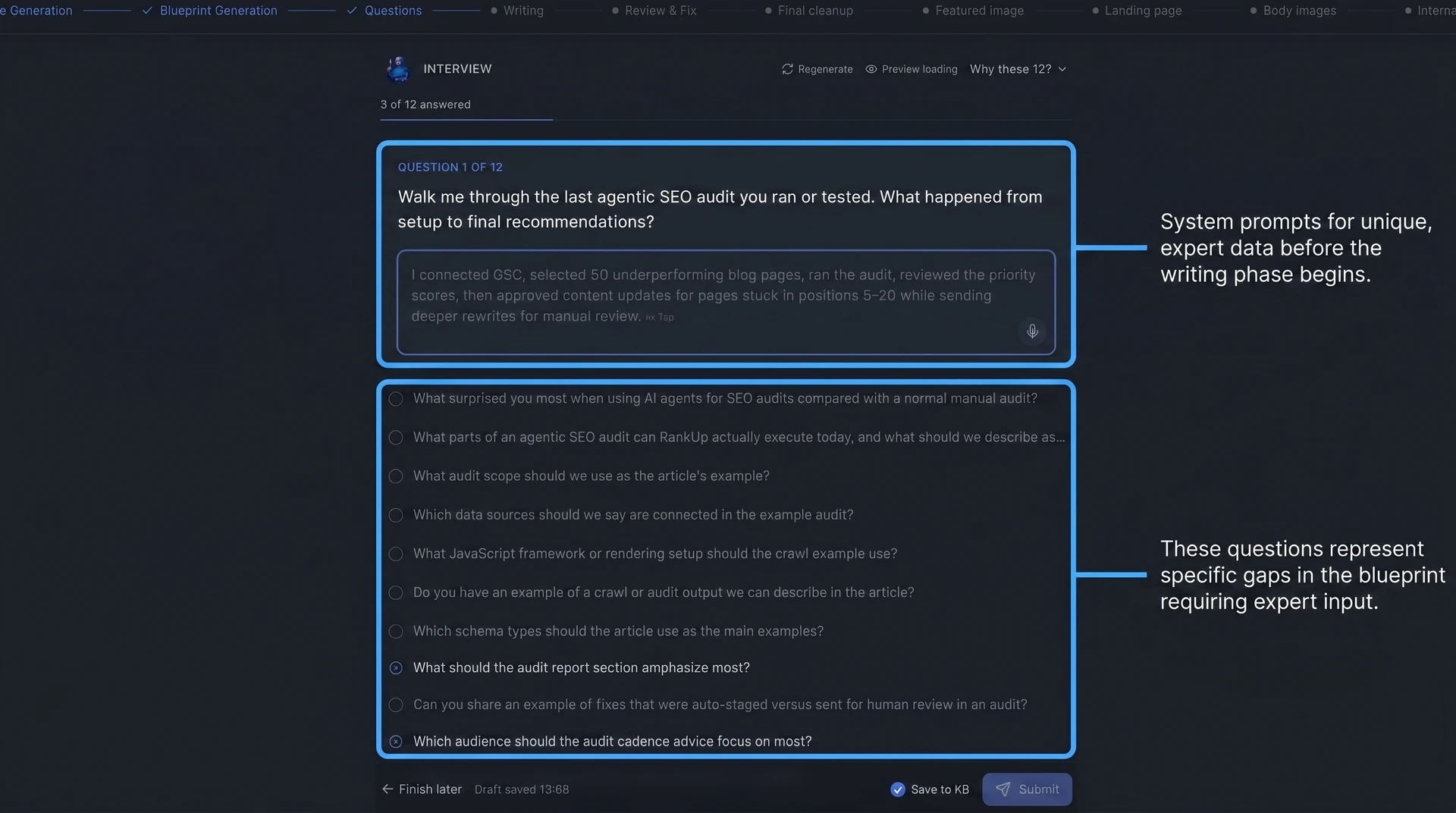
Asks focused interview questions only when missing expertise would weaken the article.
The interview step matters because generic completeness is no longer enough. In a study of 150 pages, unique data points had the strongest correlation with originality scores. *(On-Page.ai study)*
Top-three comparison: The study scored only top-three pages. Pages with 15+ unique data points averaged 62/100, versus 40/100 for pages with one or fewer.
The same study found that the top three results contained more new information than lower-ranking pages. Google's Information Gain patent points in the same direction.
Search Engine Journal's patent analysis identifies the cited patent as the one discussed in SEO research. Pages need information competitors did not already provide.
Those unique data points can come from:
Customer objections your sales team hears repeatedly
Product workflows competitors cannot describe
Founder opinions on where the market is moving
Internal benchmarks, screenshots, or examples
Expert explanations that clarify a hard topic
Original research done by your team
A blueprint makes those inputs usable. The writer does not have to invent originality during drafting because the evidence and perspective are already mapped to the sections where they matter.
4. Draft Section by Section
Drafting section by section means converting one blueprint entry into copy at a time. Each section gets its own context, purpose, and quality check before the article moves forward.
One-shot generation usually loses coherence across a full article. A single prompt has to manage search intent, section logic, brand voice, examples, and transitions all at once.
That creates predictable problems:
Sections repeat ideas because the model loses track of what was already covered.
Arguments drift because there is no checkpoint between headings.
Paragraphs sound generic because the model leans on common SERP language.
Later sections get weaker as the prompt context gets overloaded.
Section-level drafting solves that by giving each heading a smaller job. The writer can focus on one reader question, one set of talking points, and one clear outcome.
For AI-drafted sections to work, three conditions matter:
A broken-down process with iteration loops: the article is written in smaller parts, with room to refine direction as the draft develops.
Strong frontier models: better models raise the baseline for reasoning, structure, and natural language.
Rich context: the model needs the company's knowledge base, interview answers, style guide, creative brief, and section notes.
Context is the biggest factor. A strong model with thin context still produces a polished version of what already exists online.
Inside RankUp, Cedric uses that context section by section:
Starts from the section's reader question and blueprint notes.
Keeps the style guide, creative brief, and knowledge base loaded while drafting.
Uses interview answers and original expertise where the blueprint places them.
Accepts extra context for a specific heading when the section needs more detail.
RankUp agentic content editing demo
The manual version is possible, but slower. A writer has to re-read the brief, pull the right notes, check the logic, and make sure the draft still sounds like the brand.
Once the copy is solid, the next quality jump is presentation. Screenshots, diagrams, and demos turn abstract advice into something the reader can actually picture.
5. Add Visuals and Product Presentation
Visuals should make the article easier to understand, especially when the content explains a product, workflow, or abstract concept.
Use a simple placement rule: every major step section gets at least one useful visual. Product explanations need a screenshot, and multi-step processes need a flowchart or short demo video.
Use this checklist when reviewing the draft:
Annotated product screenshots: Use these when the article explains a product screen, feature, dashboard, or specific on-screen action.
Custom diagrams: Use these when the concept is hard to picture from text alone, such as a content workflow or search intent model.
Short demo videos: Use these when the process takes several clicks or needs movement to make sense.
Annotated real examples: Use these when the reader needs to see what good, bad, or improved content looks like in context.
The visual should appear close to the explanation it supports. A screenshot placed five paragraphs later forces the reader to connect the dots themselves.
For product-led content, screenshots are part of the argument. If you claim a tool helps with keyword research, content review, or internal links, show the reader the actual screen where that happens.
Before publishing, check each visual against 4 questions:
Does the visual clarify something specific? If the visual only decorates the page, remove it.
Is the visual placed next to the relevant explanation? Put screenshots, diagrams, and videos beside the point they support.
Does the visual need annotation? Add callouts when the important part of the image is easy to miss.
Can a reader understand the visual without extra context? Add a short caption or surrounding sentence when needed.
This step also catches weak product presentation. A product section without screenshots reads like a claim; a product section with clear screenshots reads like a walkthrough.
6. Review, Fix, and Apply Internal Links
The review pass is the quality gate between a complete draft and a publishable article.
Start by looking for issues that hurt trust or make the article harder to read:
Brand voice drift: The tone, word choice, or point of view changes between sections.
Intro and CTA misalignment: The intro promises one outcome, but the article or CTA points somewhere else.
Weak writing style: The draft sounds generic, inflated, or too polished for the brand.
Unclear phrasing: A sentence needs rereading, uses undefined jargon, or hides the main point.
Inconsistencies: The same concept, product, or process is described differently across the article.
Repetition and redundancy: The draft repeats the same point without adding a new example, detail, or takeaway.
Factual accuracy: Product details, examples, and claims match the source material.
RankUp checks the draft against its writing rules, your style guide, and your reference article before it reaches review. That gives you a prioritized list of specific edits, so you can judge the argument, examples, and brand fit instead of hunting for basic inconsistencies.
Before publishing, writers can check a specific claim against the knowledge base from inside the editor, then confirm that the source material supports the wording they plan to keep.
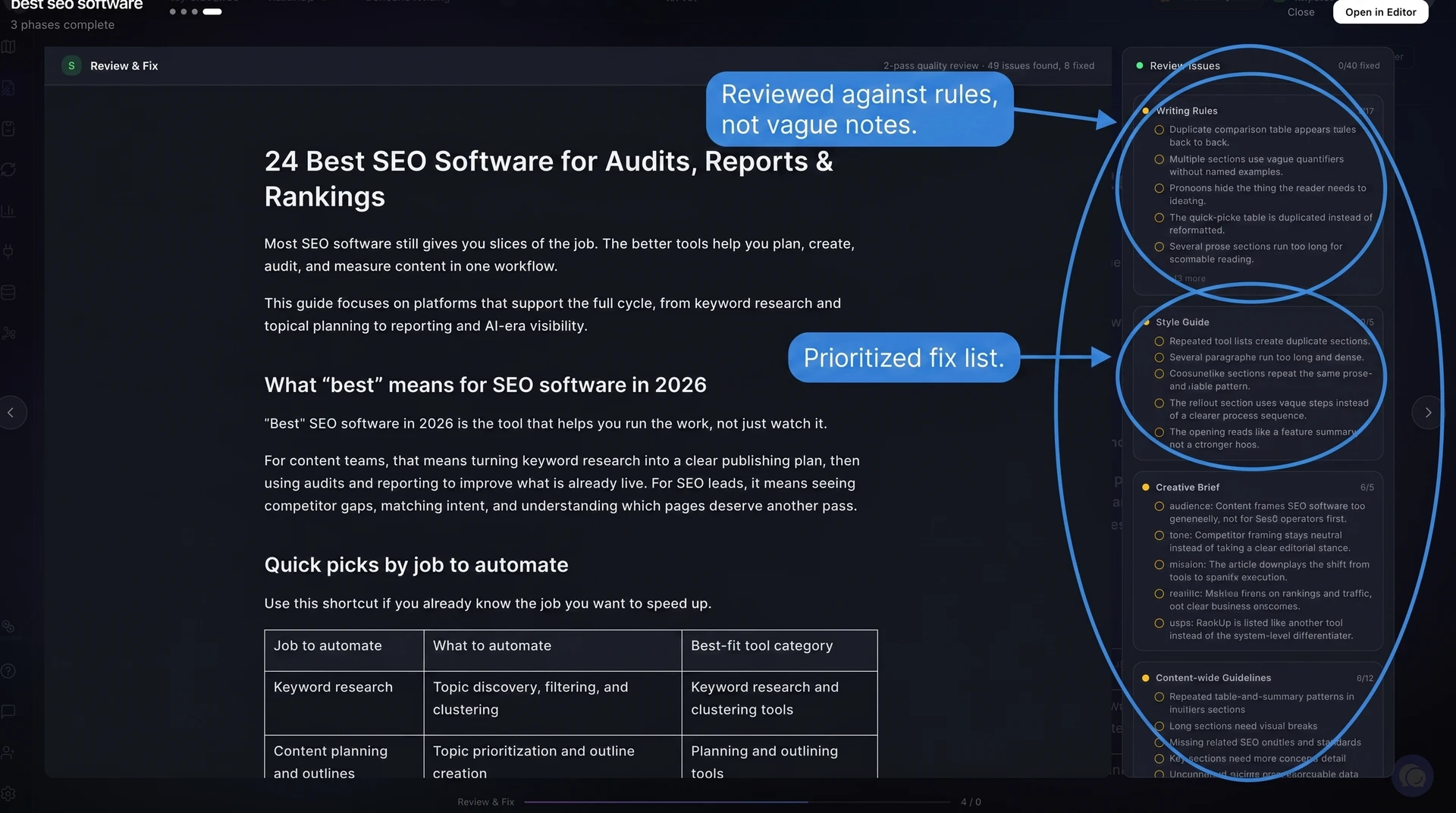
That review produces a prioritized fix list instead of a vague note to “make it better.” It catches the obvious quality issues first, so the human review can focus on taste, logic, and brand fit.
For example, RankUp can flag a CTA that conflicts with the intro, a repeated point, a product explanation that needs a screenshot, or a section where the argument loses its thread.
Still, do one human read before publishing. AI can miss subtle brand misalignment, a logic gap that only shows up when you read deeply, or copy that sounds fine but weakens conversion.
For the final human review, read the draft from top to bottom and leave comments where the logic, examples, or tone need work. Cedric turns that feedback into reviewable edits, so you can approve the changes without rebuilding the article yourself.
After the writing review, run the internal link pass.
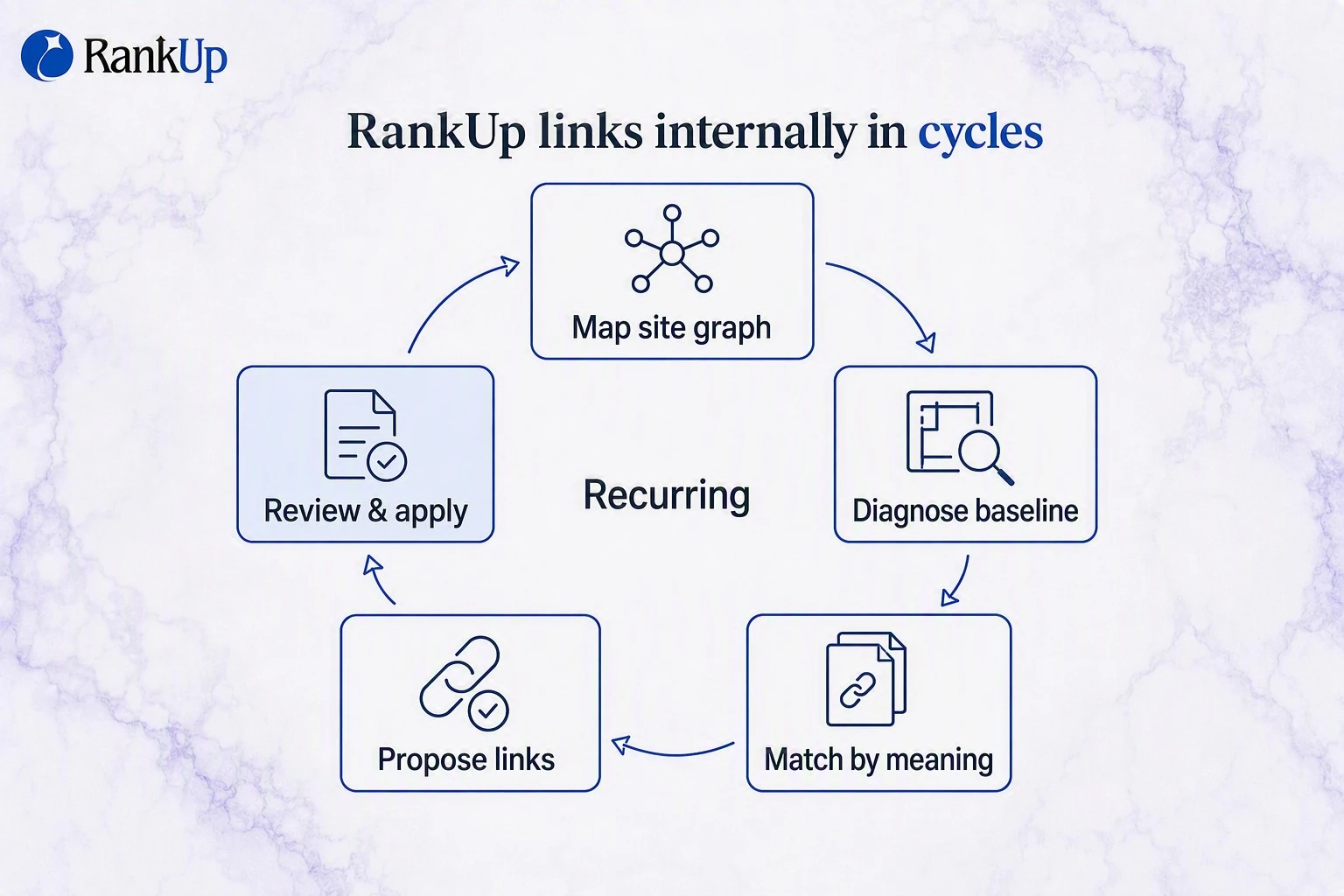
RankUp analyzes the finished article against your existing pages, then suggests links based on topic fit and site structure. When a relevant suggestion is not right to apply immediately, writers can hold it for a scheduled internal-linking pass instead of forcing it into the current draft.
A link should help the reader continue naturally. Avoid interrupting the section just because two pages share a keyword.
Use these internal link rules before applying suggestions:
Keep links relevant: Link only when the destination page helps the reader understand the current point.
Limit distraction: Use roughly one internal link per major section unless the article genuinely needs more.
Place the strongest link first: Give the most important related page the clearest placement.
Use natural anchors: Wrap words that already fit the sentence instead of forcing exact-match anchor text.
Review before applying: Check that every link still sounds like part of the article.
AI can speed up the review, but a human should still approve the final draft. Someone close to the product needs to confirm the examples, claims, screenshots, and links before the article goes live.
7. Measure Performance and Refresh Regularly
SEO content quality drops when pages get stale, even when traffic has not fallen yet. Measure performance on a fixed loop, then refresh pages before outdated information turns into ranking loss.
Start with content age and staleness. A page can still rank while the product details, examples, CTAs, pricing notes, or data points are slowly becoming wrong.
Use this refresh checklist when reviewing your content library:
Review content age: Check older pages on a fixed schedule, even when traffic looks stable.
Treat ranking drops as a diagnostic signal: Find the cause of the position loss before rewriting the page.
Flag pages below their ceiling: Pull pages getting impressions or clicks but sitting below the positions they could realistically reach.
Apply product and messaging changes: Refresh screenshots, use cases, positioning, feature names, and customer language when your product changes.
Replace outdated CTAs and pricing: Swap stale conversion paths, offer language, and pricing references so readers do not hit conflicting information.
Fix data inconsistencies: Correct conflicting stats, dates, claims, and definitions that could confuse readers or AI search systems.
Keep the cadence realistic. RankUp does not need a weekly content review loop; the useful rhythm is monthly prioritization and a quarterly refresh cycle for pages that matter.
Monthly: Review performance changes, product updates, CTA changes, and ranking movement, then decide which pages actually need work.
Every 3 months: Refresh priority pages that are tied to revenue, product positioning, or active search opportunities.
At least every 6 months: Re-check important pages for stale claims, screenshots, examples, pricing notes, and CTAs, even if rankings still look stable.
The important part is turning measurement into edits. A report that says a page declined is useful, but the page only improves when someone diagnoses the cause and changes the content.
RankUp turns performance data into a managed content update workflow. The monthly reports explain what improved, declined, or stayed flat, then Lyra turns the highest-priority work into reviewable edits.
That workflow helps you keep targeting the pages and topics that can improve rankings, strengthen Google and AI-search visibility, and bring the right SaaS buyers to your site. Guardian Home co-founder Alonso Solis reported leads in the first month and seeing the company in AI-generated search suggestions after using RankUp for organic acquisition; those are customer-reported outcomes, not a promise of the same result for every site.
If you want to put this quality loop to work on your own site, Start your 7-day free trial.
RankUp analyzes your site and situation, learns your brand context, and runs a light AI-search audit with baseline findings and next actions.
From there, RankUp proposes a custom ongoing plan tailored to your needs rather than a one-size-fits-all package.
(For SaaS and tech companies with English-language sites only.)
FAQs
Is SEO dead or evolving in 2026?
SEO is evolving, not dying. In 2026, organic rankings, AI citations, and reader conversion work together instead of sitting in separate SEO buckets.
Top rankings still matter: Depending on the study, 38% to 54.5% *(BrightEdge)* of AI Overview citations come from pages already in the organic top 10, so classic search visibility still feeds AI visibility.
AI engines often follow similar sources: Around 60% of citations in the cited Perplexity analysis overlapped with Google's top 10 organic results, so organic visibility also supports Perplexity visibility.
Clicks need a stronger reason - When AI answers the simple part, your page needs original data, examples, and product context that make the click worthwhile.
How does Google evaluate content quality?
Google evaluates quality by asking whether the page satisfies intent with trustworthy, current, and useful information. E-E-A-T is the shorthand: Experience, Expertise, Authoritativeness, and Trustworthiness.
Intent and behavior signals: The page should answer the query directly; weak engagement after the click can suggest the answer missed what searchers wanted.
Experience and expertise: First-hand examples, original analysis, and specific recommendations show Google the content adds something beyond rewritten SERP summaries.
Trust and freshness: Accurate claims, current product details, reputable references, and consistent site-wide facts reduce quality risk.
Thin-content risk: Duplicate, shallow, or generic AI pages can drag down more than one URL when the pattern appears across a site.
Can AI write quality SEO content?
Yes, autonomous SEO tools can write quality SEO content when the workflow is broken into clear stages, the model is strong, and the context is rich. The context matters most.
One-shot AI generation usually produces the same recycled advice already sitting on the SERP. Quality comes from giving the writer agent enough source material to sound like your business.
That means the AI needs:
A filled-out knowledge base: your positioning, customer pains, product details, examples, and opinions.
A structured blueprint: the keyword, search intent, competitor gaps, section plan, and proof points before drafting starts.
Section-level drafting: each section gets written against a specific job instead of turning one prompt into a full article.
Review loops: the draft gets checked for accuracy, originality, formatting, internal links, and product fit.
RankUp applies that standard to your content process. It starts with your product and customer context, then Cedric researches, plans, writes, reviews, and prepares the article for publication.
The point of that interview flow is simple: the draft should represent what your business believes, not just what Google already ranks.
How often should you update SEO content?
Update SEO content when there is a clear trigger, rather than forcing every article into the same fixed schedule. Some pages need monthly attention, while others can stay accurate for much longer.
Review a page when you see any of these triggers:
Stale information: Statistics, examples, screenshots, tools, regulations, or benchmarks have changed.
Ranking drops: A page slips from positions 1-3 into 4-10, or traffic declines for the terms that matter.
Ranking upside: A page sits around positions 5-15 and needs more depth, better formatting, or missing subtopics to compete.
Business changes: Pricing, features, CTAs, messaging, or product positioning changed anywhere on the site.
Use Google Search Console data with a little patience. Newest Search Console data can be incomplete, so look for patterns over several days before rewriting a page.
RankUp can turn a product update or performance finding into a managed content update. Lyra identifies the affected pages, frames the work, and routes the writing to Cedric as reviewable edits.
Quality SEO content is a loop: build the foundation, draft with context, review hard, and refresh when reality changes.
:quality(80))
Author of the article
Georg Richard Aare
Georg is the co-founder of RankUp and an SEO nerd who spends (almost) every waking minute refining his craft and sharing his learnings. When he’s not behind his computer, which is rare, you’ll find him in the gym doing bench (never legs) to clear his mind.
This article was created using: